Triggering Script with Button 
-
Design a form using the following form fields:
Field Name Field ID Type Get type of users get Button User type type Dropdown -
Define an associate script to get the User type and map the script to
field Get types of users.
Script Description sers=[{“type”:”Permanent”},{“type”:”Consultant”}]print(json.dumps(users))Where type is the Field ID to which the retrieved values are appended to on the form. -
From the menu on the top, click
 (View) icon.
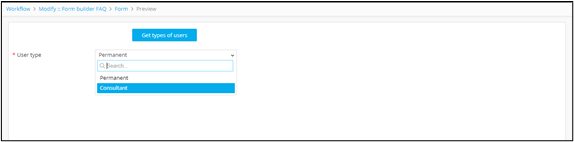
Clicking the Get type of users button triggers the script and populated the User type field.
(View) icon.
Clicking the Get type of users button triggers the script and populated the User type field.