|
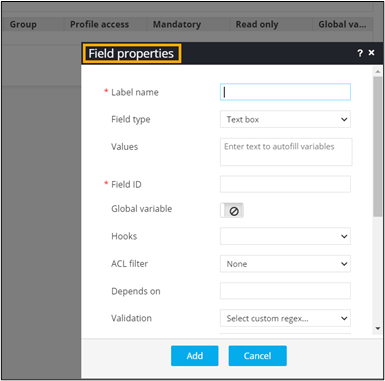
*Label name
|
- Enter a valid label or field name such as
Username, Enter IP address, Environment Type,
Environment Info and so on.
- Char Length: Min (2), Max (120).
|
| Field type |
Select field type from the dropdown. |
|
Values
|
- Define field values relevant to a form
field.
- Values can be delimited by a comma.
- Chars not allowed: ‘&’ and ‘|’.
|
|
*Field ID
|
- Enter a unique field ID to reference the
field name.
- Allowed characters: ‘-‘ and ‘_’
- Character Length: Min (1), Max (50).
|
| Global variable |
Assign the field as a global variable. |
| Hooks |
- Select a hook that is relevant to the from
field.
- Hooks can be either Script or REST
API.
- Hooks are used to fetch details against a
specific form field from the device and/or database
and map them to the respective field on the user
interface.
|
| ACL filter |
- This field is used to validate, filter
information displayed in the provisioning request
page based on RBAC defined through ‘authorized
control’ under account management.
- Options: Device, Device Objects, Cert
Groups, and None (default).
|
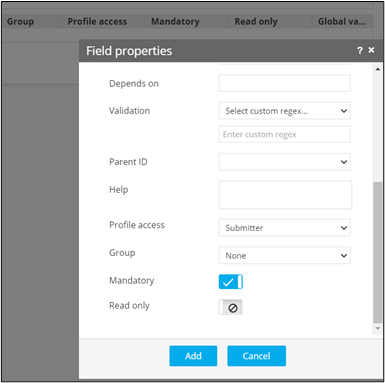
| Depends on |
- Define dependencies between form fields
based on ‘Field ID’ and ‘Values’.
- Operators used: ‘&’ and ‘|’
- Max character: 550
- Format: [Field Id1: value1 & Field
Id2: value1 & Field Id3: value3], [Field Id1:
value1 | Field Id2: value1].
|
| Parent ID |
- Select the relevant tabular component
(Field ID) against which the form field must be
mapped to.
- Used only when defining a tabular element
in the form.
|
| Help |
Enter the help instructions that need to be defined
against the field for the user’s reference. |
| Profile access |
Select the profile from the dropdown to restrict form
field display within a template based on the relevant
profile. |
| Group |
- Group fields logically within the
form.
- Associate an existing group or create a
new group.
|
| Mandatory |
Provision to mark the field as mandatory or
otherwise. |
| Read only |
Provision to mark the field as read only or
otherwise. |
| * : Mandatory
fields |


 (Create) icon.
 (Add) icon.