
Automation API Guide
AppViewX’s Automation module is a hybrid cloud automation and orchestration platform that allows for simple and complex network automation within your infrastructure. The module supports a wide range of device types, vendors, actions and integrations, in order to help you manage and automate your entire network with a unified automation and orchestration platform. Its primary interface is through both the Web GUI interface and a HTTP Restful API. A developer would use this API for programmatic access.
This guide provides information about the AppViewX exposed APIs intended for use in Visual Workflow actions.
API Reference
- From the top right corner of your screen, click
 (API Reference) icon.Note: The API Reference icon is displayed for the Admin user and users with ACF permission enabled for API Reference.You will be redirected to AppViewX API Reference page.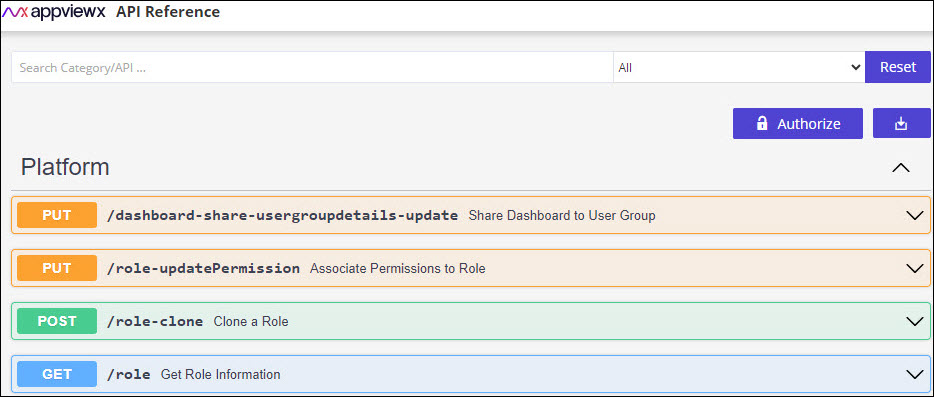
- Click any API to Try it out.
Enable ACF Permission for API Reference
- Go to Platform module IDENTITY > Role.
You will be redirected to Role page.
- Click on the role name to enable the ACF permission.
You will be redirected to the Modify :: [RoleName] page, with the Information tab open by default.
- Switch to the Authorized Functions tab and expand the Platform by
clicking
 (Expand) icon.
 - To assign API Reference, select the checkbox beside API Reference.
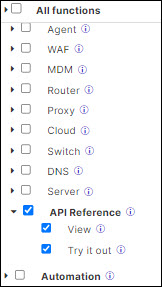
- Click Save.
Best Practices for Working with the AppViewX API
- Use appropriate HTTP methods
Ensure that the correct HTTP method is used for each operation (e.g., GET for retrieval, POST for creation).
- Handle errors gracefully
Implement proper error handling in your application to manage API responses.
- Use secure storage
Store access tokens securely and avoid hardcoding them in your application code.
- Implement pagination
For endpoints that return large datasets, implement pagination using limit and offset parameters.
