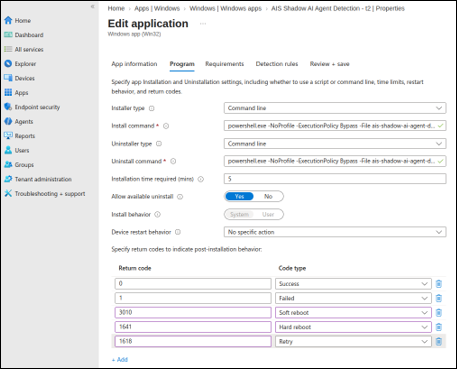
Step 2.2: Configure program details
- On the Program page, set Installer type to Command line.
-
In the Install command field, enter the command that matches
your network configuration.
Standard installation for endpoint machines with standard network access:
powershell.exe -NoProfile -NonInteractive -ExecutionPolicy Bypass -File ais-shadow-ai-agent-detection-install.ps1 -TenantSubdomain "prodtest" -BootstrapToken "<YOUR_BOOTSTRAP_TOKEN>" -AllowDirectFallbackExample:
powershell.exe -NoProfile -NonInteractive -ExecutionPolicy Bypass -File ais-shadow-ai-agent-detection-install.ps1 -TenantSubdomain "acme" -BootstrapToken "ais_bt_v1_xxxxxxxxxxxxxxxx_xxxxxxxxxxxxx" -AllowDirectFallbackProxy-enabled installation for endpoint machines that require an enterprise proxy for network access:
powershell.exe -NoProfile -NonInteractive -ExecutionPolicy Bypass -File ais-shadow-ai-agent-detection-install.ps1 -TenantSubdomain "prodtest" -BootstrapToken "<YOUR_BOOTSTRAP_TOKEN>" -ProxyMode "CustomConfig" -ProxyUrl "http://PROXY_FQDN:PORT" -DisableDirectFallbackExample:
powershell.exe -NoProfile -NonInteractive -ExecutionPolicy Bypass -File ais-shadow-ai-agent-detection-install.ps1 -TenantSubdomain "prodtest" -BootstrapToken "ais_bt_v1_xxxxxxxxxxxxxxxx_xxxxxxxxxxxxx" -ProxyMode "CustomConfig" -ProxyUrl "http://proxy.example.com:8080" -DisableDirectFallbackThe following optional parameters control detection behavior:
Parameter Default Purpose -ScanIntervalSeconds <n>15 Seconds between detection scans. Lower values provide faster detection but increase API calls; higher values reduce load. -DnsPollIntervalSeconds <n>2 Seconds between background DNS-event checks for short-lived custom-agent activity. Lower values catch shorter-lived signals more reliably; higher values reduce overhead. -DetectionHistoryWindowSeconds <n>120 Detection history window in seconds. Each portal history row covers at most this span. Allowed range: 60–3600. Distinct signals are kept; only exact repeats inside the window collapse. In-memory event-log buffers stay capped so a longer window cannot exhaust endpoint memory. -
In the Uninstall command field, enter:
powershell.exe -NoProfile -ExecutionPolicy Bypass -File ais-shadow-ai-agent-detection-uninstall.ps1 -
Set the remaining program options as follows:
Setting Value Installation time required (mins) 5 Allow available uninstall Yes Install behavior System Device restart behavior No specific action Return codes Retain the default Intune return codes: 0 = Success, 1 = Failed, 3010 = Soft reboot, 1641 = Hard reboot, 1618 = Retry.