
Home / Dashboards
Agent Identity Security dashboards transform agent monitoring data into security insights that help you understand your AI environment, assess risk, and take action.
How Agent Identity Security dashboards work?
Agent Identity Security dashboards do more than display data they interpret it. While the rest of Agent Identity Security collects and organizes agent information through discovery, registry, identity mapping, and governance enforcement, the dashboards analyze that data, identify patterns, and surface the findings that need your attention
Every AI agent in your environment is subject to a continuous evaluation cycle that Agent Identity Security runs automatically:
- Discovery Agent Identity Security identifies agents across connected integrations and maintains a live, accurate agent inventory in the registry.
- Identity mapping Agent Identity Security links each agent to the human identity or service account that owns or operates it, establishing accountability.
- Posture evaluation Agent Identity Security evaluates every agent configuration against security standards, detecting misconfigurations, exposed credentials, unsanctioned tools, and governance gaps before an agent executes any action.
- Risk scoring Agent Identity Security assigns a weighted risk score to each agent based on access behavior, posture deviations, credential configuration, and policy violations.
- Compliance assessment Agent Identity Security evaluates agent activity and configuration against mapped compliance framework controls such as NIST AI RMF, SOC 2, HIPAA, and PCI-DSS.
- Governance enforcement Agent Identity Security applies policy controls and monitors for violations in real time.
- Event monitoring Agent Identity Security captures runtime access events and classifies each based on behavior patterns, flagging anomalous or high-risk activity.
Every metric you see is the direct output of this cycle calculated from real agent data, not estimates giving you a reliable basis for investigation and action.
Why dashboards matter
AI agents operate autonomously, execute code, access sensitive data, and interact with external services often without human oversight. The volume, variety, and pace of change in a typical enterprise AI agent landscape makes manual tracking impractical. Agent Identity Security dashboards address this directly by answering the security operations questions that matter most:
- Which agents present the highest risk to the organization right now?
- Which agents have security misconfigurations that require immediate remediation?
- Are high-risk access events increasing or decreasing over time?
- Which agents are connected to unapproved AI models or MCP servers that may introduce supply-chain risk?
- Which agents are operating without an identified owner, creating accountability gaps?
- Which compliance controls are being violated across the fleet, and what is the exposure?
- Is the overall security posture of AI agents in this environment improving or degrading over time?
Without dashboard visibility, these questions require manual investigation across registry data, event logs, posture reports, and compliance mappings. Agent Identity Security dashboards make the answers immediately available and connect each insight directly to the underlying data for investigation.
Accessing the dashboards
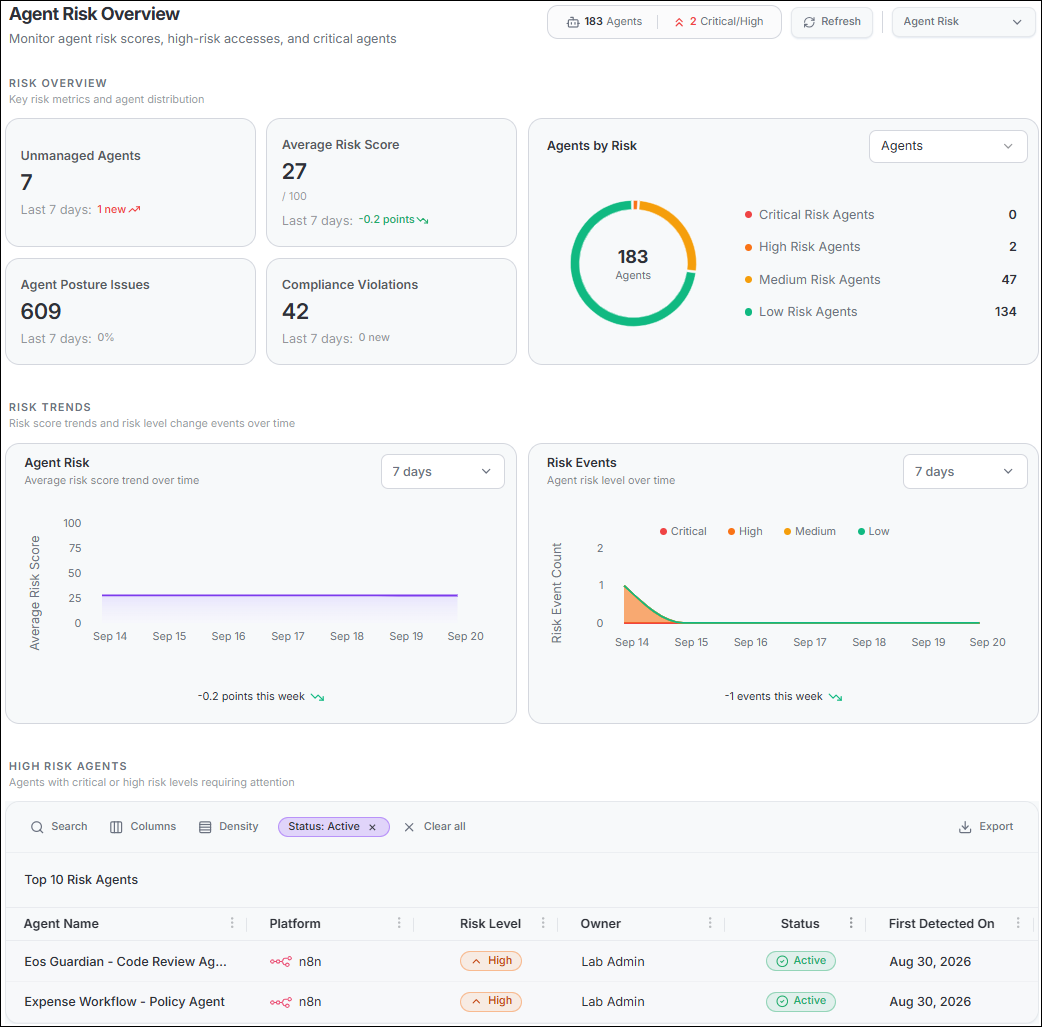
Both Agent Identity Security dashboards are available from the Home page. To switch between dashboards, select the Dashboard Switcher dropdown in the upper-right corner of the dashboard header and choose the dashboard you want to view.
Data refreshes every 5 minutes. To reload immediately, select Refresh in the header. The header also shows summary badges; agent count and Critical/High count on the Risk dashboard, total Issues and Critical count on the Posture dashboard so you can assess overall health before examining any detail.
| Dashboard | Central question | Primary use case |
|---|---|---|
| Agent Risk | How dangerous is what my agents are doing right now? | Monitor real-time risk scores, high-risk access events, compliance violations, and risk trends across the agent fleet. Identify which agents require immediate investigation based on calculated risk. |
| Agent Posture | Are my agents correctly and safely configured? | Monitor configuration health, identify misconfigurations and governance gaps, track posture issue trends, and triage the highest-severity issues requiring remediation. |
Using dashboards effectively
The following practices help security teams get the most operational value from Agent Identity Security dashboards:
- Review dashboards daily. The Risk and Posture dashboards are designed for daily security operations. Monitoring both dashboards each day ensures that new agents, new issues, and emerging trends are identified promptly.
- Watch the trends, not just the totals. A KPI value is a snapshot. The trend charts reveal whether the situation is improving, stable, or deteriorating. An increasing Average Risk Score or a growing Posture Issues count over 7 or 30 days signals a systemic issue that requires investigation even if no individual metric appears alarming.
- Prioritize Critical and High findings first. Agent Identity Security assigns severity levels based on exploitability and impact. Critical findings represent immediately exploitable conditions. Address these before investigating Medium or Low findings.
- Use click-through navigation to investigate. Every KPI card, chart segment, and table row navigates to filtered detail data. Start at the dashboard to identify what needs attention, then follow the navigation path to understand why.
- Export data for ticketing and reporting. The High Risk Agents table and Agent Posture list both support CSV export. Use exported data to create remediation tickets, share findings with stakeholders, and track resolution progress.
