
Agent Posture Dashboard
The Agent Posture dashboard shows you what is misconfigured, unapproved, or non-compliant across your AI agents so you can fix issues before they turn into security incidents.
What posture means in Agent Identity Security
Agent posture is the security configuration state of an AI agent, evaluated against security standards, organizational policies, and compliance requirements. Agent Identity Security evaluates every agent continuously identifying configuration risks before an agent causes harm, not after.
Common posture issues include:
- API keys, secrets, or credentials embedded in agent system prompts or configuration files.
- Agents connected to MCP servers that are not on the organizational approved list.
- Agents using AI models that lack required compliance certifications or are not on the approved model list.
- Agent sessions running without authenticated user identity associations, creating accountability gaps.
- MCP tool parameter mutations changes to tool input parameters that may alter the scope of what the tool can access or do.
- Sensitive data exfiltration paths configurations that allow an agent to transmit data to external or unapproved destinations.
The Agent Posture dashboard aggregates all detected posture issues across the fleet and provides tools to triage, investigate, and track remediation.
Accessing the Agent Posture dashboard
Select Agent Posture from the Dashboard Switcher dropdown in the upper-right corner of the Home page. The dashboard loads with the most recently collected posture evaluation data.
The dashboard header displays two summary badges that provide an immediate posture
health indicator:
- Issues — The total number of open posture issues across all registered agents. This is the total remediation backlog across all severity levels.
- Critical — The number of open posture issues rated as Critical severity. This badge is highlighted to draw attention to the most urgently exploitable conditions in the environment.
Data refreshes every 5 minutes. Select Refresh in the header to reload immediately.
Posture Overview
Four KPI buttons identify the highest-priority security exposures. Each button shows
a live count and navigates directly to the filtered view for that category.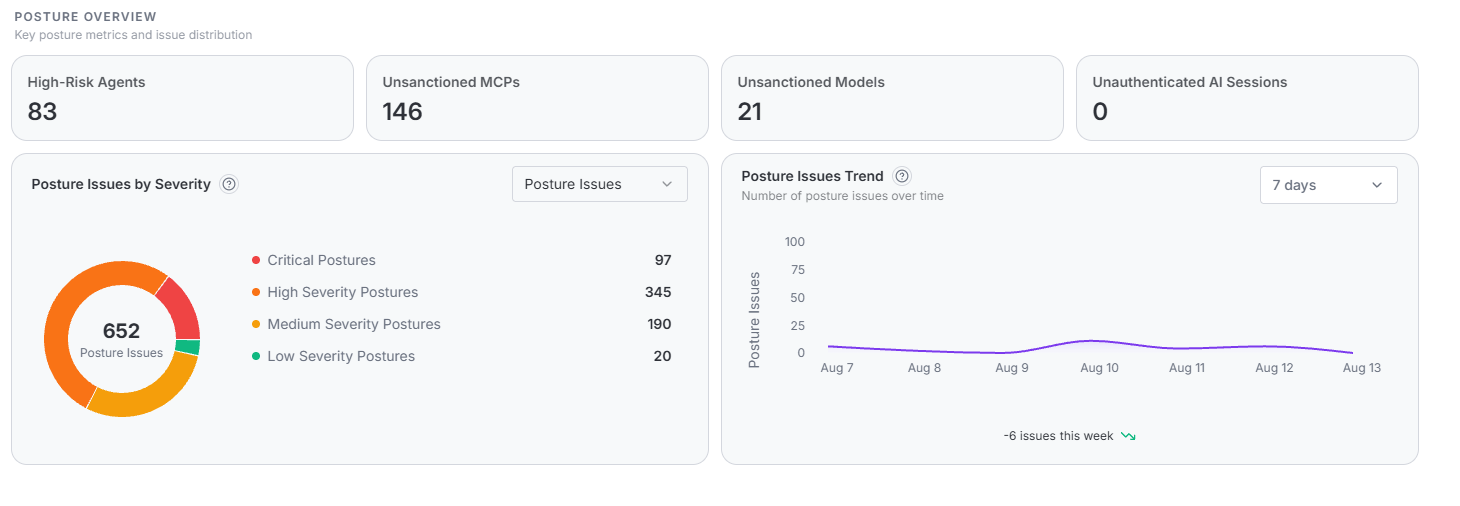
| KPI | What it measures | Recommended action |
|---|---|---|
| High-Risk Agents | Agents with a risk score ≥60 (High or Critical). High scores are typically driven by posture issues. | Select to open the Agents list filtered to High and Critical. Sort by Risk Level and open each Critical agent profile to identify the driving posture issues. |
| Unsanctioned MCPs | MCP servers connected to agents that are not on the organizational approved list. Each unsanctioned server is an unreviewed extension of agent capability. | Select to open the MCP Registry filtered to Unsanctioned. Review each server and either approve it, reject it, or migrate agents to an approved equivalent. |
| Unsanctioned Models | AI models used by agents that have not been approved through the Models Registry. Unapproved models may lack required compliance certifications or data residency guarantees. | Select to open the Models Registry filtered to Unsanctioned. Approve or replace each model. Require model approval before deploying new agents. |
| Unauthenticated AI Sessions | Agent sessions not linked to an authenticated user or service identity. These sessions create audit gaps — actions cannot be attributed to an authorized identity. | Zero is the target. If the count rises, select to open Event Logs filtered to unauthenticated sessions. Identify the agent and session origin, then configure the integration to pass identity context. |
Posture Issues by Severity
A donut chart showing all open posture issues across four severity levels, with the total count in the center. The severity mix tells you where to focus — 646 issues that are mostly Low is very different from 646 that are mostly Critical.
| Severity | Exploitability | Remediation priority and SLA |
|---|---|---|
| Critical | Immediately exploitable condition. Active threat potential exists in the current configuration. | Same-day remediation required. Do not wait for a scheduled maintenance window. Examples: credentials in system prompts, active sensitive data exfiltration paths, agents connected to unsanctioned MCP servers with known dangerous tool parameters. |
| High | Serious configuration weakness that significantly increases the risk of exploitation or compliance failure. | Remediate within 7 days. Examples: agents using unapproved models that handle regulated data, agents with excessive permission grants, MCP tool parameter changes that expand data access scope. |
| Medium | Moderate risk condition that does not present an immediate exploitable path but increases the attack surface over time. | Address within the current sprint cycle (14 days). Examples: agents without an identified owner, agents with unused MCP connections, configuration deviations from organizational standards. |
| Low | Informational or minor deviation from best practice. No immediate exploitable path exists. | Monitor and address as capacity allows. Examples: minor configuration style deviations, outdated but still approved model versions, non-critical metadata gaps. |
A healthy fleet has most issues in the Low and Medium tiers. If Critical and High together exceed 60% of total issues, you need an organized remediation effort, not ad-hoc fixes. Select any segment to navigate to the filtered issue list for that severity. Use the Posture Issues dropdown to filter by issue type.
Posture Issues Trend
A line chart showing how total open posture issues changed daily. Select 7, 15, or 30 days from the dropdown. A change indicator shows net change for the period. Use this chart to tell whether the backlog is growing, shrinking, or standing still.
Interpreting trend patterns
| Trend pattern | Likely cause and recommended response |
|---|---|
| Steady upward slope | New agents are being discovered and evaluated, generating more issues than are being resolved. Review the recent agent discovery log. Establish an agent onboarding security review process to reduce the number of issues new agents introduce at deployment time. |
| Sudden single-day spike | A large batch of new agents was discovered on that date, or a new posture evaluation rule was added that identified a previously undetected issue type across multiple agents. Investigate the discovery log for that date and review any recent changes to the posture evaluation ruleset. |
| Gradual downward slope | Remediation efforts are making net progress. The rate of new issue generation is lower than the resolution rate. This is the target state. Monitor to ensure the trend continues. |
| Flat line at a high level | Remediation is keeping pace with new issues but no net progress is being made against the backlog. This indicates that remediation capacity is being consumed by new issues rather than reducing the existing backlog. Investigate the sources of new issues likely a high-volume integration or platform and address the root configuration patterns rather than individual issues. |
| Flat line at or near zero | The desired state. All detected posture issues are resolved as they are generated. Confirm by reviewing the total issue count in the header badge and the severity distribution chart. |
Top Issues
The 5 most critical open posture issues across the fleet. Fixing these first produces the fastest improvement in overall posture health.
| Column | What it reveals |
|---|---|
| Expand (>) | Select to expand the row and view the full issue details panel, including a detailed description, remediation guidance, Issue ID, and affected resource information. The expanded panel provides the context needed to investigate and resolve the issue. |
| Posture Issue | The name of the posture issue type that was detected — for example, "Agent Configuration Exposes Secrets" or "Sensitive Data Exfiltration Path Detected". Issue names are standardized across the fleet, which means the same issue type appearing on multiple agents indicates a systemic problem that may require a platform-level or policy-level response rather than individual agent remediation. |
| Agent | The display name of the AI agent affected by this issue. Select the agent name to open the full Agent Profile for that agent, which shows all posture issues, access history, identity linkages, and recommended remediations for that specific agent. |
| Risk Level | The severity badge for this posture issue: Critical, High, Medium, or Low. Issues in the Top Issues list are always the highest-severity open issues in the fleet — in most environments this means all five rows carry Critical severity badges. |
Expanded issue details
Select the expand arrow on any row to see the full detail panel:
| Field | What it provides |
|---|---|
| Description | A human-readable explanation of the issue, what it means in the context of this agent, what the risk implication is, and the recommended response. This is the primary remediation guidance field for the issue. |
| Tool Count | For MCP-related issues, the number of MCP tools affected by the detected condition — for example, the number of tools whose parameters were modified in a Tool Parameter Mutation issue. |
| Tools With Changes | For MCP-related issues, the specific tool names whose parameters were added or changed. This field helps identify whether the change affects a critical data access tool (high risk) or a lower-impact utility tool. |
| Resource | The Agent Identity Security resource associated with this issue — for example, the name of the MCP server, the outbound data path, or the system prompt location. A copy button is available for use in incident tickets. |
| Issue ID | A unique identifier for this posture issue instance. Copy the Issue ID to the clipboard for use in remediation tickets, incident reports, or audit documentation. The Issue ID enables precise tracking of an issue across its lifecycle from detection to resolution. |
| URL | The URL of the affected MCP server or resource. Select to open the resource directly in a new browser tab for inspection. Use this to verify the current state of the resource and confirm whether a reported remediation has actually taken effect. |
Posture analysis
- Read the header badges and KPI buttons together. Any non-zero KPI value needs attention. A high Unsanctioned MCPs count with zero Unauthenticated Sessions tells you the primary risk is MCP supply-chain exposure, not identity gaps.
- Check the severity distribution. If Critical and High together exceed 60% of total issues, move to organized sprint-based remediation with assigned owners not ad-hoc fixes.
- Evaluate the trend direction. Growing backlog? Check the discovery log for new agents and recent rule changes. Shrinking? Project when the Critical/High backlog will clear at the current rate.
- Triage the Top Issues. Expand each row and check whether the issue is isolated or repeated across agents, whether the agent has an owner, whether it requires immediate shutdown, and whether a compliance framework is mapped to it.
- Go to the full posture list. Select Govern > Agent Posture. Sort by Severity descending, filter to Unresolved. Use the Compliance Mapping column to prioritize by regulatory risk and the Detected date to find the oldest unresolved issues.
Security insights
Key patterns to watch for when interpreting Agent Posture dashboard metrics:
Agent configuration exposes secrets
Secrets embedded in agent system prompts are visible to anyone who can view the agent definition and can be exfiltrated by the agent through prompt injection. Remove the credential immediately and rotate it. Use a secrets manager to inject credentials at runtime instead of storing them in configuration.
Sensitive data exfiltration path detected
Agent Identity Security detected a configuration path that could transmit data to an external or unapproved destination commonly an MCP tool that writes to an external endpoint, or outbound connections to unregistered services. The same issue on multiple agents connected to the same MCP server indicates a server-level data flow problem. Investigate the MCP server's tool definitions immediately.
Supply-chain risk through unsanctioned MCPs
Unsanctioned MCPs are the most common structural posture risk in enterprise AI. Developers connect agents to community MCP servers without knowing approval is required. Each unsanctioned server is an unreviewed capability extension. When reviewing, prioritize servers with file system write access or authenticated API calls over those that only read public data.
MCP tool parameter mutation
Tool parameters on a connected MCP server changed since the server was last evaluated. Parameter changes can silently expand what a tool can access. Agent Identity Security flags these because they may be unauthorized server-side modifications. Check the expanded issue detail for the specific parameters that changed.
Unauthenticated sessions and audit readiness
A non-zero Unauthenticated AI Sessions count means agent actions in the audit log cannot be attributed to an identity a direct compliance gap under SOC 2, HIPAA, and ISO 27001. If you are in an active audit cycle, reducing this to zero is the highest-priority posture action.
Use compliance framework mapping to prioritize
In the full posture list (Govern > Agent Posture), the Compliance Mapping column shows which issues carry GDPR, HIPAA, EU AI Act, or OWASP Top 10 for LLMs implications. Use this to align remediation with your compliance obligations not all Critical issues are equally urgent.
