
Agent Risk Dashboard
The Agent Risk dashboard shows you which AI agents are risky, what they are doing wrong, and what to fix first.
Dashboard purpose
This dashboard answers one question: Which of my agents are dangerous right now? It combines signals from agent behavior, configuration, credentials, and policy violations into a single view that updates continuously.
Use this dashboard to:
- Find the agents with the highest risk scores and decide where to investigate first.
- Spot sudden increases in risky agent actions,which can signal unauthorized access or credential misuse.
- See whether overall risk is going up or down across the fleet.
- Track compliance violations tied to regulatory frameworks.
- Catch newly discovered agents that are already at Critical or High risk.
Each metric links directly to the data behind it. Start here, then drill in.
Accessing the Agent Risk dashboard
Select Agent Risk from the Dashboard
Switcher dropdown in the top-right corner of the
Home page.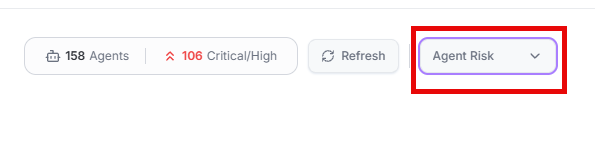
Two badges at the top give you an instant health snapshot:
- Total Agents — How many AI agents Agent Identity Security is currently tracking.
- Critical/High — How many agents are at the most dangerous risk levels. The badge turns red when any agents reach these levels — check this before anything else.
Data refreshes every 5 minutes. Select Refresh to reload immediately — useful right after you fix something and want to confirm the change.
Risk Overview
Four cards show the most important risk signals for the last 7 days. Each card shows
the current value, a trend arrow, and takes you to the detail view when selected.
Select ? on any card for a quick definition.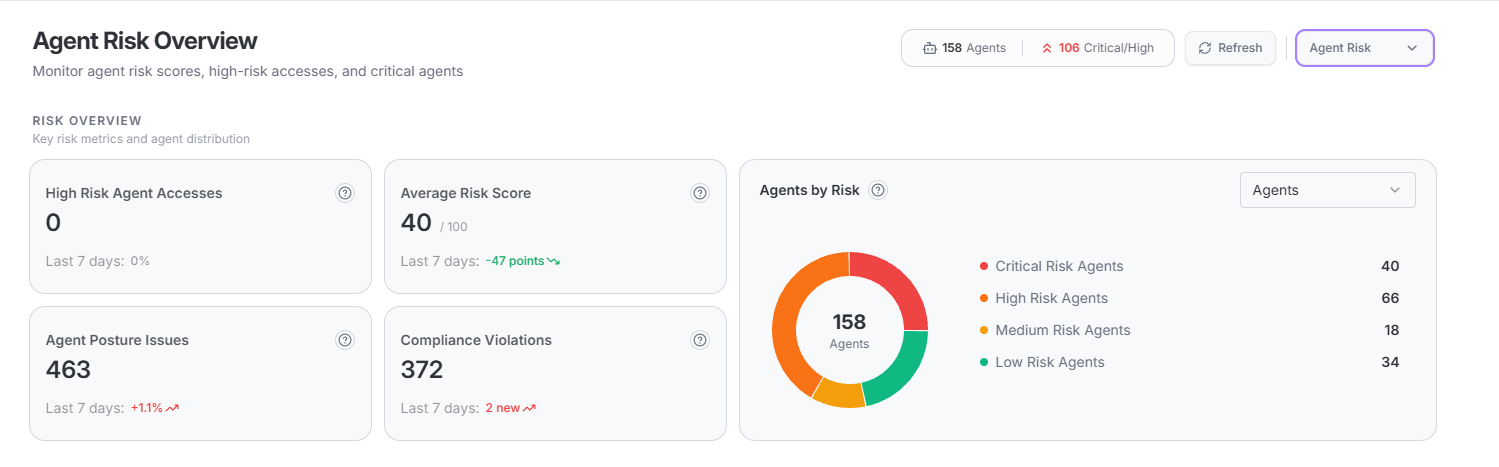
| KPI | What it tells you | Recommended action |
|---|---|---|
| High Risk Agent Accesses | Agent actions flagged as risky such as accessing sensitive data, calling unapproved APIs, or acting outside the agent's intended purpose. A rising count means something is actively wrong, not just a configuration warning. | Select to open Event Logs filtered to high-risk events. Review which agent triggered the event, what resource was accessed, and who owns the agent. |
| Average Risk Score | The average risk score (0–100) across all agents. A slow but steady increase means risk is growing faster than it is being fixed. | Select to navigate to Agent Posture. If the score rose more than 5 points in 7 days, check for newly onboarded agents with unreviewed configurations. |
| Agent Posture Issues | Total unfixed configuration problems across all agents. Exposed credentials, unapproved tools, governance gaps. A growing count means the fix backlog is getting longer. | Select to open the Agent Posture list. Sort by Severity descending. Escalate Critical issues open for more than 7 days. |
| Compliance Violations | Policy failures mapped to compliance frameworks such as NIST AI RMF, SOC 2, HIPAA, GDPR, and EU AI Act. Each one is a real control failure with regulatory consequences — not just a warning. | Select to open Compliance Controls. Filter by framework to focus on areas with active audit exposure. |
Zero High Risk Agent Accesses does not mean your agents are safe. An agent can have serious configuration problems even if it has not done anything risky yet.
Agents by Risk
A donut chart showing how your agents are spread across four risk levels. The total count is in the center. If Critical and High together make up more than 30% of the fleet, the problem is not just a few bad agents it is a wider issue that needs a different approach.
| Risk level | Score range | Interpretation and recommended action |
|---|---|---|
| Critical | 80–100 | Agents in this tier have the highest concentration of serious risk signals. Immediate investigation and remediation is required. Common causes include unsanctioned MCP servers with dangerous tool parameters, exposed credentials in system prompts, excessive permission grants, and active policy violations. |
| High | 60–79 | Agents with serious but not immediately critical risk. Investigate within 7 days. Review posture issues for each agent, verify ownership, and apply recommended controls. |
| Medium | 30–59 | Agents with moderate risk that warrant scheduled review. Plan remediation within the current sprint cycle. Apply controls identified in the agent's posture assessment. |
| Low | 0–29 | Agents with minimal detected risk. Continue standard monitoring. Review periodically to confirm that configuration changes have not introduced new exposures. |
Select any segment to filter the High Risk Agents table to that level. Use the Agents dropdown to show specific risk levels. Hover for an exact count tooltip.
If Critical and High together exceed 30%, go to Settings > Risk Configuration and check whether the risk scoring is calibrated to your organization's actual tolerance.
Risk Trends
Two line charts show how risk is changing over time. Each has its own time range (7,
15, or 30 days) and a change summary below the chart.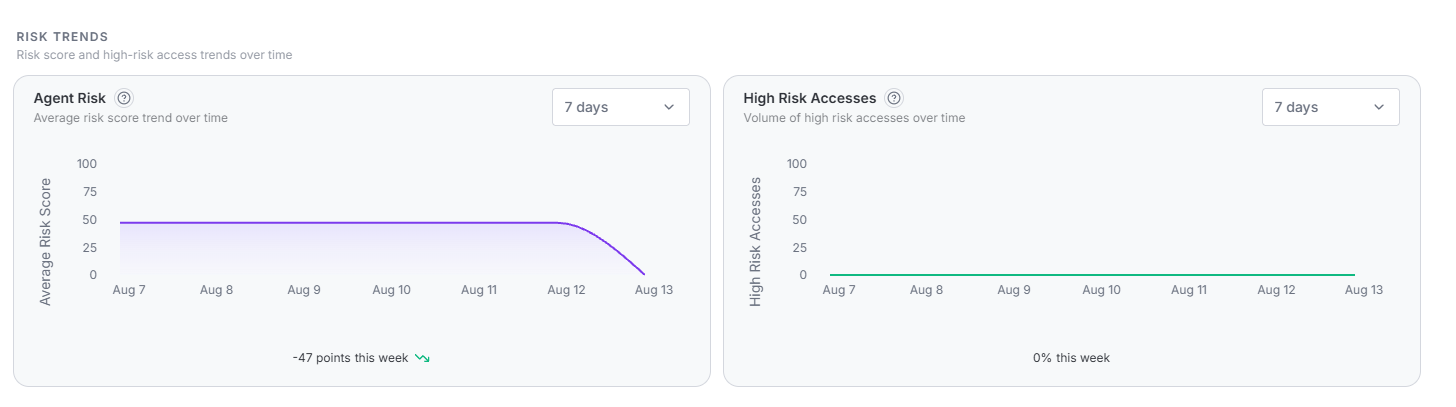
Agent Risk shows the daily average risk score. A score that keeps rising is more urgent than one that is high but stable direction matters more than the number. Investigate if it rises more than 5 points in any 7-day window.
High Risk Accesses shows daily risky agent actions. Zero is the goal. A one-day spike might be a test or a misconfiguration. A multi-day spike needs investigation — go to Event Logs and filter to the spike date to find the agents involved.
High Risk Agents
The 10 riskiest active agents, sorted from highest to lowest risk score. Select any
row to open the Agent Profile. Select Export to download the
list as CSV.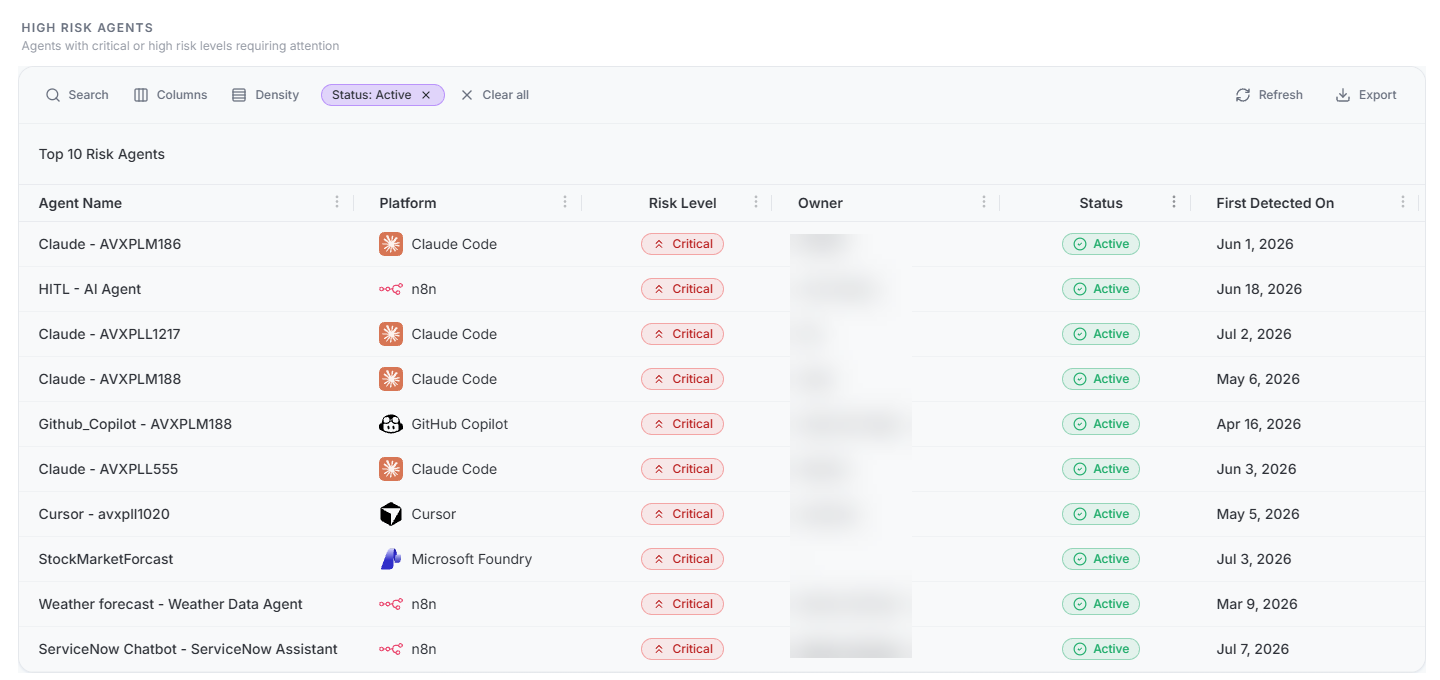
| Column | What to look for |
|---|---|
| Agent Name | Select to open the Agent Profile for posture details, access history, and remediation guidance. |
| Platform | Multiple high-risk agents on the same platform may indicate a platform-level issue rather than isolated agents. |
| Risk Level | Color-coded badge showing the current classification. Agents in this table are typically Critical or High. |
| Owner | A dash (—) means no owner is identified. Assign ownership to ownerless Critical agents before investigation can be tracked effectively. |
| Status | Active Critical agents are the highest priority — they are running right now at high risk. Remediate Inactive agents before re-enabling them. |
| First Detected On | A Critical agent detected within the last 7 days was likely deployed without security review — treat it as immediate priority regardless of table position. |
Investigation guidance
- Check the header badges first. A rise in the Critical/High count means a new high-risk agent appeared or an existing agent escalated. Investigate before reviewing the full table.
- Look at KPI trend arrows. A red upward arrow means the metric worsened in the last 7 days. Prioritize trending-worse metrics over ones that are high but stable.
- Check the fleet distribution. If the Critical tier grew by more than 5 agents, new agents were likely onboarded without security controls. Address the onboarding policy — not just individual agents.
- Open each Critical agent profile. Review posture issues, access history, and identity linkage. Identify whether risk is from configuration or behavior.
- Resolve ownerless agents. No owner listed means no clear remediation path. Engage the platform administrator to assign ownership before investigation can proceed.
- Correlate with Risk Trends. A score that jumped in the last 3 days is more urgent than one that has been stable at the same level for 30 days.
- Use Event Logs for behavior. When High Risk Accesses is elevated, go to Govern > Event Logs, filter by agent, and review what was accessed and when.
Act the same day when you see any of the following:
- A Critical agent that is also Active.
- A Critical agent first detected within the last 24 hours.
- High Risk Accesses up more than 50% in a single day.
- Compliance Violations up more than 10 in a single day.
- Average Risk Score up more than 5 points in 24 hours.
Security insights
Common patterns to watch for when interpreting Agent Risk dashboard metrics:
Too many permissions
A high Average Risk Score often means agents can do far more than they need to. An agent that can read files, call external APIs, and modify records builds up risk across multiple categories even if nothing has gone wrong yet. Give agents only the permissions they actually need.
Unapproved MCP servers
Agents connected to unapproved MCP servers are a leading cause of high risk scores. The agent takes on the risk of the server, which may have dangerous tool settings or broad data access. Look in the High Risk Agents table for agents running on platforms like n8n or Claude Code that support MCP connections.
New agents raising the average score
If the total agent count and the Average Risk Score both go up at the same time, a group of new agents was probably added without a security review. New agents get scored the moment they are discovered and they start high until someone reviews and fixes their configuration.
Compliance violations mean real audit risk
Every compliance violation on this dashboard is an actual control failure not just a warning. If the count is rising, your audit exposure is growing. Set clear deadlines for fixing violations by framework and use the compliance export to track progress.
No owner means no one to call
A Critical agent with no owner is a problem waiting to happen. If something goes wrong, there is no clear person to contact. Make owner assignment a requirement before any agent goes live, and use the Agent Identity Security registry to enforce it.
