
Istio Ingress Gateway Access Logs Configuration
To access the istio ingress gateway access logs configure the ef-ingress-gateway-access-log file as described below.
-
Log in to the installer node and go to the envoy_filter directory.
cd <appviewx_kubernetes_path>/scripts/envoy_filter
-
Create the ef-ingress-gateway-access-log.yaml file and paste the code
below.
apiVersion: networking.istio.io/v1alpha3 kind: EnvoyFilter metadata: name: ingressgateway-access-logs namespace: istio-system spec: workloadSelector: labels: istio: ingressgateway configPatches: - applyTo: NETWORK_FILTER match: context: GATEWAY listener: filterChain: filter: name: "envoy.filters.network.http_connection_manager" patch: operation: MERGE value: typed_config: "@type": type.googleapis.com/envoy.extensions.filters.network.http_connection_manager.v3.HttpConnectionManager access_log: - name: envoy.access_loggers.file typed_config: "@type": type.googleapis.com/envoy.extensions.access_loggers.file.v3.FileAccessLog path: "/var/log/istio-ingressgateway-access.log" log_format: json_format: "start_time": "%START_TIME%" "method": "%REQ(:METHOD)%" "path": "%REQ(X-ENVOY-ORIGINAL-PATH?:PATH)%" "protocol": "%PROTOCOL%" "response_code": "%RESPONSE_CODE%" "response_flags": "%RESPONSE_FLAGS%" "bytes_received": "%BYTES_RECEIVED%" "bytes_sent": "%BYTES_SENT%" "duration": "%DURATION%" "upstream_cluster": "%UPSTREAM_CLUSTER%" "user_agent": "%REQ(USER-AGENT)%" "downstream_remote_address": "%DOWNSTREAM_REMOTE_ADDRESS%" "downstream_local_address": "%DOWNSTREAM_LOCAL_ADDRESS%" "upstream_service_time": "%RESP(X-ENVOY-UPSTREAM-SERVICE-TIME)%" "x_forwarded_for": "%REQ(X-FORWARDED-FOR)%" -
Execute the command below to apply the envoy filter.
kubectl apply -f ef-ingress-gateway-access-log.yaml

-
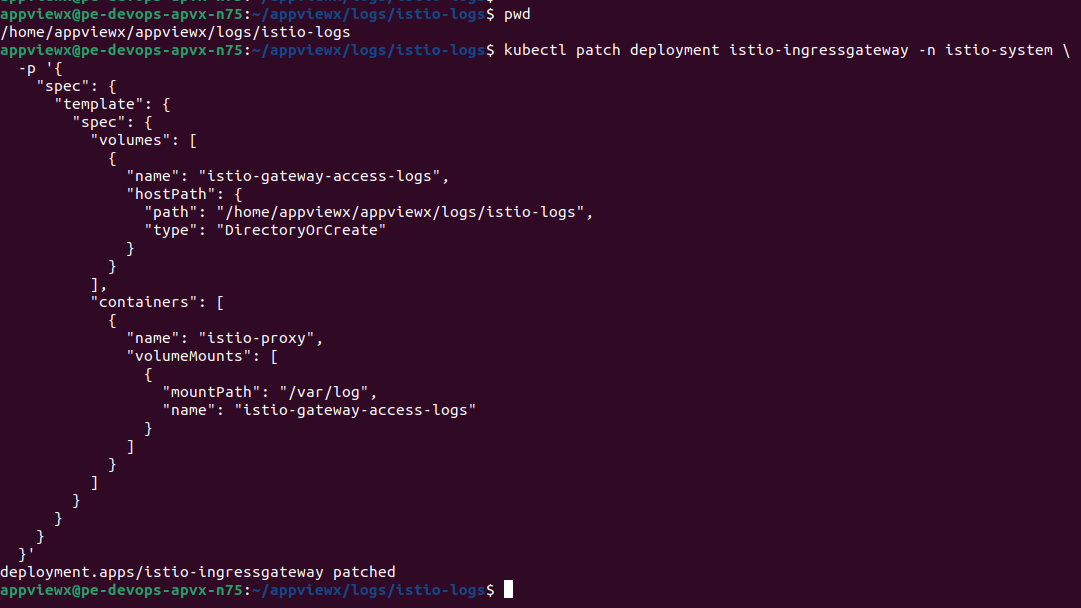
Patch the istio ingress gateway deployment as shown below.
Note: Please update the <INSTALLATION_PATH> placeholder before executing patch command below.
kubectl patch deployment istio-ingressgateway -n istio-system \ -p '{ "spec": { "template": { "spec": { "volumes": [ { "name": "istio-gateway-access-logs", "hostPath": { "path": "<INSTALLATION_PATH>/logs/istio-logs", "type": "DirectoryOrCreate" } } ], "containers": [ { "name": "istio-proxy", "volumeMounts": [ { "mountPath": "/var/log", "name": "istio-gateway-access-logs" } ] } ] } } } }' -
Update ownership of the istio-logs directory and configure the correct
installation user
cd <INSTALLATION_PATH>/logs
sudo chown -R appviewx:appviewx istio-logs/
-
Replace the logrotate_configmap.yaml under
<appviewx_kubernetes_path>/yaml.
cd <appviewx_kubernetes_path>/appviewx_logrotate/logrotate_setup/chart/templates
logrotate_configmap.yaml: {{- $root := . -}} {{- $dot := . }} --- apiVersion: v1 kind: ConfigMap metadata: name: logrotate-config namespace: {{ $dot.Values.appviewx_logrotate.namespace }} data: mongodb.conf: | /appviewx/dependencies/logs/mongodb-*.log { rotate 5 size 200M compress missingok notifempty copytruncate sharedscripts postrotate /bin/bash /appviewx/dependencies/properties/mongodb_logrotate.sh $(find /appviewx/dependencies/logs/ -iname "mongo*db*.log" -exec stat --format='%Y %n' "{}" + | sort -nr | head -n1 | awk '{gsub(/\.log$/, "", $2); print $2}' | xargs basename) endscript } heapfile.conf: | /appviewx/dependencies/logs/*.hprof { rotate 5 missingok notifempty } gc.conf: | /appviewx/dependencies/logs/*.gc { rotate 5 missingok notifempty copytruncate compress } istiologs.conf: | /appviewx/dependencies/logs/istio-logs/*.log { rotate 5 missingok notifempty copytruncate compress } --- apiVersion: v1 kind: ConfigMap metadata: name: mongo-logrotate namespace: {{ $dot.Values.appviewx_logrotate.namespace }} data: mongodb_logrotate.sh: |- {{ $root.Files.Get $dot.Values.appviewx_logrotate.script_mongo_local_path | indent 4 }} -
Uninstall and reinstall the appviewx-logrotate-sa cronjob by the
following commands:
cd <appviewx_kubernetes_path>/appviewx_logrotate/helm uninstall appviewx-logrotate-sa./run.sh
