
Enabling the Load Balancer for the Kube API Server
Prerequisite:
Create the TCP load balancer for Kube master API Server.
Note: This section is applicable only when the load balancer
for the kube apiserver is not installed during the installation.
Sample Configuration:
Load balancer Configuration for
Kube
Master:
ltm virtual vs-appviewxmasterapi {
destination <IP Address>:sun-sr-https
ip-protocol tcp
mask XXX.XXX.XXX.XXX
pool pool-avxmasterapi
profiles {
fastL4 { }
}
serverssl-use-sni disabled
source 0.0.0.0/0
source-address-translation {
type automap
}
translate-address enabled
translate-port enabled
}
Pool Member Configuration for Kube
Master
ltm pool pool-avxmasterapi {
 members {
 <Master Node IP Address>:sun-sr-https {
 address XXX.XXX.XXX.XXX
 session monitor-enabled
 state up
 }
 <Master Node IP Address>:sun-sr-https {
 address XXX.XXX.XXX.XXX
 session monitor-enabled
 state up
 }
 <Master Node IP Address>:sun-sr-https {
 address XXX.XXX.XXX.XXX
 session monitor-enabled
 state up
 }
 }
 monitor gateway_icmp
 }
To enable the load balancer for Kube Master:
-
To verify whether the load balancer is functioning normally, execute the
curlcommand with endpoint/healthzor/versionas shown below:curl -k https://loadbalancer-ip:6443/healthzNote: The/healthzendpoint should return an "OK" status, indicating that the Load Balancer is functioning properly and the API Server is reachable.curl -k https://loadbalancer-ip:6443/versionNote: The/versionendpoint may require an auhorizaiton. Usingcurlto access endpoints like/versionwithout an authentication token will result in a 403 Forbidden error, as unauthenticated requests are not permitted.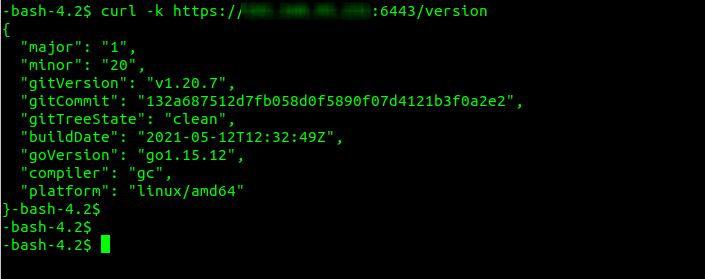
- Apply the latest script patch from the release portal.
- Navigate to the <installerLocation>/appviewx_kubernetes/scripts/ directory.
- Open the appviewx.conf file.
- Search for the API_ADDRESS parameter.
-
Modify the value of the API_ADDRESS parameter to reflect the IP Address
or the FQDN of the load balancer.

- Navigate to the <installerLocation>/appviewx_kubernetes/scripts/loadbalancer/ directory.
-
To run the load balancer script, execute the following command:
./loadbalancer.sh
- Enter the password of the nodes when prompted.
-
To verify the changes, execute the following command:
kubectl cluster-infoThe output should contain the updated load balancer URL (IP Address or FQDN) of the kube API server.Note: Once the LoadBalancer has been verified, proceed to delete the backup of the older control plane certificates using the following command:rm -rf <actual_directory_path>/kubernetes_API_LB_backup_*Replace
<actual_directory_path>with the actual directory path.
Rollback Master LB
-
Modify the following parameters in the appviewx.conf file with the values
as specified.
- API_ADDRESS = <IP of the Master Node>
- API_ADDRESS_LISTNER_PORT = 6443
-
Run the load balancer script, using the following command:
./loadbalancer.sh -
Once the script completes successfully, execute the command below to
confirm that the cluster is now pointing to the master IP.
kubectl cluster-info
