
Enabling Device Syslog Processing
The Syslog module in AppViewX is used to receive syslogs from the device and update the necessary changes made in the device into the AppViewX database.
To enable Syslog parsing for the devices managed by AppViewX:
- Navigate to the /home/appviewx/appviewx_kubernetes/scripts directory.
-
To open the appviewx.conf file, execute the following command:
vi appviewx.conf - Search for the SYSLOG parameter.
-
Set the value of the SYSLOG parameter to TRUE.
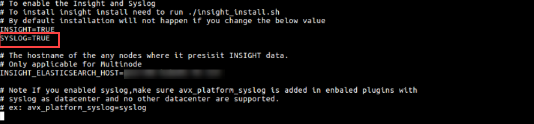
- Search for Enabled Plugins.
-
Add the following plugins:
- appviewx_dependencies
- avx_platform_syslog
- avx_platform_gateway
Note: Gateway must be added to register the new APIs from the plugins that are installed.
-
Update the data center as syslog for the parameter
avx_platform_syslog plugin.
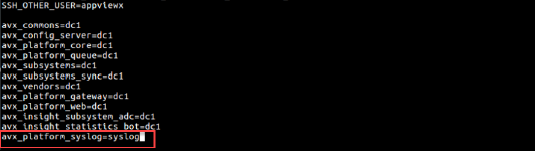
- Save and exit the appviewx.conf file.
-
From the
/home/appviewx/appviewx_kubernetes/scripts directory,
execute the following command:
./insight_install.sh -
Execute the following command:
./plugins_install.sh -
Execute the following command:
kubectl get services -n syslogIt displays the results as shown in the image below. Fetch the Syslog port from the service logstash-syslog-service. Here, the Syslog port is 30336. This Syslog port changes for every
installation/upgrade.
This Syslog port changes for every
installation/upgrade. - Connect to the MongoDB and open the avx_app_metadata collections. Edit this file by searching the parameter SYSLOG_RECEIVER_ENABLED and set it to TRUE. Save the file and move out of the DB.
-
To configure Syslog as TRUE, execute the following command:
kubectl edit configmaps -n "data center name" Set SYSLOG_RECEIVER_ENABLED=True,SYSLOG_HOST=192.168.XXX.XXX (Node IP where Syslog is installed)),SYSLOG_PORT=30047 (fetch the ports from point 8) - Save and exit the <configmaps> file.
-
To get the Pod name, execute the following command:
kubectl get pods -n "data center name" - To restart subsystems and vendors, execute the following command:
kubectl delete pods “Pod name” -n ‘’data center name’’
For example: You may restart multiple pods and the config servers by entering the name of the pod and the config server in the command below with space.
kubectl delete pods avx-subsystems-7666cfb459-6q4rn avx-vendors-99c69cd69-jtr4w avx-config-server-85ff9dd46d-h5qnr-n ’'data center name’’ 