
Form Field - Form Group
- Go to (Menu) > Automation > Service Catalog > Design.
- To design a new form page, click the + (Design) icon.
- Click the + (New Page) icon.
- On the displayed new page, in the Switch Layout pop-up, select either Single Page or Multi page to proceed. (You may even close the pop-up without selecting any option. Single Page is the default layout applied.)
- On the left click Build, and scroll down to view the Form components.
-
Select Form Group and drag it to the right on the new page.
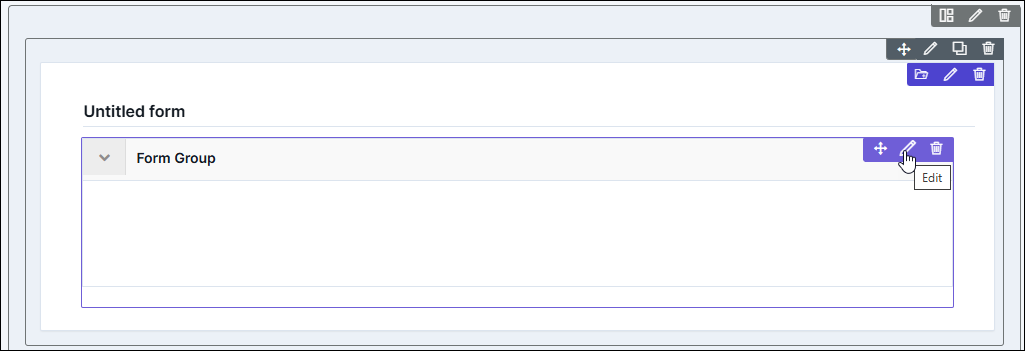
The Form Group component is added in the form, with icons to Move, Edit, and Delete.
-
To modify the properties and styles click the Edit icon. Refer to the sections
below.
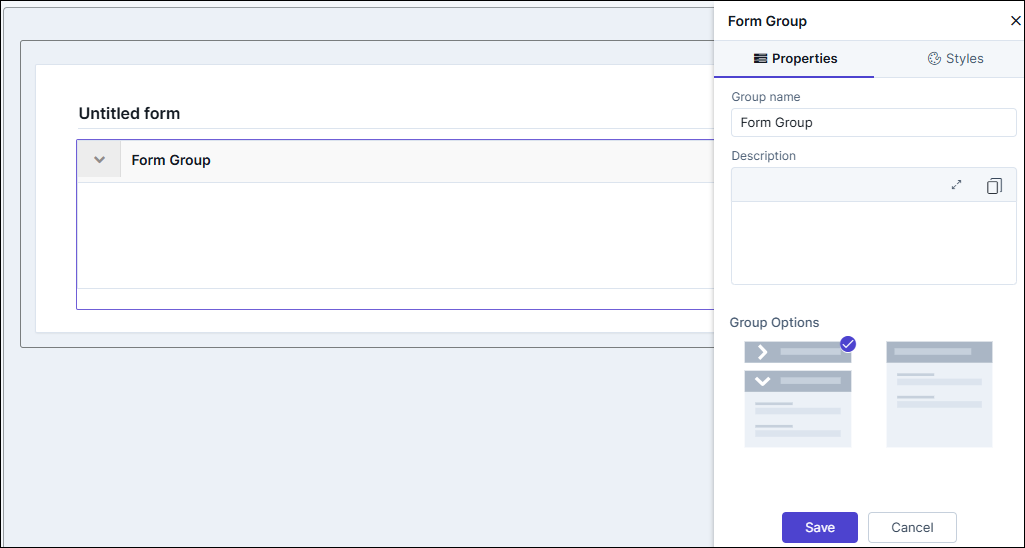
Editing Form Group Properties
| Fields | Description |
|---|---|
| Group name | Enter a valid name for the component. |
| Description | Allows you to write a description for the component that will be displayed below the group name. |
| Group Options | Allows you to select from two options, drill-down and without. Choosing the drill-down option enables to expand/hide the grouped components. |
| Save / Cancel buttons | To update the changes, click Save. To undo the changes, click Cancel. |
Editing Form Group Styles
| Fields | Description |
|---|---|
| Group Title | |
| Weight | The Weight dropdown list lets you set the font thickness of the field label using one of the following values: Default, Light, Normal, Bold. |
| Size | Allows you to increase/decrease font size of the component. |
| Line height | Allows you to increase/decrease the line height of the field. This means the space between the field and the field border. |
| Color | Allows you to define the color of the component/label name. |
| Align | Allows you to align the field name to the left, center or right side of the form. |
| Group Outer Spacing | Allows you to increase/decrease the spacing between the outer border and the component. |
| Group Inner Container Spacing | Allows you to increase/decrease the spacing between the inner (added components) and the form group component. |
| Border Bottom | Border Color - Allows you to change the color of the
border below the label name. Border Width - Allows you to change the width of the border below the label name. |
| Save / Cancel / Restore buttons | To update the changes, click Save. To undo the changes, click Cancel. To restore the settings
to default, click |
 icon.
icon.