
Login Workflow
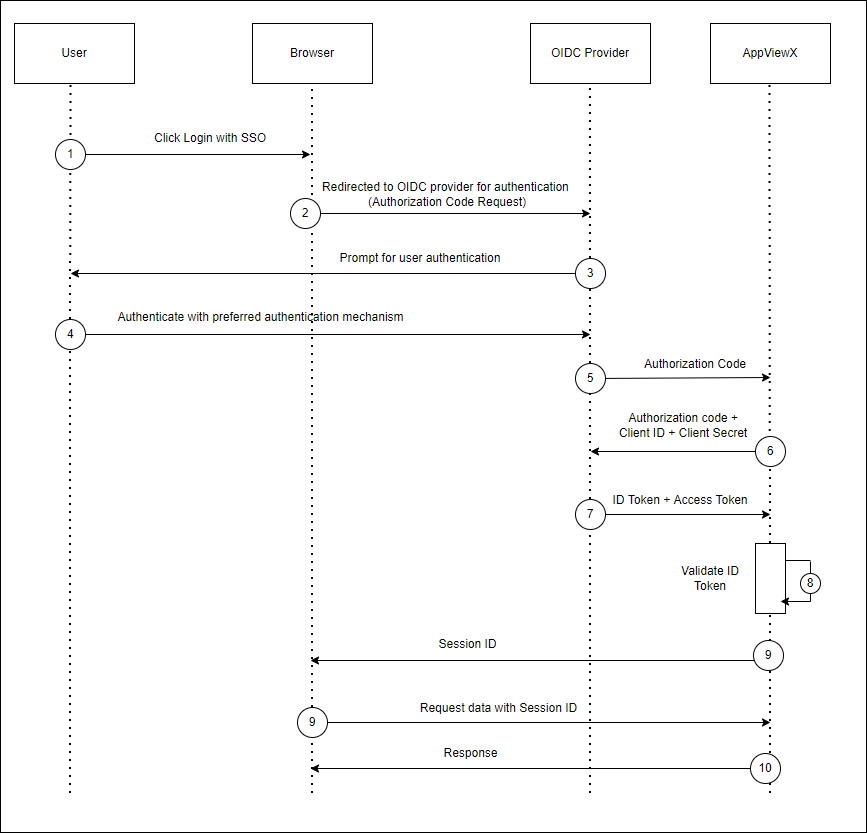
- When user tries to login with SSO in AppViewX, user will be redirected to the OIDC provider’s login page.
- The user can now use the preferred authentication mechanism to login to the OIDC. After successful authentication, OIDC provider will send Authorization code to AppViewX.
- AppViewX will then send the Client ID and Client Secret along with that Authorization code to the OIDC provider.
- OIDC provider validates the client credentials and authorization. On successful validation, it returns ID Token and Access Token to AppViewX.
- AppViewX validates the ID Token and uses the user information received in ID token.
- If a user tries to login for the first time, then that user account will be created in AppViewX using the details fetched from ID Token.
- If Local Authorization is enabled, the admin must map the user to the respective user group to grant necessary permission and scope of management.
- Upon completion of the user mapping, the user can access the AppViewX console. Any attempt to log in before this mapping results in an error.
- If Local Authorization is disabled, then the authorization in AppViewX will be performed based on the groups the user exists in IDP.
-
AppViewX will compare the user group details available in the ID token with the
existing user groups in AppViewX. If the same user groups exists in both, then
the user will be assigned with permissions and the scope of those groups. Else,
user will not have any permissions within AppViewX.
Note: For Microsoft Azure, the token configuration should be configured with custom claims for sending user login name with the claim as upn and a group claim to send security groups as User Group.
