
Switching between HSMs
Once the encryption of the AppViewX MEK has been enabled, it cannot be disabled. However,
it is possible to switch between the HSMs used for encryption. The process involves
decrypting the MEK using the current HSM and then re-encrypting it using the new HSM. To
switch between HSMs, AppViewX executes the following steps: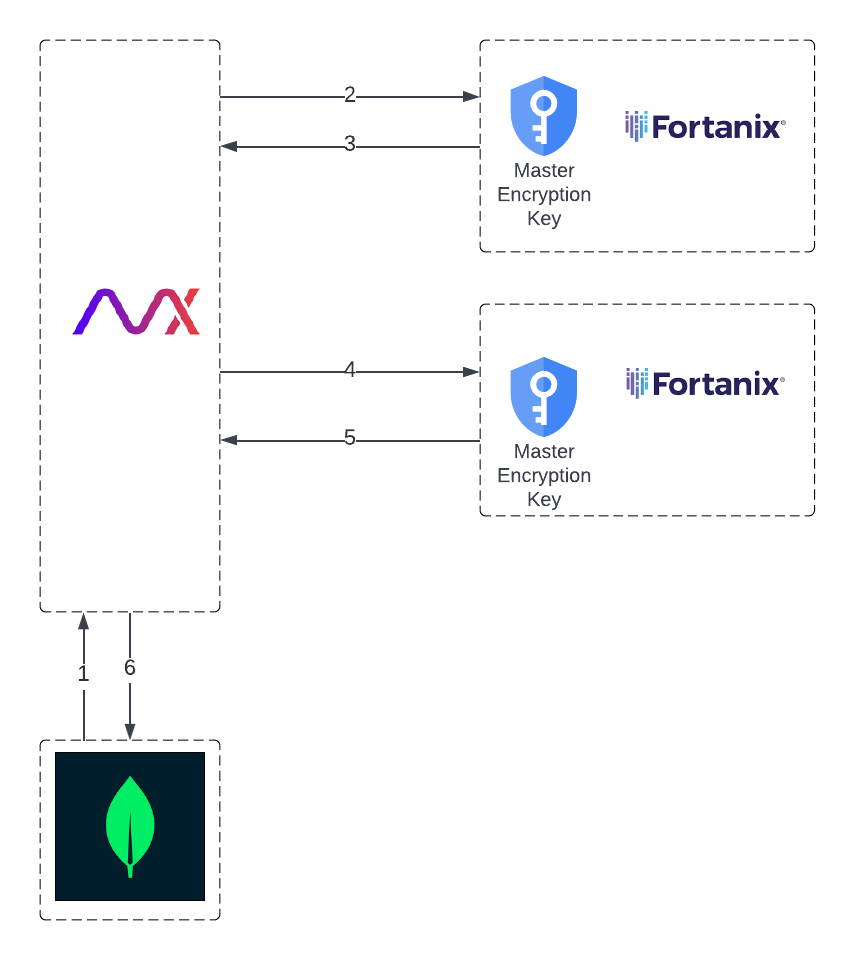
- Retrieve the encrypted AppViewX MEK from the tenant database.
- Decrypt the AppViewX MEK using the current HSM.
- Retrieve the KMS-encrypted AppViewX MEK.
- Encrypt the AppViewX MEK using the new HSM.
- Retrieve the double-encrypted AppViewX MEK.
- Persist the encrypted AppViewX MEK in the tenant database.
Warning: When switching between HSMs, the User’s
Master Key in the existing HSM should be retained till the process is complete,
failing which can result in a failure in the switch operation.
