
Enabling AppViewX Master Key Encryption
Encrypting the AppViewX Master Key using the User's Master Key
AppViewX offers the ability to encrypt the AppViewX Master Key using the User's
Master Key stored in the User's Hardware Security Module (HSM). This delegation of
control over all data to the user enhances the confidentiality and security of
sensitive information. With this option enabled, AppViewX can only access sensitive
data if the User's Master Key is available and valid.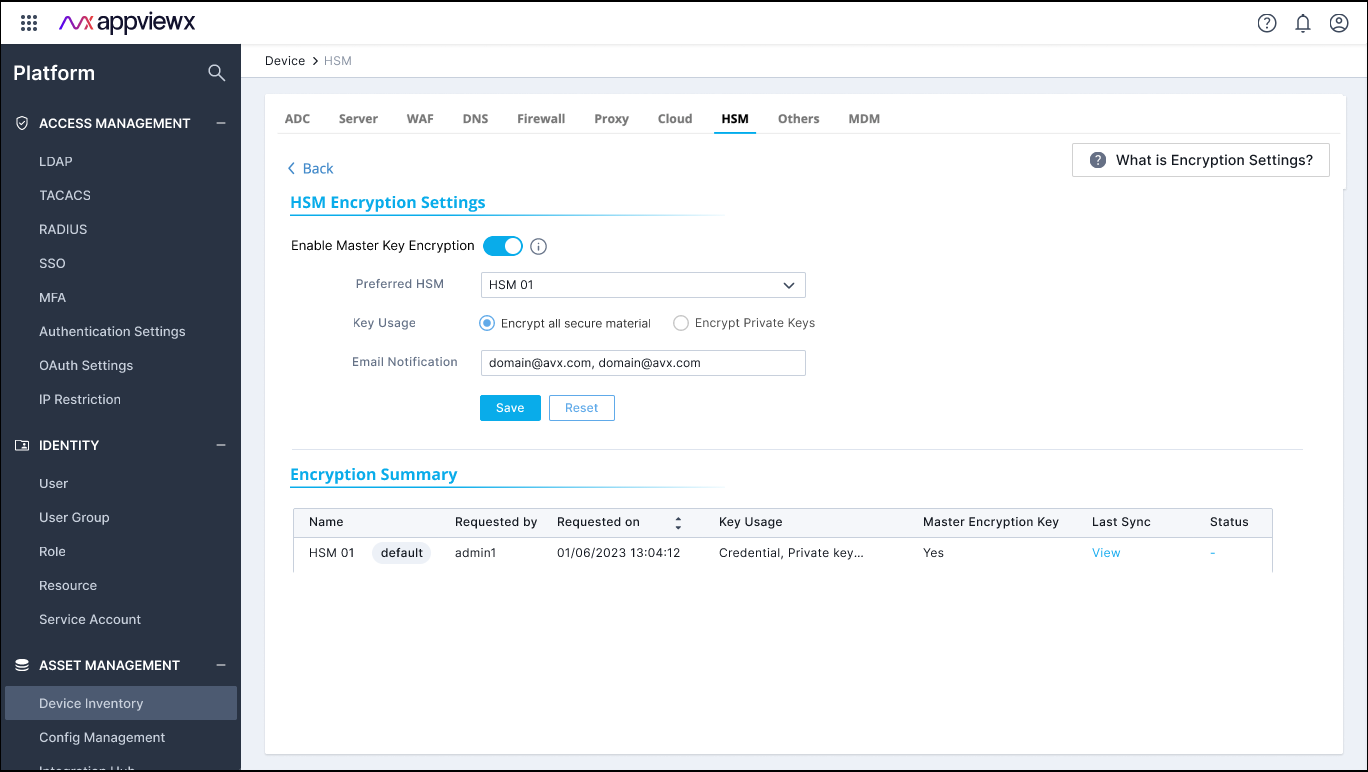
When the user chooses to encrypt the AppViewX Master Key using the User's Master Key
stored in the HSM, AppViewX executes the following steps: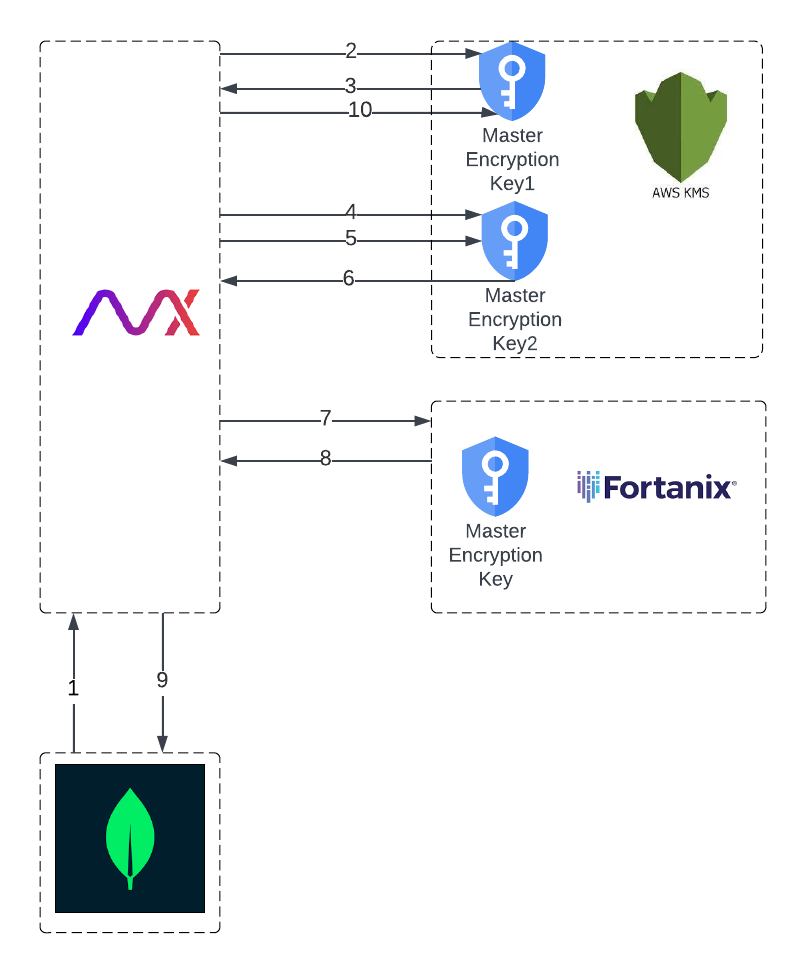
- Retrieve the existing KMS-encrypted Master Encryption Key (MEK) from the tenant's database.
- Decrypt the AppViewX MEK using the MEK (Master Encryption Key 1) created during tenant onboarding in the KMS.
- Retrieve the plaintext AppViewX MEK.
- Generate a new MEK (Master Encryption Key 2) in the KMS.
- Encrypt the AppViewX MEK using the MEK 2 in the KMS.
- Retrieve the KMS-encrypted AppViewX MEK.
- Encrypt the KMS-encrypted AppViewX MEK using the User’s Master Key in the HSM.
- Retrieve the double-encrypted AppViewX MEK.
- Update the new double-encrypted AppViewX MEK in the database, replacing the previous KMS MEK encrypted ciphertext in the tenant's database.
- Schedule the Master Encryption Key 1 for deletion to ensure that any previous data backups are invalidated.
Note: It is important to note that the AppViewX Master
Encryption Key is stored only in its encrypted form within the tenant's database
and is not paged or stored elsewhere.
Why is there a dependency on AWS KMS?
AppViewX uses the AWS KMS for two main purposes:
- To retain a key for encrypting the AppViewX Master Encryption Key (MEK) when it is sent to the user's HSM through the AppViewX Cloud Connector
- To encrypt sensitive information related to the HSM.
New Encryption/Decryption Flow
When sensitive data is fed into AppViewX after enabling AppViewX MEK encryption via
the HSM, to ensure data security, AppViewX executes the following steps: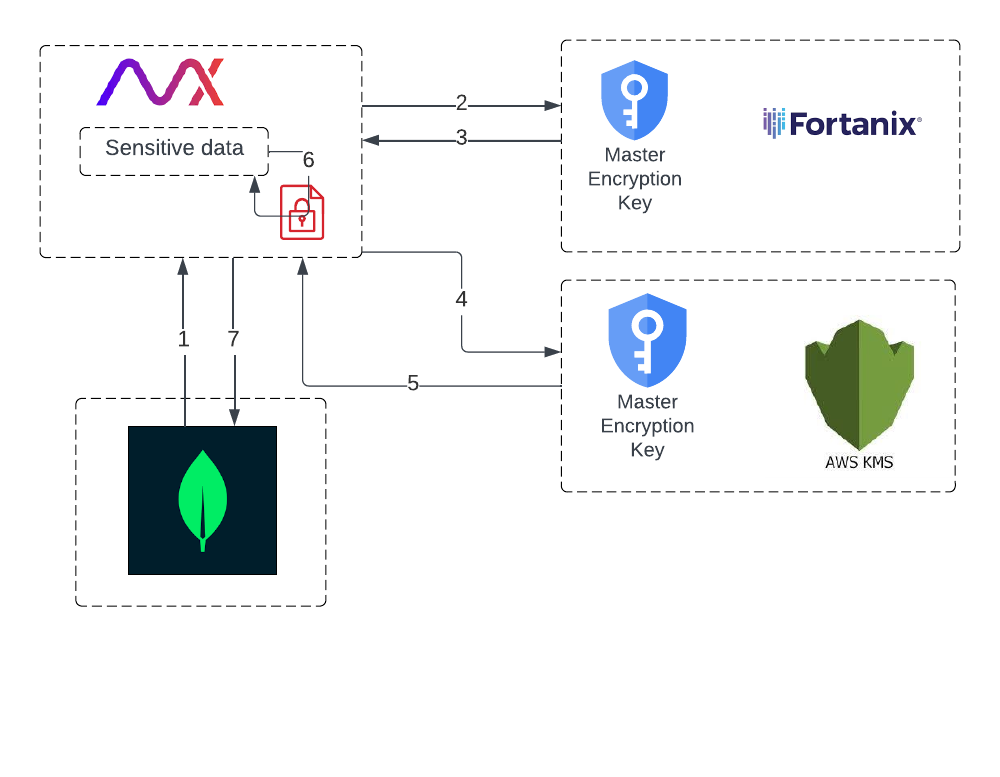
Note: The AppViewX
Master Encryption Key (MEK) is required to encrypt/decrypt the sensitive data,
but it is not readily available. The process of retrieving the AppViewX MEK
involves two steps, with the HSM initially in control.
- Retrieve the encrypted AppViewX MEK from the tenant's database.
- Send a request to the HSM, which decrypts the encrypted MEK and sends back a response. This response is a ciphertext encrypted using the KMS MEK.
- Retrieve the decrypted value (KMS encrypted).
- Send a request to the AWS KMS to decrypt the KMS-encrypted AppViewX MEK using the KMS's MEK.
- Retrieve the plaintext AppViewX MEK.
- Encrypt/Decrypt sensitive data using the plaintext AppViewX MEK.
- Persist the encrypted sensitive data in the tenant database.
Warning:
- After enabling AppViewX Master Key encryption, if the User’s Master Key is removed from the HSM, all data becomes inaccessible and irrecoverable. There is no way for the recovery of this data.
- Once AppViewX Master Key encryption is enabled, there is no option to roll back to the default approach of using AWS-KMS.
