
Key Rotation Settings
HSM key rotation involves the regular replacement of cryptographic keys used by a Hardware Security Module (HSM) to bolster security and safeguard sensitive data. This process includes generating new keys and securely substituting the current ones.
Accessing Rotation Settings
| New Menu | Old Menu |
|---|---|
| In the Platform module, from the navigation pane on the
left, under VAULT & SECURITY, select Rotation
Settings. The Settings :: Key Rotation page is displayed. |
|
| For more information on how to switch between menus, click here. | |
Automatic Key Rotation Configuration
"Automatic key rotation" configuration involves the automatic rotation of cryptographic keys at predefined intervals, ensuring the automatic replacement of encryption keys without manual intervention.
- On the Settings :: Key Rotation page, from the left corner of
the screen, navigate to the Automatic key rotation
configuration.
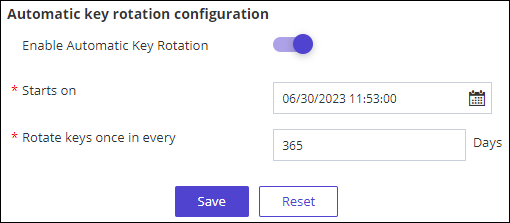
- Enable the toggle to Enable Automatic Key Rotation. Note: On selecting Enable Automatic Key Rotation, the *Starts on and *Rotate keys once in every attribute appears.
Table 1. Field descriptions for Automatic Key rotation configuration Field Description * Starts on This field provides a calendar option to specify the start date and time of the key rotation. * Rotate keys once in every This field enables you to define the rotation frequency of keys in terms of the number of days. * : Mandatory fields - Click Save.
A Confirmation message indicating
 is displayed on the screen.
On Demand Key Rotation
- On the Settings :: Key Rotation page, from the right corner of
the screen, navigate to the On Demand Key Rotation.
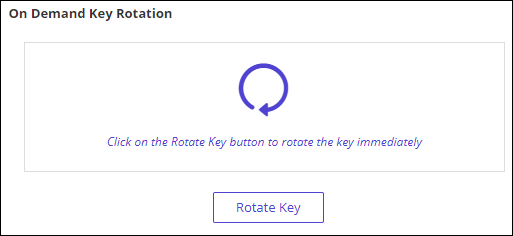
- Click Rotate Key to rotate the key immediately. A pop-up window of Confirmation is displayed.
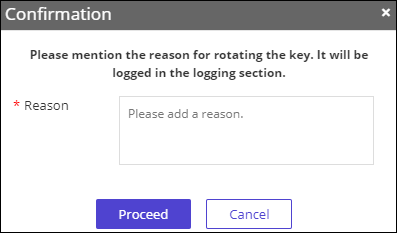
- Enter the Reason for rotating the key. It will be logged in the logging section.
- Click Proceed.
A Confirmation message indicating Key rotation triggered successfully is displayed on the screen.
