
Decrypting Data Using the AppViewX MEK
To decrypt the sensitive information stored in the tenant database, AppViewX executes the
following steps: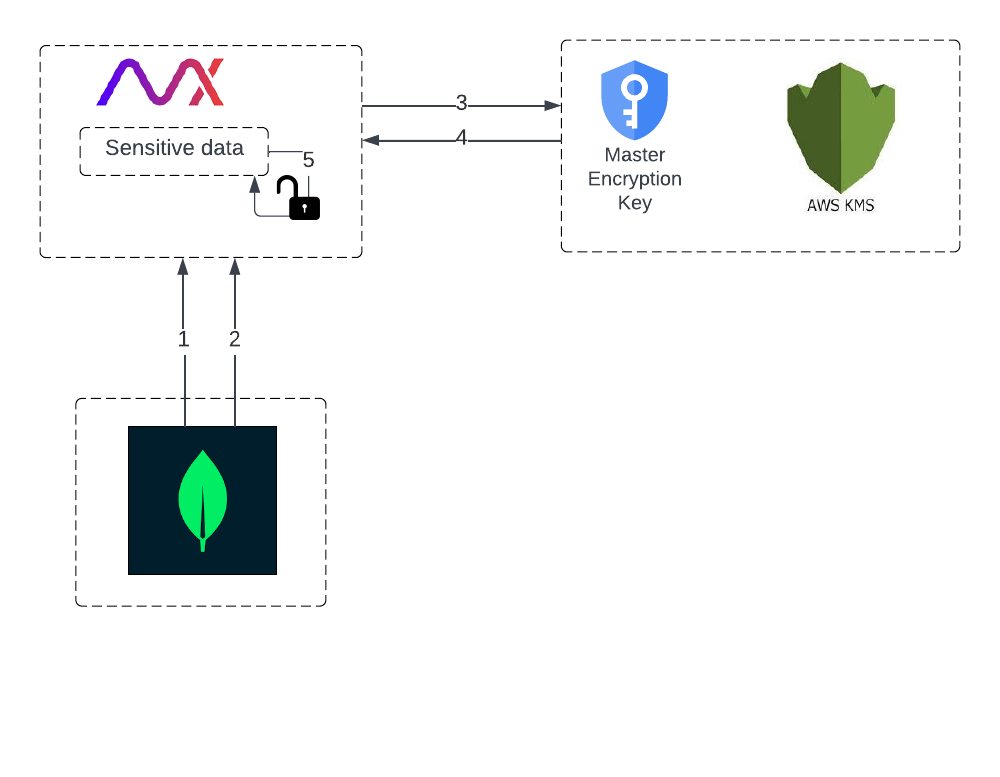
- Retrieve the encrypted sensitive data (ciphertext).
This ciphertext can only be decrypted using the AppViewX Master Encryption Key (MEK).
- Retrieve the encrypted AppViewX MEK from the in-memory cache.
If the plaintext AppViewX MEK is unavailable in memory, it is retrieved from the tenant database.
- Initiate a request to AWS KMS to decrypt the encrypted MEK.
- Retrieve the plaintext MEK from the AWS KMS.
- Decrypt the sensitive data using this plaintext MEK.
