
Encrypting Data Using the AppViewX MEK
To ensure the protection of sensitive data, it should be encrypted. To securely encrypt
the data, AppViewX executes the following steps: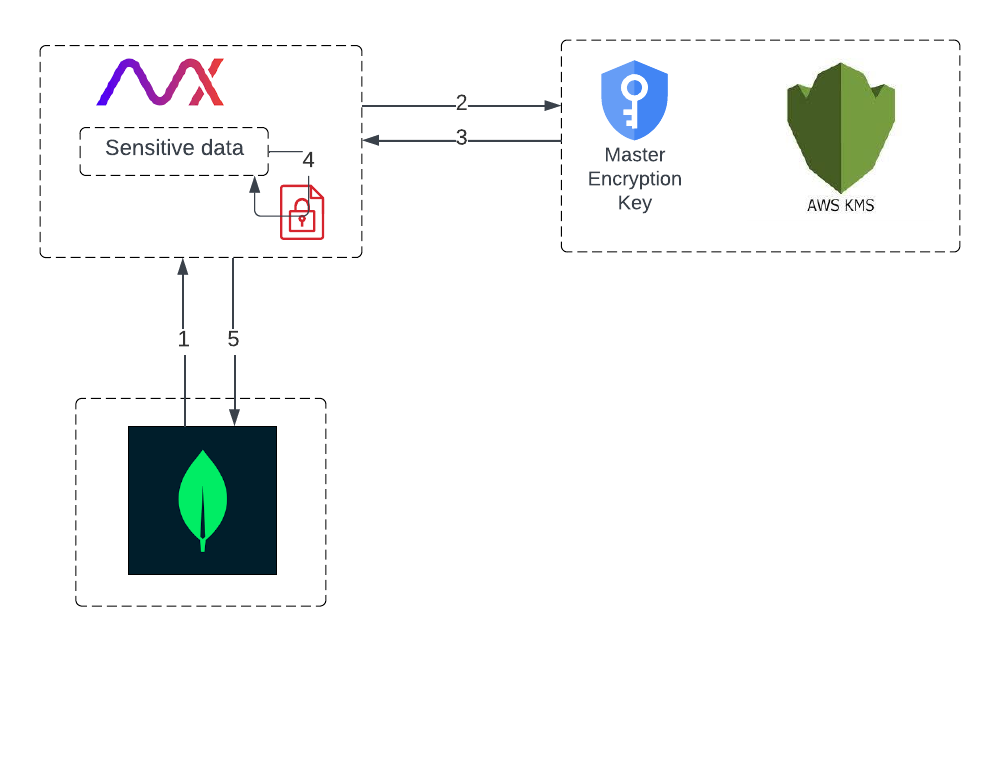
- Retrieve the encrypted MEK from the in-memory cache.
If the AppViewX Master Encryption Key (MEK) necessary for encryption is not yet available in the in-memory cache, it is retrieved from the tenant's database.
- Send a request to the AWS KMS to decrypt the MEK.
- Retrieve the decrypted plaintext AppViewX MEK and cache it in memory.
- Encrypt sensitive data using AppViewX MEK.
- Once the plaintext MEK has been retrieved, store it in memory for future
sensitive data encryptions.
This helps to improve performance by reducing the number of calls to AWS KMS for each encryption/decryption request.
