
Scheduled jobs
The Reports :: Schedule page lists all the scheduled jobs or the
emails that have been scheduled by a user to trigger at pre-set time intervals. 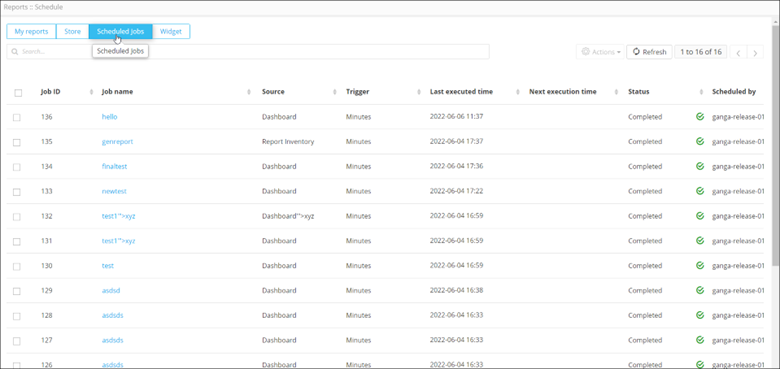
The following table describes the options available under the Scheduled Jobs tab:
| Options | Description |
|---|---|
| Search bar | Searches for the given keyword(s) in the field and produces results featuring the searched keyword(s). |
| Refresh | Refreshes the page. |
| Job ID | Displays the Job ID. |
| Job name | Displays the Job name. |
| Source | Displays the source of the scheduled job. |
| Trigger | Displays the frequency at which the job is scheduled to be triggered. |
| Last executed time | Displays the time when the job was last executed. |
| Next execution time | Displays the time when the job will be executed next. |
| Status | Displays the status (pause/resume) of the job. You can click on the green arrow to change the status. |
| Scheduled by | Displays the name of the user who scheduled the job. |
Note: For more information on scheduling reports, click
here.
