
ACME
What is ACME?
ACME, or Automated Certificate Management Environment, is a communications protocol that leverages an agent to automate the process of CSR generation and certificate/key rotation. It is primarily used by the popular public CA, Let’s Encrypt, to issue and renew 90-day Domain Validated certificates quickly and efficiently.
The protocol, developed by Internet Security Research Group (ISRG) for Let's Encrypt to issue x.509 (SSL/TLS) certificates, is now supported by other CAs, PKI vendors, and browsers for issuing various types of certificates.
ACME is Automated Certificate Management Environment, which is a certificate management protocol targeting Public Key Infrastructure (PKI) clients that need to acquire certificates and associated CA certificates. Architecturally, the ACME service (agent) is located between a CA and a client.
- There should be a plugin/pod (avx_vendor_cert_acme_agent) up and running for ACME in AppViewX.
- This ACME plugin works in the HTTPS gateway (The default gateway is used in AppViewX with port 31443)
- It is highly recommended to turn OFF the Approval Required flag in Menu > Inventory > Certificate > Policy page.
- A valid agent settings should be available in Menu > Inventory > Certificate > Settings.
How does ACME work?
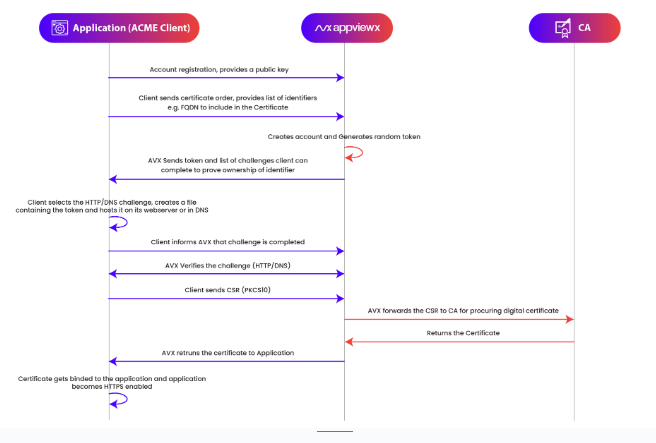
- The application (ACME client) registers an account with AVX and provides a public key.
- The client sends a request for a certificate, listing the identifiers (e.g., Fully Qualified Domain Names like example.com) to be included in the certificate.
- AVX creates the account and generates a random token. It also sends back a list of challenges (like HTTP-01 or DNS-01) to prove the client owns the domain.
- The client chooses a challenge (e.g., HTTP or DNS), creates a token file and hosts it either on the web server (.well-known/acme-challenge) or in DNS as a TXT record.
- The client tells AVX that the challenge setup is complete and is ready for verification.
- AVX accesses the HTTP URL or DNS record to verify the token.
- The client sends a PKCS#10 CSR (with the public key and requested identifiers) to AVX.
- AVX forwards the CSR to the CA, which returns a signed digital certificate. AVX sends the certificate back to the application. The application binds the certificate to itself, and HTTPS is enabled.
