
WAEP
Windows Auto-Enrollment Proxy (WAEP) is a powerful component developed by AppViewX to enable seamless certificate enrollment and migration for users and devices within a Microsoft domain. Designed to automate and simplify certificate lifecycle management, WAEP allows organizations to transition from their existing certificates to AppViewX PKI (Public Key Infrastructure).
WAEP comes equipped with extensible features that enhance its functionality and adaptability to enterprise needs. It includes the ability to automatically fetch certificate templates, streamlining the configuration process by dynamically pulling template details from the Microsoft Certificate Authority (CA). Additionally, WAEP supports per-template CA configuration, allowing administrators to specify distinct types of certificate for different templates, thereby offering greater control and flexibility. This robust integration empowers organizations to leverage their existing Microsoft domain infrastructure while benefiting from the advanced capabilities of AppViewX PKI.
Key Reasons to Migrate to PKI with WAEP
Migrating to AppViewX PKI using WAEP provides organizations with a modern, centralized approach to certificate lifecycle management, offering significant advantages over traditional Microsoft Certificate Authority (MSCA) solutions. While MSCA serves basic certificate needs within a Microsoft domain, it often falls short in providing unified visibility and efficient management of certificates across diverse environments. AppViewX PKI addresses these challenges by offering a single point of management for all certificates, enabling better control, enhanced visibility. This migration eliminates the complexity of managing certificates in fragmented systems, ensuring seamless integration.
AppViewX PKI includes advanced features such as centralized reporting, real-time certificate monitoring, and streamlined template configuration using WAEP. These capabilities allow organizations to maintain compliance, reduce operational inefficiencies, and strengthen their overall security posture, making it a superior choice for enterprises looking to upgrade from MSCA.
Microsoft CA Native Data Flow: Pre-AppViewX Stage
- MSCA is installed without the Certificate Enrollment Policy (CEP) and Certificate Enrollment Services (CES) components
- MSCA is installed with the CEP and CES components
- MSCA Auto-Enrollment without CEP and CES
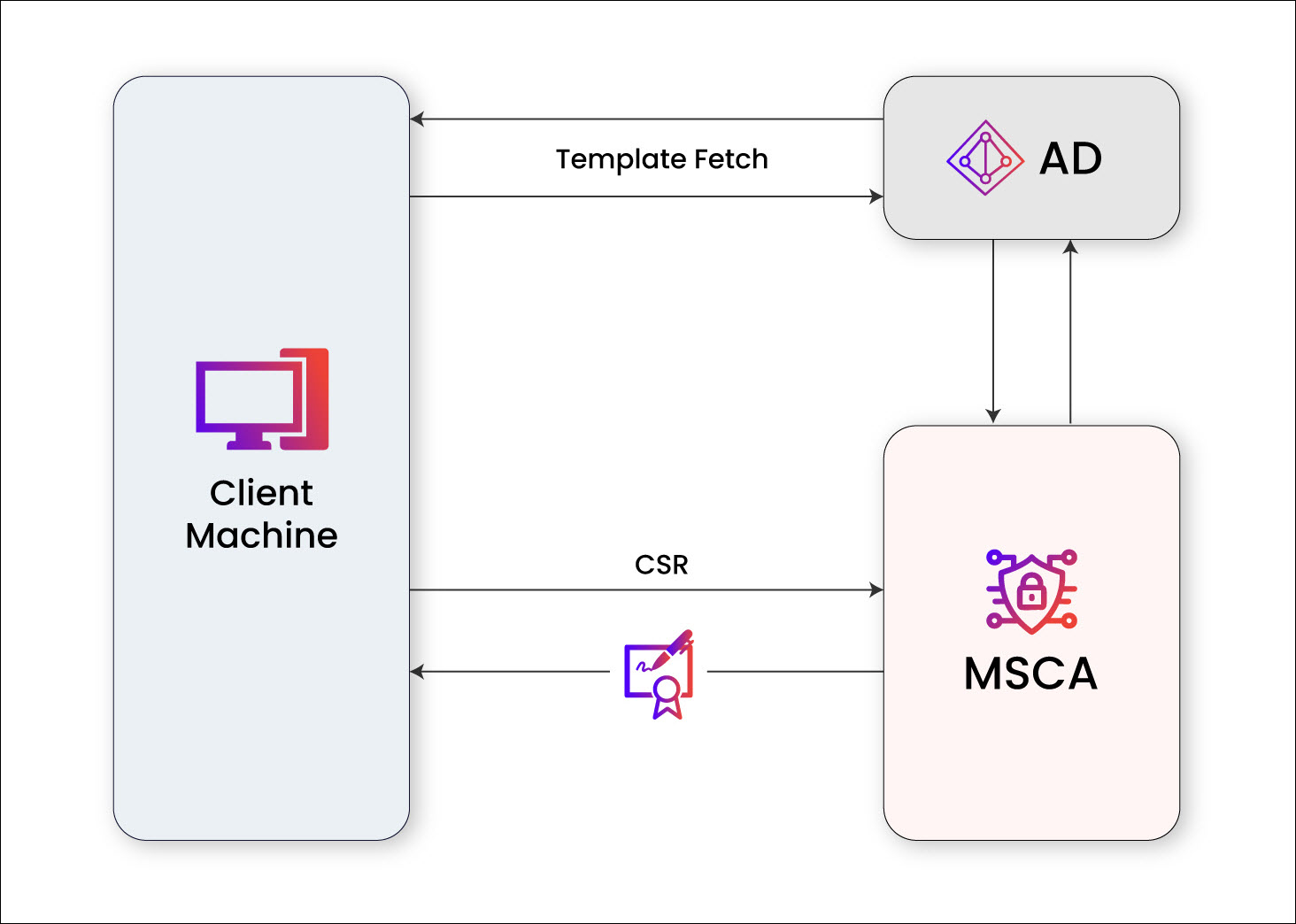
Template Retrieval
The client machine sends a request to fetch the templates configured in the Active Directory (AD), and these templates are used for certificate enrollment.
Certificate Enrollment Request and issuanceThe client machine initiates a certificate enrollment call with a CSR to the MSCA and the MSCA issues the certificate to the end machine. If this is the existing environment, then CEP and CES must be installed and configured as mentioned in the Section, Prerequisites to proceed with WAEP.
- MSCA Auto-Enrollment with CEP and CESThe following diagram illustrates the flow of the MSCA certificate enrollment process, starting from the Windows machine requesting a certificate to the issuance under the same domain.
.png)
Template Retrieval
The client machine sends a request to fetch the templates configured in the CEP, and these templates are used for certificate enrollment.
Certificate Enrollment Request and issuanceThe client machine initiates a certificate enrollment call with a CSR to the MSCA and the MSCA issues the certificate to the end machine.
AppViewX-WAEP: Understanding the Data Flow
AppViewX auto-enrollment is supported through two approaches:
- CEP/CES
The following diagram illustrates the entire flow of the WAEP certificate enrollment process THOUGH cep/ces , starting from the Windows machine requesting a certificate to the PKI+ issuance of the certificate.
The following diagram illustrates the entire flow of the WAEP certificate enrollment process, starting from the Windows machine requesting a certificate to the PKI+ issuance of the certificate.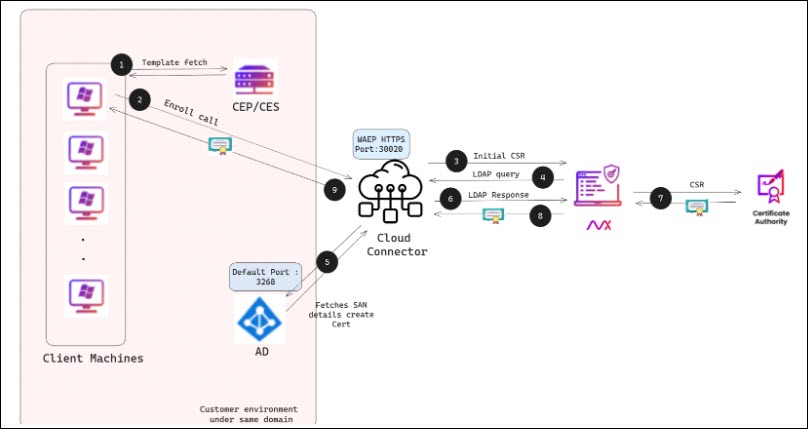 Explanation of each call and its corresponding number is detailed:
- Template Retrieval [1-2]
The client machine sends a request to fetch the templates configured in the CEP. CEP fetches the template from AD and responds to the request
- Certificate Enrollment Request [3-4]
The client machine initiates a certificate enrollment call with a CSR to the cloud connector (CC) machine for a selected template. And the initial CSR is forwarded to AppViewX.
- LDAP Query for SAN Details [5-7]
An LDAP query is made to retrieve SAN details from the AD machine via the cloud connector from AppViewX.
- Certificate Issuance [8-10]
The SAN details are added to the certificate request, and the CSR is submitted to the CA for issuance. The issued certificate is then returned to the client machine.
- Template Retrieval [1-2]
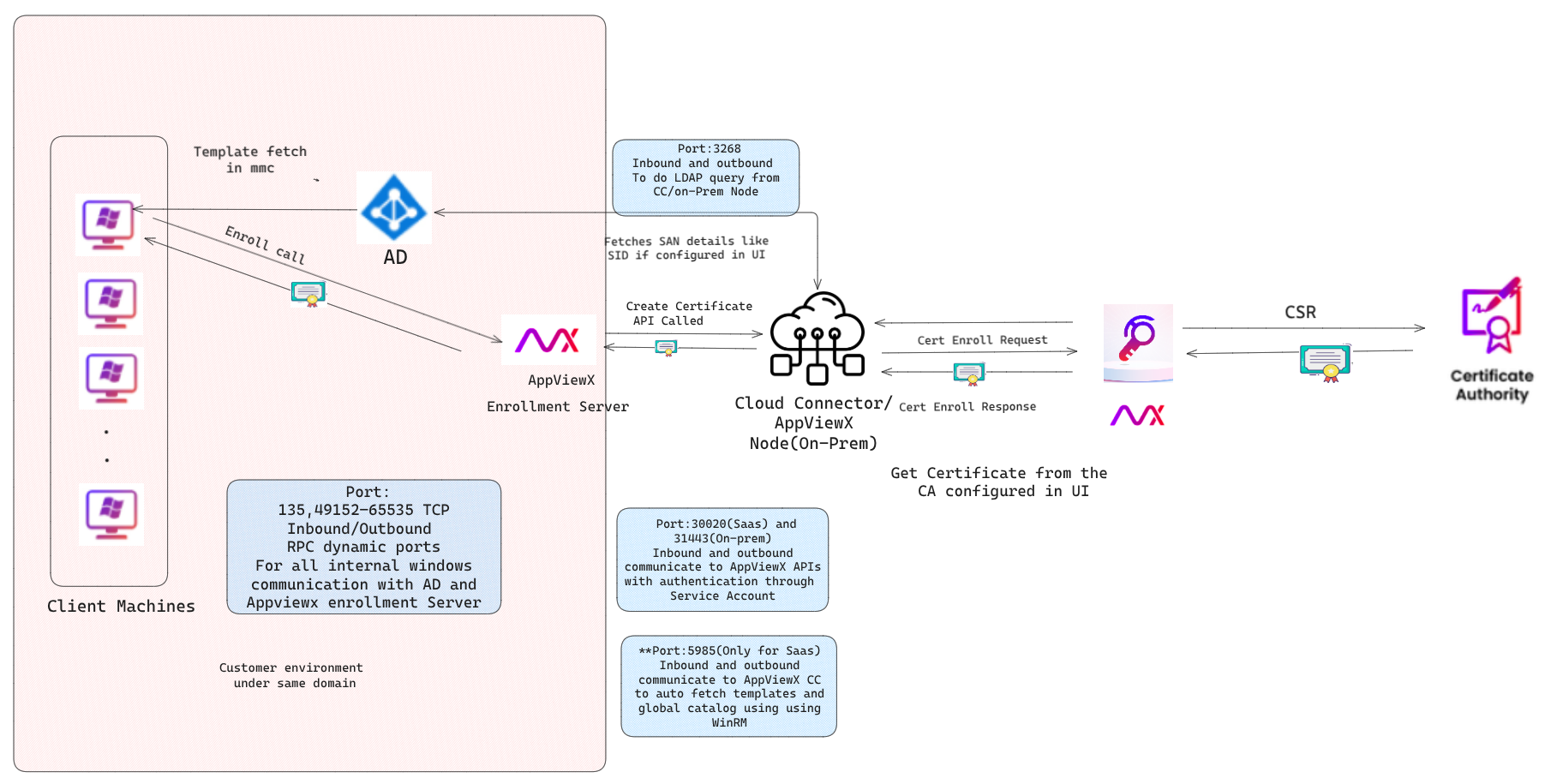
- AppViewX Auto-enrollment ServerThe following diagram illustrates the entire flow of the WAEP certificate enrollment process through AppViewX Enrollment Server starting from the Windows machine requesting a certificate to the PKI+ issuance of the certificate.
Auto-Fetch of Templates and Global Catalog (Applicable only for SaaS)
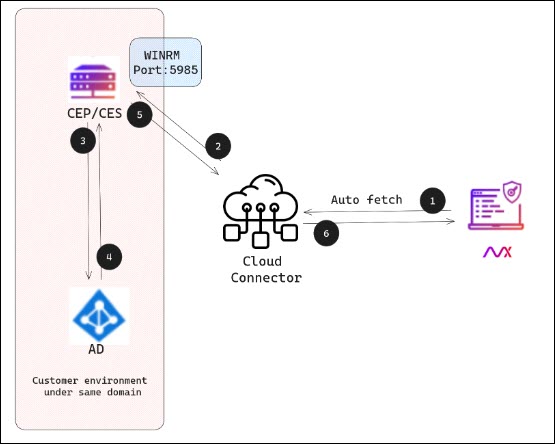
The diagram explains the flow of auto-fetch of templates:
- AppViewX sends an auto-fetch request to the cloud connector (CC).
- The CC uses the WinRM to execute a query on the CEP/AppViewX Enrollment Server machine.
- The CEP/AppViewX Enrollment Server machine retrieves the certificate details from the Active Directory (AD).
- The fetched data is sent back to AppViewX for processing.
