
MS Intune
What is MS Intune?
- There should be an agent (avx_vendor_cert_intune_agent) up and running for MS Intune in AppViewX.
- This Intune plugin can either be in HTTPS or HTTP, but it needs a HTTP gateway running in order to communicate with the client.
- In order to make that HTTP gateway up and running go to /home/appviewx/appviewx/avxgw/avxgw-profile.json. Enable the HTTP profile and restart the gateway.
- It is highly recommended to keep the 'Approval Required' flag in OFF state from Menu > Inventory > Certificate > Policy page.
- A valid agent settings should be available in Menu > Inventory > Certificate > Settings.
Microsoft Intune is a cloud-based service that focuses on mobile device management (MDM) and mobile application management (MAM). Intune is integrated with Microsoft’s Enterprise Mobility + Security (EMS) suite, it manages the application and protects the organization data. Users can configure specific policies to control the applications. It makes sure that the organization data is protected and isolated from the personal data.
What is SCEP?
What is MS Intune Connector?
- In Intune, the administrator creates a SCEP certificate profile, and then targets the profile to users or devices.
- The device checks into Intune.
- Intune creates a unique SCEP challenge. It adds the additional integrity-check information, such as what the expected subject and SAN should be.
- Intune encrypts and signs both the challenge and integrity-check information, and then sends this information to the device with the SCEP request.
- The device generates a certificate signing request (CSR) and a public/private key pair on the device based on the SCEP certificate profile that is pushed from Intune.
- The CSR and encrypted/signed challenge are sent to the third-party SCEP server endpoint.
- The SCEP server sends the CSR and the challenge to Intune. Intune then validates the signature, decrypts the payload, and compares the CSR to the integrity-check information.
- Intune sends back a response to the SCEP server and states whether the challenge validation is successful or not.
- If the challenge is successfully verified, then the SCEP server issues the certificate to the device.
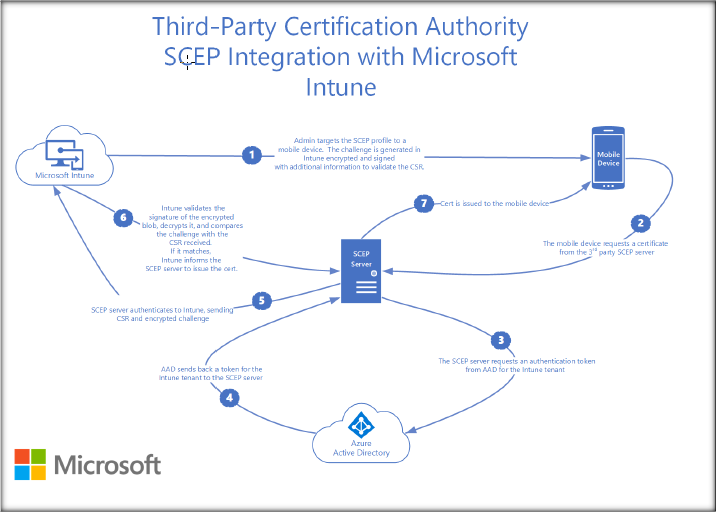
MS Intune AppViewX connector plays the role of the third-party SCEP server that enables certificate enrollment through AppViewX. This SCEP server performs as follows:
- Handles the GetCACaps SCEP request by providing the capabilities that are supported by the CA.
- Handles the GetCACert SCEP request by providing the SCEP server certificate.
- Handles the certificate enrollment SCEP request by performing the below steps:
- Validates the incoming enrollment requests using the Microsoft java library.
- If the validation is successful, get the certificate issued by AppViewX and send it back to the device.
- Send appropriate (success/failure) notifications to Intune using the Microsoft library.
Managing devices using MS Intune
- Check the devices enrolled and get an inventory of devices accessing organization resources.
- Configure the devices to set security and health standards for organization. For example, blocking the jail-broken devices.
- Push certificates to devices so users can easily access your Wi-Fi network or use a VPN to connect to your network.
- Check the reports on users and devices that are compliant, and not compliant.
- Remove the organization data if a device is lost, stolen, or not in use.
Third-party CA or RAs can provision mobile devices with new or renewed certificates by using the simple certificate enrollment protocol (SCEP).
