
Appendix B: List of Scheduled Jobs
Unset
{
"_id": "MISC_SYNC_QUEUE_DELAY_IN_SEC",
"constant": "60"
}
Currently, the discovery/config-sync calls for all devices are triggered in order, without any delay. With the delay configured, when the specified jobs are triggered, the discovery/config sync call for each device will be triggered after the pre-defined interval.
Auto Regenerate Certificates
This job is triggered periodically to check whether the regeneration action to be triggered for the certificates in the inventory that are enabled with Regenerate Automatically in the CA connector, based on whether the certificate is reached the time to trigger the regenerate action.- Check - The cron job is executed for auto regeneration of certificates at a scheduled time.
- Monitor - The scheduled job is monitored and triggered by default daily
at 02:00:00 A.M. Note: Auto generates for the certificate available in the inventory, enabled with Auto regenerate action in the CA connector when the threshold is reached, as mentioned in the CA connector form, the auto regenerate will be triggered.
- Audit - The internal business logic of auto-regenerates certificates is captured via audit logs and notification logs in the logging module.
Automated Credential Rotation
This job automates the rotation of credentials (keys, passwords, or tokens) for integrated systems or devices. It can be scheduled to run at regular intervals based on the credential's TTL, or triggered on demand. The job is disabled by default and can be enabled as needed.
For instructions on enabling/disabling and configuring the job, see Working with the Job Scheduler.
Auto-Renew Certificates
This job is triggered periodically to check whether the renewed action to be triggered for the certificates in the inventory that are enabled with Renew Automatically in the CA connector, based on a certificate is reached the time to trigger the renew action.- Check - To auto-renew certificates if it is scheduled.
- Monitor - The scheduled job is monitored and triggered by default daily every 6 hours.
- Audit - The internal business logic of auto-renew certificates is captured via audit logs and notification logs in the logging module.
CA Attributes Sync
- Sectigo
- Microsoft Enterprise
- DigiCert
- GlobalSign SSL
This is an automated daily metadata synchronization job that is integrated with certificate authorities to ensure all CA-specific attributes, mandatory for CLM activities, are always updated.
- Go to
 (Menu) > CERT+ >
Administration > Job
Scheduler.
(Menu) > CERT+ >
Administration > Job
Scheduler. - Under Task Name, for the CA Attributes Sync
job, from the Actions field, click Trigger
Now.The job is triggered, and all missing certificate metadata is fetched from the corresponding CAs and updated in AppViewX.Note: On-demand triggering of the job does not impact the pre-defined job schedule.
- Go to (Menu) > CERT+ >
Administration > Job
Scheduler.
- Under Task Name, for the CA Attributes Sync
job, from the Actions field, turn on/off the
Enabled/Disabled toggle
key.The key label shows the current job status.Important: Disabling this job or reducing its frequency is not recommended since it may result in CLM activity failures if the required CA-specific attribute values are missing.
The Certificate Logs capture the start and completion details of job, along with a count of certificates successfully updated and those that failed to update.
CA Connector Validity Updater
It allows to check the validity offered by CA and update the same in CA connector and policy.- Check - The cron job is executed to check the validity offered by the External CA and update the same in CA connector and Certificate policy.
- Monitor - The scheduled job is monitored and triggered by default on every Sunday at 06:00:00 A.M.
- Audit - The internal business logic to update the CA connector and Policy is captured via audit logs and notification logs in the logging module.
Certificate CAA Record Check
A Certification Authority Authorization (CAA) record is used to specify which certificate authorities (CAs) are allowed to issue certificates for a domain.CAA records allow domain owners to declare which certificate authorities are allowed to issue a certificate for a domain. They also provide a means of indicating notification rules in case someone requests a certificate from an unauthorized certificate authority. If no CAA record is present, any CA is allowed to issue a certificate for the domain. If a CAA record is present, only the CAs listed in the record(s) are allowed to issue certificates for that hostname.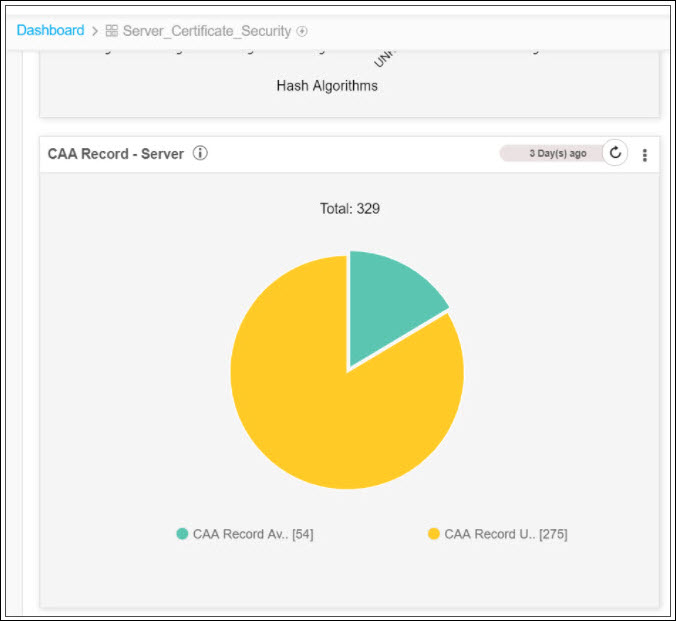
- Check -
- The cron job is executed to check the CAA record for all the certificates in the inventory.
- Once the job is completed, the CAA report is updated in the server_certificate_security dashboard.
- Monitor - The scheduled job is monitored and triggered by default weekly, on Monday.
- Audit - The internal business logic to check the CAA records for all the certificates are captured through audit logs and notification logs in the logging module.
Certificate Compliance Check
A compliance check is the process of review and analysis of the implemented controls to check that the implemented controls and their outputs meet the certificate policy requirements. It checks the compliance for all the certificates in the inventory. If the policy is changed the compliance will be in pending status till this job is executed.- Check
- The cron job is executed to check the compliance status for all certificates in the inventory.
- If the policy is changed the compliance will be in pending status till this job is executed.
- Once the job is completed, the compliance report is updated in the server and client certificates dashboard.
- Monitor - The scheduled job is monitored and triggered by default daily at 05:00 A.M.
- Audit - The internal business logic for compliance checks is captured via audit logs and notification logs.
Certificate Expiry Status Check
This job is triggered periodically to update the expiry status for all the certificates in the inventory.- Check - The cron job is executed to check the expiry status of all the certificates available in the inventory.
- Monitor - The scheduled job is monitored and triggered by default daily 20 minutes every 5 hours.
- Audit - The internal business logic to check the expiry status is captured via audit logs and notification logs in the logging module.
Certificate Polling Request
This job gets triggered only during the performance of CLM actions. Once the CSR gets submitted to the Certificate Authority, until the signed certificate is received from the certificate authority, the polling request job gets triggered to collect the certificate in the response.Certificate Revoke Status Check From CA
For all the certificates managed or monitored in the inventory, this job will be performed periodically at the configured duration. Based on this check, the certificate status in the inventory will be updated with either revoked or others.- Check - The cron job is executed to check only the certificate revoke status from the CA Portal.
- Monitor - The scheduled job is monitored and triggered by default every 15 minutes.
- Audit - The internal business logic to check the certificate revoke status from the CA portal is captured via audit logs and notification logs in the logging module.
Certificate Transparency Check
This is a periodical running job to update the certificate transparency report data available in the dashboard Server certificate security. It allows checking the certificate transparency for all certificates in the inventory (Google CT project). The Certificate Transparency safeguards the certificate issuance process by monitoring and auditing HTTPS certificates.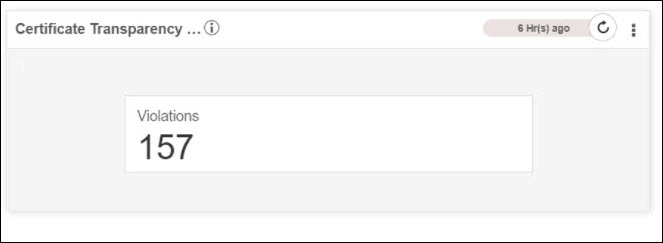
- Check
- The cron job is executed to check the Certificate transparency for all certificates in the inventory.
- The internal business logic uses the Google CT project (Open source) to identify the violation
- Once the job is completed, the CT and CAA reports are updated in the server_certificate_security dashboard.
- Monitor - The scheduled job is monitored and triggered by default weekly, on Sunday.
- Audit - The internal business logic to check the CT for all the certificates is captured via audit logs and notification logs in the logging module.
Certificate Validation Check
This is a periodical running job to validate the chain of trust information for all the certificates in the inventory. Based on this validation, the certificate validation report will be updated with the latest data in the server certificate dashboard.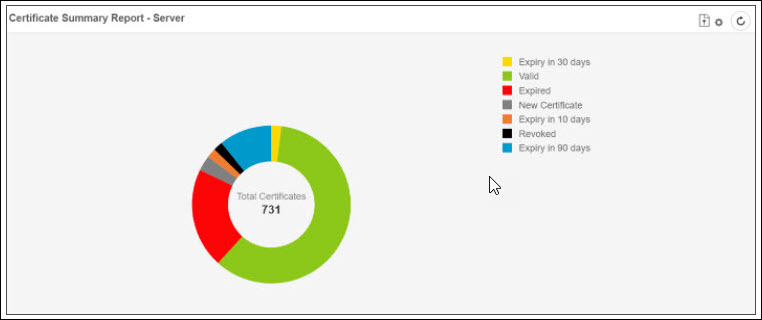
- Check
- The cron job is executed to check the validation for all certificates in the inventory.
- Once the job is completed, the certificate summary report is updated in the Server Certificate and Client Certificate Dashboard.
- Monitor - The scheduled job is monitored and triggered by default weekly, on Monday.
- Audit - The internal business logic to check the CT for all the certificates is captured through audit logs and notification logs in the logging module.
Certificate Vulnerability Check
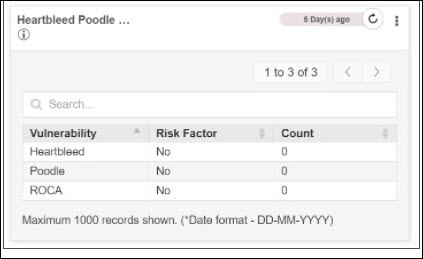
This is a periodical running job to update the vulnerability report data available in the dashboards Server endpoint security. It allows checking the vulnerability in the device such as Toodles, Heart bleed, and Roca.- Check -
- The cron job is executed to check the certificates and their device association
- There is internal business logic to check the Poodle, Heart bleed, and Roca vulnerabilities for the associated device.
- Once the job is completed the “Vulnerability reports” are updated in “Server_Endpoint_Security”, “Client_Endpoint_Security”.
- The ROCA vulnerability is a cryptographic weakness that allows the private key of a key pair to be recovered from the public key in keys generated by devices with the vulnerability.
- The Heartbleed Bug is a serious vulnerability in the popular OpenSSL cryptographic software library. This weakness allows stealing the information protected, under normal conditions, by the SSL/TLS encryption used to secure the Internet.
- The Poodle vulnerability lets an attacker eavesdrop on communication encrypted using SSLv3. The vulnerability is no longer present in the Transport Layer Security protocol (TLS), which is the successor to Secure Socket Layer (SSL).
- Monitor - The scheduled job is monitored and triggered by default weekly, on Saturday.
- Audit - The internal business logic to check the vulnerability of the
device. It is captured via audit logs and notification logs in the logging
module.
CRL Certificate Revocation Check
To download the CRL for all the certificates in the inventory and validate with the downloaded CRL record. You can change the revocation status in the inventory.- Check
- The cron job is executed to download CRL data for all the certificates available in the inventory.
- Once CRL is downloaded compare and change the revocation status in the inventory.
- Monitor - The scheduled job is monitored and triggered by default daily every 6 hours.
- Audit - The internal business logic for certificate revocation check is captured via audit logs and notification logs in the logging module.
CRL Download Monitor Job
To monitor the certificates in inventory and download the CRL for the newly added certificate. Make sure that the below actions are completed for the CRL download monitor job.- Check - The cron job is executed to monitor the certificates in inventory to download the CRL for the newly synchronized certificate.
- Monitor - The scheduled job is monitored and triggered by default every 5 minutes.
- Audit - The internal business logic for the certificate download monitor job is captured via audit logs and notification logs in the logging module.
Delete Expired Certificates
This is a periodical job to check and delete the expired certificates available in the inventory. This job will be triggered only when this action is enabled in Expired Certificates.- Check - The cron job is executed to delete the expired certificates in
the inventory. To enable the delete expiry certificate function, do the
following steps:
- Go to (Menu) >
CERT+ > ADMINISTRATION
> Expired Certificates.
- Enable Yes to delete the expired
certificates.
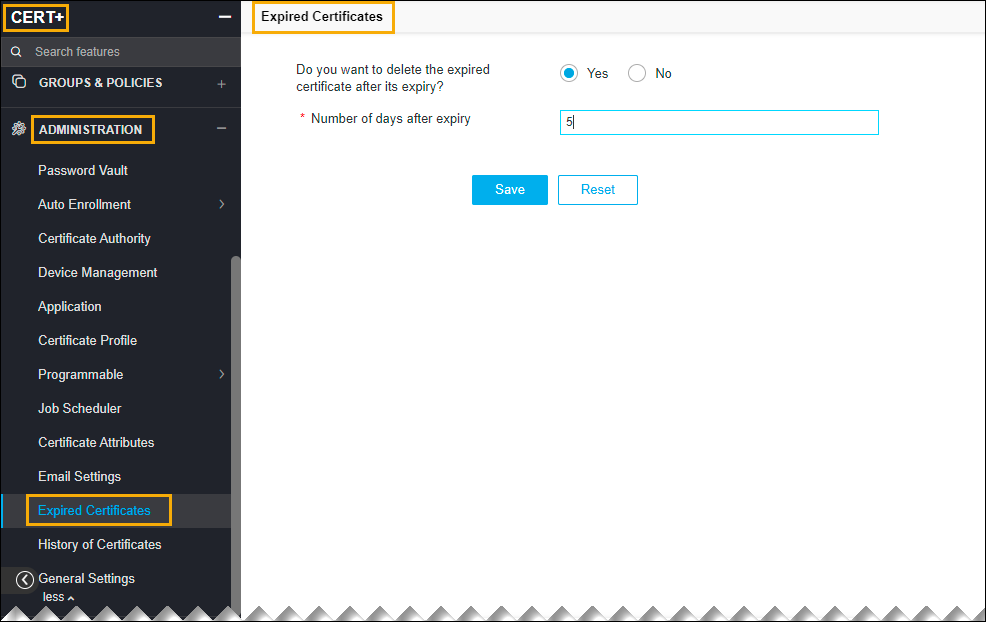 Note: Once enabled, automatically the expiry certificate will be deleted.
- Go to
- Monitor - The scheduled job is monitored and triggered by default daily at 03:00:00 A.M.
- Audit - The internal business logic of auto regenerate certificates are captured via audit logs and notification logs in the logging module.
Device and Certificate synchronization
This periodical running job synchronizes the data such as certificates and objects used for application connectors from devices to AppViewX. The device includes ADC, Servers, Firewall, WAF, Cloud, and MDM.- Check
- The cron job is executed to synchronize the inventory certificates from the managed device inventory.
- The device inventory is categorized as ADC, Server, WAF, Firewall, Cloud, MDM, and so on.
- The job discovers all devices in the managed state.
- Monitor
Periodic CRL Update for AppViewX and Custom CAs
To do the CRL rotation for AppViewX and Custom CA. The CRL is regenerated, any expired certificates are removed from the CRL.- Check - The cron job is executed to rotate CRL for AppViewX and Custom CA so that the CRL is regenerated, any expired certificates are removed from the CRL.
- Monitor - The scheduled job is monitored and triggered by default daily at 05:00:00 A.M.
- Audit - The internal business logic to update the CRL is captured through audit logs and notification logs in the logging module.
