
Insights Risk and Crypto
In Certificate Life Cycle Management, the "Crypto Score" typically refers to a metric or rating that assesses the security and health of cryptographic elements within the certificate ecosystem. This score evaluates factors such as certificate validity, strength of cryptographic algorithms, adherence to security best practices, and overall robustness of encryption protocols. It helps administrators monitor and maintain the security posture of certificates throughout their life cycle, identifying potential vulnerabilities or weaknesses that may need to be addressed.
- Crypto Score
- Non-Standard Certificates
- Certificates Expiry
- CAA Report
- Signature algorithm strength
- Hash algorithm strength
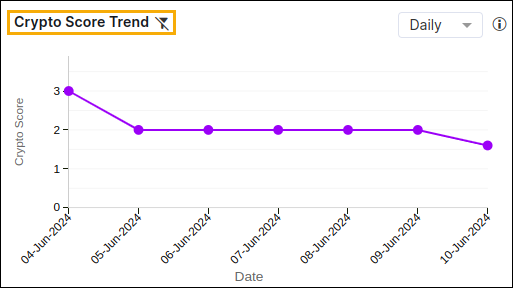
- Crypto Score Trend
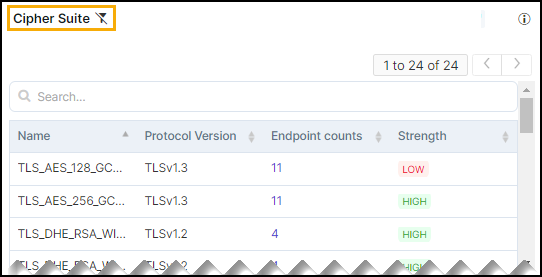
- Cipher Suite
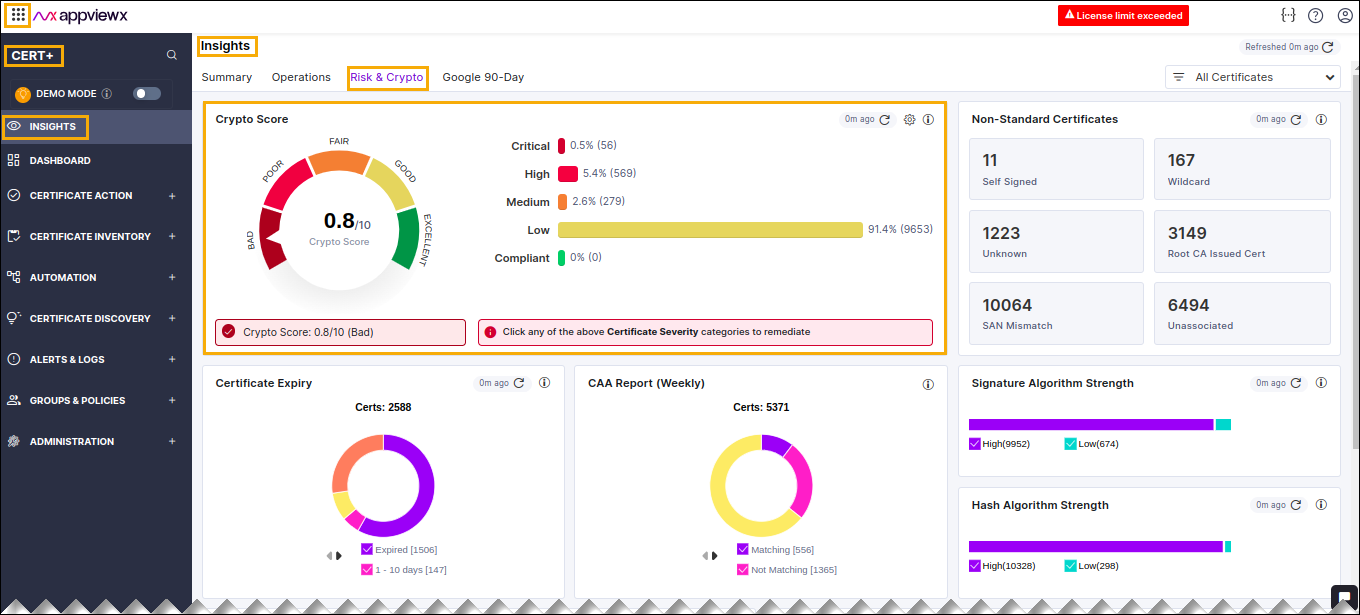
Crypto Score
The Crypto Score widget presents the average certificate score, including total score, critical risk certificates, high-risk certificates, medium-risk certificates, low-risk certificates, and good certificates, all based on the configured certificate compliance.
Crypto Score Calculation
The Crypto Score for a set of certificates is determined by combining each certificate’s base score with the weighted priorities assigned to specific risk categories. Below is a step-by-step breakdown of the calculation process:
-
Determine the Base Score: Each certificate is assigned a base score based on its attributes and usage. This score reflects factors such as:
- Validity period
- Key algorithm
- Key size
- Usage in applications or devices (for example, used for authentication).
- Assign Priority Weights: Each certificate is placed into a priority group based on its characteristics. Different priority groups have different weights:
- Each certificate is categorized into a priority group based on its
characteristics, with each group representing a specific level of risk. The
defined priority groups and their associated risks are as follows:
- Priority 0: Expired/Revoked Certificates, Self-Signed Certificates, Wildcard Certificates
- Priority 1: Weak Key Size, Weak CA Key Size
- Priority 2: Weak Hashing Algorithms
- Priority 3: Unauthorized Certificate Authorities (CAs).
Each priority group is assigned a weight, which is factored into the overall Crypto Score calculation.
Calculate the Individual Score
The individual score for a certificate is calculated using the following formula:
Individual Score = ∑ (Priority Weight × Base Score)
The score is the sum of the products of each applicable priority group's weight and the certificate’s base score, providing a weighted assessment of the certificate’s overall risk.
Classify Certificate Severity
Based on the calculated individual score, the certificate is classified into one of the following severity levels:
- Critical (>=8)
- High (7.9-5)
- Medium (4.9-3)
- Low (2.9-1)
- Good (0.9-0).
After classification, certificates are grouped by severity for further aggregation.
- Example 1: Weak Certificate
Attributes:
-
Wildcard certificate (Priority 0)
-
Weak key size (Priority 1)
-
Weak hashing (Priority 2).
Base Scores:
-
Wildcard: 5
-
Weak key size: 3
-
Weak hashing: 2
Priority Weights:
-
Priority 0: 3
-
Priority 1: 2
-
Priority 2: 1
Calculation:
Individual Score = (3 × 5) + (2 × 3) + (1 × 2)
= 15 + 6 + 2
= 23
-
As the individual score is 23, which is greater than 8, the certificate falls into the Critical severity range and is categorized as Critical.
Example 2: Strong Certificate
Attributes:
-
Valid
-
Strong key size
-
Strong hashing
Priority Weights:
-
Priority 0: 0.1
-
Priority 1: 0
-
Priority 2: 0
Calculation:
Individual Score = (0.1 × 5) + (0 × 3) + (0 × 2)
= 0.5 + 0 + 0
= 0.5
Since the individual score is 0.5, which is less than 0.9, the certificate is categorized as Good.
Aggregate Overall Crypto Score
The overall Crypto Score is calculated by aggregating all certificates based on their severity levels using a logarithmic scale.
-
The final Crypto Score ranges from 1 to 10.
If the calculated score exceeds 10, it is capped at 10.
Crypto Score Configuration
To configure the crypto score, do the following steps.
- Go to
 (Menu) > CERT+ >
INSIGHTS.The Insights window is displayed.
(Menu) > CERT+ >
INSIGHTS.The Insights window is displayed. - Click Risk & Crypto.
The Rick & Crypto score page is displayed.
- In the Crypto Score section, click the (Settings Gear)
icon.
The Crypto Score Configuration page is displayed.
The field description for configuring the crypto score.
Table 1. Field Description *Strongest Algorithm Select the strongest algorithm to ensure that the data security and integrity in various cryptographic operations, such as encryption, digital signatures, and authentication. The available options are: - *RSA
- *DSA
- *EC.
*Strongest Hash Select the strongest hash from the list. *Prioritize score components Select components based on priority level to calculate the crypto score. You can select maximum 3 components in a single priority list. - Priority 0
- Priority 1
- Priority 2
- Priority 3
*: Mandatory fields - Click Save.
Non-Standard Certificates
Displays a report detailing the count of non-standard certificates in the following categories:
- Self-Signed
- Wildcard
- Unknown
- Root CA Issued Certificates
- SAN Mismatch
- Unassociated Certificates.
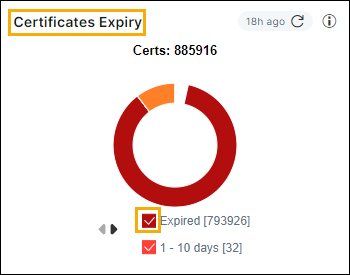
Certificates Expiry
- Select the check-box to view the specific portion, excluding unselected items.
- Click on the pie chart to redirect to the Certificates Expiry :: Expired and ×Certificates Expiry :: 1 - 10 days, and to the remaining pages.
- Click the View in inventory tab that redirects to the
Certificates Expiry page.
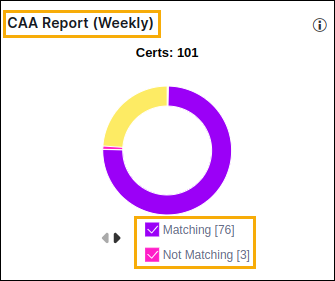
CAA Report
This report shows the count of certificates with and without CAA records in the inventory. You have the following options:
- Select the check-box to view the specific portion, excluding unselected items.
- Click on the pie chart to redirect to the respective inventory report.
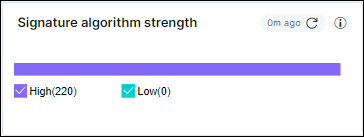
Signature algorithm strength
Displays the count of certificates based on their signature algorithm strength, categorized as either high or low. A higher signature algorithm strength indicates stronger cryptographic algorithms, which are more resistant to attacks and tampering, thus enhancing the overall security posture of the system. You have the following options:
- Select the check-box to view the specific portion, excluding unselected items.
- Click on the chart to redirect to the respective report.
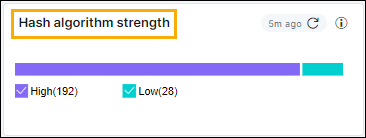
Hash algorithm strength
Displays the count of certificates based on their hash algorithm strength, categorized as either high or low. A higher signature hash strength indicates stronger cryptographic algorithms, which are more resistant to attacks and tampering, thus enhancing the overall security posture of the system. You have the following options:
- Select the check-box to view the specific portion, excluding unselected items.
- Click on the chart to redirect to the respective report.
Crypto Score Trend
Cipher Suite
Threshold Limits
- For fewer than 100,000 certificates, live data will be displayed whenever the user navigates to the Insights page.
- For more than 100,000 certificates, a pre-calculated report will be shown with the last generated time indicated at the widget level.
- Users can click the widget level refresh to view the live data.
