Certificate Expiry Notification with JIRA
To trigger this workflow:
-
From the Certificate Lifecycle
Automation catalog, under the Incident Automation category, hover
your mouse over the Certificate Expiry Notification with JIRA workflow and click
 .
The workflow is executed with the workflow inputs requested at the first stage.
.
The workflow is executed with the workflow inputs requested at the first stage. -
Under the Incident Ticket section, select the requested field information as
described in the table below.
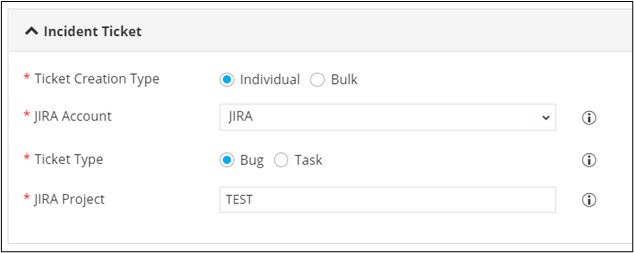
Table 1. Field Description for Incident Ticket section. Field Description *Ticket Creation Type Select Ticket Creation Type as: - Individual: A separate ticket will be created for each certificate.
- Bulk: A single ticket will be created for all the expiring certificates as per the category. The categories can be configured based on the ticket priority as Low, Medium and High.
Note: Individual is the default selection.*JIRA Account Select the JIRA Account as configured in the Integration Hub from the options available in the dropdown. Note: JIRA is the default selection.*Ticket Type Select the type of ticket with reference to the project: - Bug: This will indicate that the ticket is for a bug in the project.
- Task: This will indicate that the ticket is for a task in the project.
Note: Bug is the default selection.*JIRA Project Enter the name of the project for which ticket(s) have to be raised. Note: Test is the default selection.All Asterisk (*) marked fields are mandatory. - Under the Low - Set Incident ticket Priority section, enter a value (number of days) for tickets with low priority. For example, for certificates expiring in 90 days, incident priority can be low.
- Under the Medium - Set Incident ticket Priority section, enter a value (number of days) for tickets with medium priority. For example, for certificates expiring in 60 days, incident priority can be medium.
- Under the High - Set Incident ticket Priority section, enter a value (number of days) for tickets with high priority. For example, for certificates expiring in 30 days, incident priority can be high.
-
Under the Description Fields section, select certificate attributes from the
dropdown that will be displayed in the JIRA issue description.
Note: This is a mandatory field. Multiple certificate attributes can be displayed by selecting the checkbox of the attribute name.
-
Click Submit.
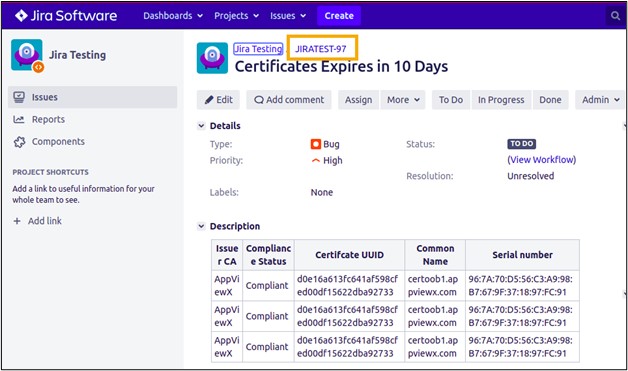
The Ticket Creation Summary stage of workflow execution displays the JIRA ticket ID and the ticket for Certificate expiry notification is created on JIRA.