
Manage Notifications
The Manage Notifications page allows administrators to review all
dispatched notifications and compose new ones. Access it from the Settings navigation
area. 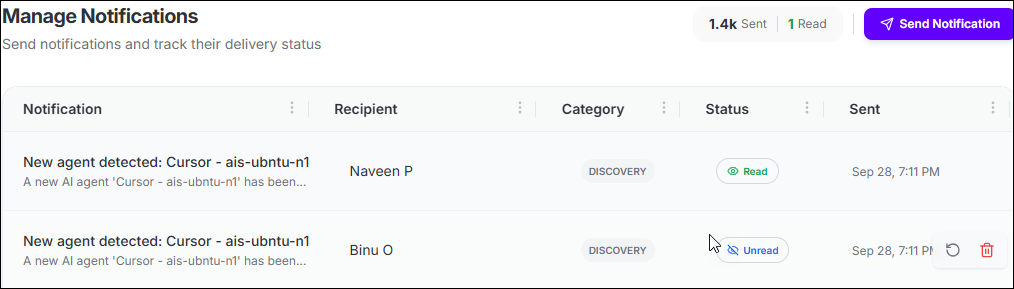
The page header displays two summary counters:
- Sent: Total number of notifications dispatched from this tenant.
- Read: Number of dispatched notifications that have been opened and read by recipients.
Notifications Grid
The grid lists all sent notifications and supports column-level filtering and
pagination.
All columns support filtering via the filter icon in each column header. The
grid supports pagination with configurable page sizes of 10, 25, 50, or 100
notifications per page.
| Column | Description |
|---|---|
| Notification | The notification title and message body displayed as a two-line cell. The title summarizes the triggering event; the message body provides additional context. |
| Recipient | The identifier of the user or entity that received the
notification, shown as a truncated ID prefix (for example,
9cc975a1...). |
| Category | The category that classifies the notification event type.
Common values include discovery (new agent or
resource detected) and system
(platform-initiated messages). The category is set when the
notification is sent. |
| Status | Whether the recipient has read the notification:
|
| Sent | The date and time when the notification was dispatched (for
example, Jun 12, 12:05 PM). |
| Actions | Per-row action buttons:
|
