
Sessions
View and manage user authentication sessions across Agent Identity Security. The
Sessions page provides visibility into signed-in users and allows
administrators to terminate sessions when required. Sessions are displayed across all users
and devices, with options to search, filter, refresh, and export session data.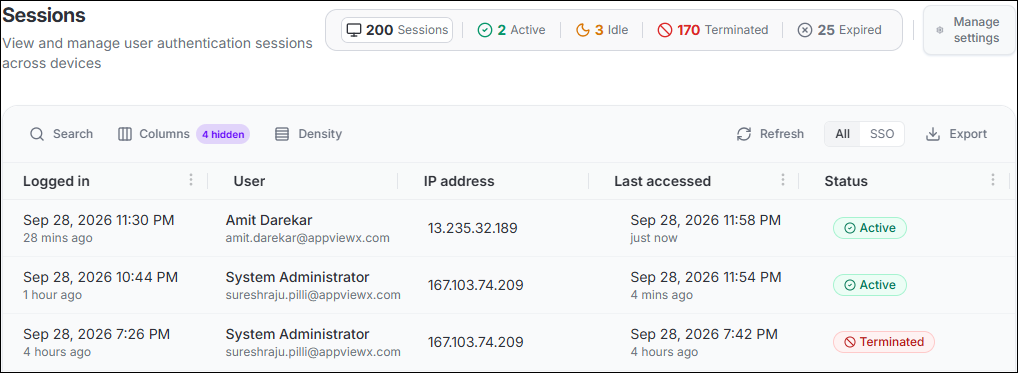
Session Statuses
The summary bar at the top of the page shows the total session count broken down by status:
- Active: The session is valid and currently in use.
- Idle: The session is valid but has been inactive beyond the configured idle threshold.
- Terminated: The session has been ended by an administrator or by an automated session control.
- Expired: The configured session lifetime (TTL) has elapsed.
Session Inventory
The session list displays the following information for each session:
- Logged in: The date and time the session was created, with a relative time indicator.
- User: The display name and email address of the authenticated user.
- IP address: The IP address from which the session was established.
- Last accessed: The date and time of the most recent activity in the session, with a relative time indicator.
- Status: The current state of the session (Active, Idle, Terminated, or Expired).
Terminate a Session
Administrators can terminate an Active or Idle session when access from a particular session needs to be revoked.
Terminating a session invalidates that session and requires the user to authenticate again.
Manage Session Settings
Session Settings lets you configure session lifetime, concurrency, idle detection, and record retention. To open it, select Manage settings in the summary bar on the Sessions page.
| Setting | Default | Description |
|---|---|---|
| Session TTL (hours) | 24 hours | Defines the duration for which a session and its refresh token remain valid after the user signs in. When the TTL expires, the session is marked Expired and the user must sign in again. |
| Max sessions per user (sessions) | 5 sessions | Defines the maximum number of concurrent active sessions allowed per user. When a new sign-in exceeds this limit, the oldest valid session is automatically terminated to enforce the cap. |
| Idle threshold (minutes) | 15 minutes | Defines how long a session can remain inactive with no mouse, keyboard, or touch activity detected in the browser before the user is automatically signed out. A 1-minute warning is displayed to the user before sign-out occurs. |
| Session retention period (days) | 90 days | Defines how long terminated and expired session records are retained in the system. After this period, session records are permanently deleted from the database, starting from the date of termination or expiry. |
- Review and update the settings as required.
- Select Save Settings to apply the configuration. The new settings take effect for all subsequent sign-ins. The idle threshold and retention period apply immediately to existing sessions.Note: To discard changes, select Cancel.
