
Create User
The Users & Roles page is your central place to manage who can sign in to Agent Identity Security and what they can do. Every account you create must have exactly one role assigned. The role determines the user's access scope across the platform.
The Users & Roles page shows the count of Active and Total accounts. If the numbers differ, you have disabled accounts still in the system remove accounts that are no longer needed.
Before
you begin:
- Your role must include user management permissions.
- Have the user's full name, work email address, and the role you want to assign ready before you start
To create a user, fill out the Add user form by following these
steps:
- Navigate to .
- The Create User popup is displayed.
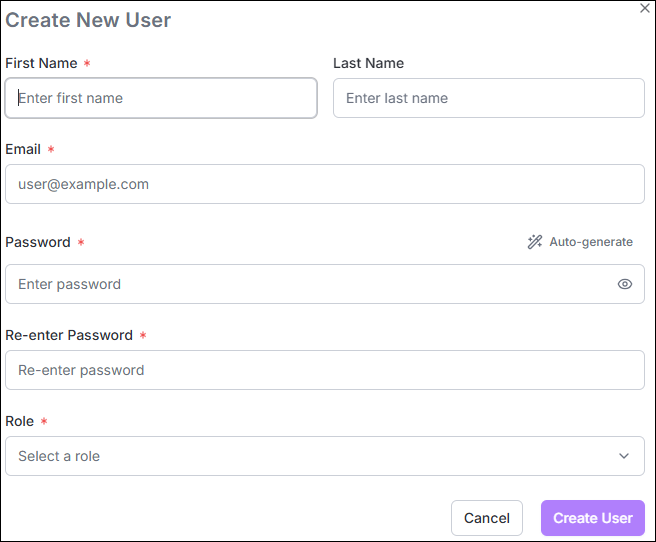 Enter the following fields:
Field Description *First Name The user's given name. Required. Last Name The user's family name. Required. *Email The login identifier for the new user. Must be a valid email address in the format [email protected]. Cannot be changed after the account is created.*Password The initial password for the account. Must satisfy all complexity rules displayed below the field (minimum 12 characters; uppercase, lowercase, digit, and special character required). A real-time checklist updates as you type. Use the eye icon to toggle password visibility, or click Auto Generate to have Agent Identity Security create a compliant password automatically. If a password is auto-generated, use the Copy icon to copy it to the clipboard before closing the dialog. *Re-enter Password Re-enter the chosen password to confirm it. The Create User button remains disabled until both password fields match. *Role Select the role to assign to the new user. Click the information icon next to the field to view a summary of the selected role's permissions. See for a full description of each role. - System Admin: Full access to all resources, settings, and user management.
- System Admin Read Only: Read-only access across all resources, including the dashboard, agents, activity logs, policies, and settings.
- Security Engineer: Manage own agents and perform limited agent operations; view relevant activity and posture data.
- GRC Analyst: View agents, dashboard, activity logs, and API keys; manage users and roles.
*: Mandatory fields - Click Create User.
The new user is displayed in the grid.
Note: The user receives an email containing the URL, username (email address), and temporary password. When signing in for the first time, the user must change the password.
