
Bulk Update from Policy Engine for Associated Devices
You can now do a bulk update for associated devices from Policy Engine and these updates are automatically applied to all devices associated with the updated policy.
- Go to
 (Menu) icon > Policy Engine > POLICY MANAGEMENT >
Policies.
(Menu) icon > Policy Engine > POLICY MANAGEMENT >
Policies. - Disable the Status toggle button for the policy you want to update and
click the
 (Edit) icon.
This retrieves all device IDs associated with the specified policy and onboarding group, spanning all device groups and vendors.
- Make the updates and click Finish.
A confirmation window with a message, <Policy Name> is associated with x group(s), covering x vendor(s) and a total of x device(s). Do you want to sumbit the policy?, appears.
- Click Save and Enable Policy to confirm.
A message, Policy component is enabled successfully, appears and you are redirected to the Policies page where the Status of the updated policy is enabled.
Click Cancel and you are redirected to the Policies page where the Status of the updated policy is disabled.
Note:- For each identified device and for each field in the update, a check
is made if the old value received from Policy Engine matches the
current value on the device.
- If the value matches, → Proceed to apply the new value from Policy Engine.
- If the value does not match, → Skip the update for that field on that device. Check the audit log for details.
- If only the Default value is changed from Policy Engine, then the default value will be consumed for further on-boarding and the existing associated devices are not updated.
- If a migrated device was initially mapped to the default group but the group was later changed locally, the device remains eligible for future policy updates from Policy Engine.
- Updates made from Device Inventory are given preference over updates made from Policy Engine.
- Audit logs are available for bulk updates made from Policy Engine.
You can view the updated device from
(Menu) icon > CERT+ > ADMINISTRATION > Device Management > Server
as shown: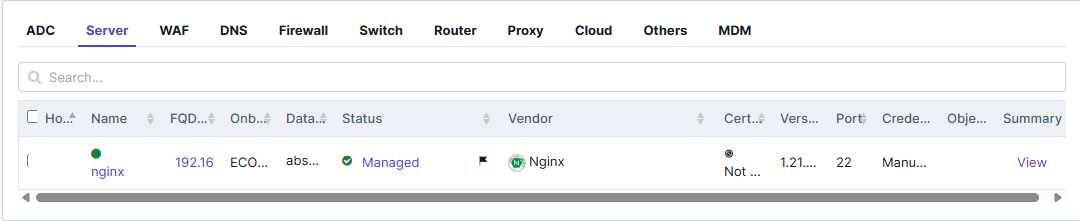 Note: When a device update is triggered from Policy Engine, a notification flag will appear next to the updated device with a message, The device has been updated by the Policy Engine. Perform a config fetch to apply the updated settings. This flag indicates that a configuration fetch is required to synchronize and apply the latest policy settings.
This notification will automatically disappear once the configuration fetch is completed successfully—either through a manual config fetch, an automatic update, or during the nightly config fetch process.
- For each identified device and for each field in the update, a check
is made if the old value received from Policy Engine matches the
current value on the device.
