
HashiCorp
Prerequisites for Integrating HashiCorp Vault with AppViewX
For links to the corresponding HashiCorp Vault documentation, see to the References section.
Configuring HashiCorp Integration Settings
-
Go to Platform > VAULT & SECURITY > PAM.
The PAM page is displayed.
- Click the + (Add credential) button.
-
On the Add credential page, from the top-right
corner of the page, click HashiCorp API
Settings.
The HashiCorp API Settings window is displayed.
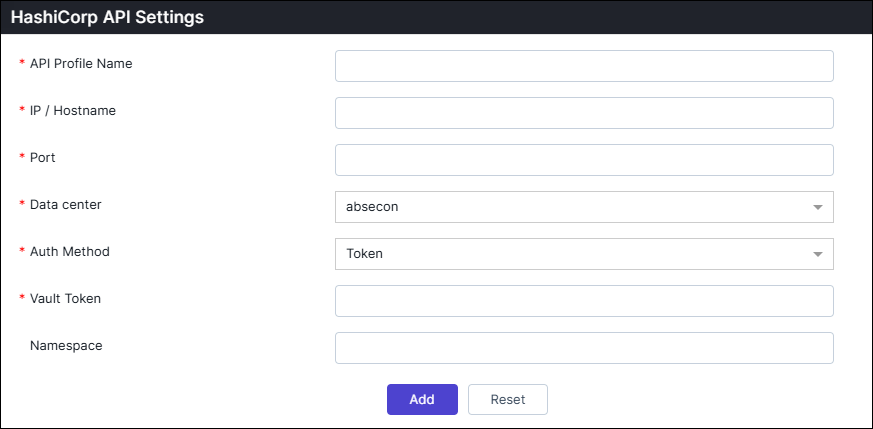
Table 1. Field descriptions for HashiCorp API Settings Field Description *API Profile Name Enter a unique name to identify the API profile *IP/Hostname Enter the hostname or IP address of the API server. *Port Enter the port number used to connect to the API. Data center Choose the data center that will be used to perform the communication. *Auth Method Choose the authentication method to access Vault (Token or AppRole). Vault Token This field is displayed if Auth Method = Token. Enter the Vault token used for direct authentication.
Role ID This field is displayed if Auth Method = AppRole. Enter the Role ID associated with your AppRole authentication.
Secret ID This field is displayed if Auth Method = AppRole. Enter the Secret ID that pairs with the Role ID for AppRole authentication.
Namespace Enter the vault namespace where the authentication and secrets are defined. *: Mandatory fields -
Once the details are entered, click Add.
Note: Multiple vaults can be added by configuring multiple profiles.
-
Close the HashiCorp Settings pop-up window.
The HashiCorp Credential Details page is displayed.
Adding HashiCorp Credential Details
-
On the Credential Details page for HashiCorp enter the
required field information.
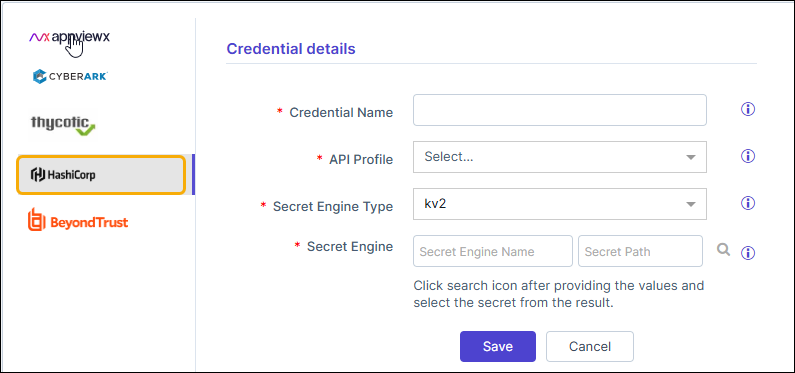
Table 2. Field descriptions for Credential details Field Description *Credential name Enter a unique name to identify the credential in AppViewX. *API Profile Select the appropriate Hashicorp API profile. Multiple profiles can be configured in the API settings for managing credentials across environments, regions, or specific use cases. *Secret Engine Type Select the secret engine type (Kv2/Open LDAP) where the secrets are stored. *Secret Engine Secret Engine Name: Enter the secret engine name and path to search for the secrets. Choose the desired secret from the results. Secret Path: The specific location (or path) within the Hashicorp where secrets are stored.
*: Mandatory fields - Click Save.
