AVX::FILEDOWNLOAD 
Syntax:
output = {"AVX::FileDownload" :{"linkData": <dictionary value> ,"fileName":‘<excel file name>', "columnHeaders":<list of column headers to be added>}}To use this command:
- Design a new workflow.
-
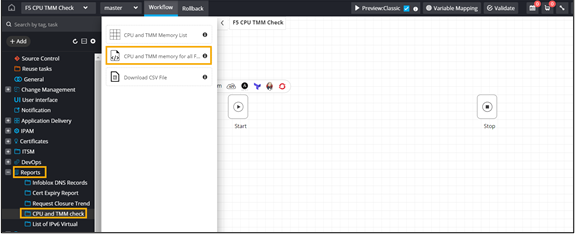
In the deisgn space, from the left menu, under Reports >
CPU and TMM folder, drag and drop the CPU and TMM Memory task.
This script will scan all the F5 devices managed for the CPU and TMM memory.
-
From the same folder, drag and drop the CPU and TMM memory List task.
This task will display the Device name, CPU (%), and TMM (%) in a grid view.
Note: Assign RBAC to users who can access this task.
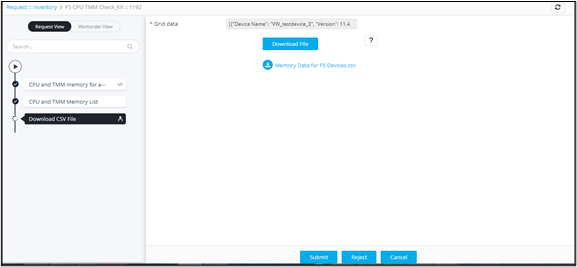
- From the same folder, drag and drop the Download CSV file task. This task contains the device and CPU/TMM details from the Grid task in a .csv file.
-
In the Download CSV file task window, define the file download logic to
generate a <.csv> file on run time.
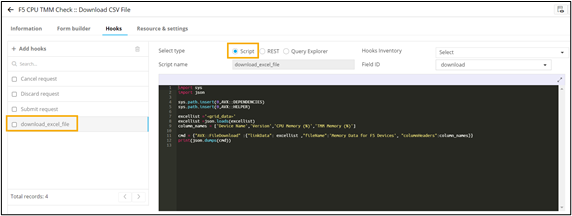
import sys
import json

sys.path.insert(0,AVX::DEPENDENCIES)
sys.path.insert(0,AVX::HELPER)

excellist ='<grid_data>'
excellist =json.loads(excellist)
column_names = ['Device Name','Version','CPU Memory (%)','TMM Memory (%)']

cmd = {"AVX::FileDownload" :{"linkData": excellist ,"fileName":'Memory Data for F5 Devices', "columnHeaders":column_names}}
print(json.dumps(cmd))