
Users
The Users page shows the people in your organization who access AI agents giving you visibility into who is using which agents, on which platforms, and how broadly.
What is a Users page
Knowing who is using which agents is essential for accountability. If an agent causes a problem, your team needs to know who was using it. Agent Identity Security discovers users automatically from your connected platforms during each integration sync. Service accounts automated system users are excluded automatically so that the list shows only real people.
Users Summary
Three numbers in the page header summarize user activity across your agent
environment:
| Number | What it means |
|---|---|
| Users | The total number of real people (excluding service accounts) discovered accessing agents across all connected platforms. |
| Agents | The total number of distinct agent connections across all users. Select this number to go to the Agents page. |
| Avg/user | The average number of agents each user is connected to. A high average may indicate that some users have very broad access. |
Users inventory
The list shows every discovered user with their agent connections and platform
access: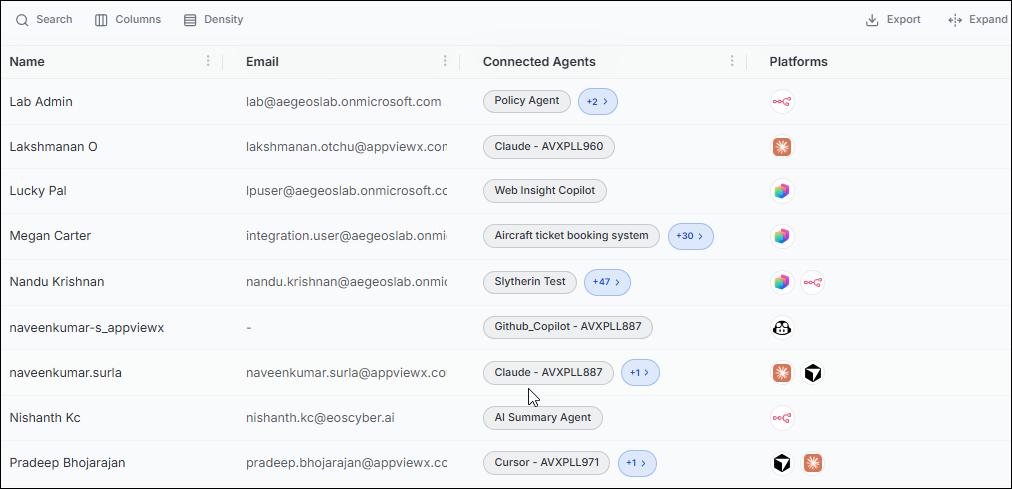
| Column | What it shows |
|---|---|
| Name | The user's display name. |
| The user's email address. | |
| Connected Agents | The first agent connected to this user. Select +N to expand and see all agents. |
| Platforms | Icons for the AI platforms the user accesses agents through. Hover over an icon to see the platform name. |
What to look for
- Users with a very high number of connected agents may have more access than their role requires. Review these users and consider reducing their agent access.
- If you see agents listed with no user associated, those are unowned agents a governance gap. Assign an owner using the agent's detail page.
- Users accessing agents on multiple platforms could indicate that the same person has shadow AI deployments across different tools.
Note: The Users page does not let you add, edit, or remove users. User
management for Agent Identity Security platform accounts is handled in
Settings > People and Access > Users and Roles. The
users shown here are discovered from your AI platforms and represent agent users,
not Agent Identity Security platform administrators.
