
Credentials
Provides a centralized inventory of credentials identified across discovered agents. It shows each credential, its current status, the agents linked to it, and the associated platform or vendor. This helps security teams understand which credentials are being used by AI agents and maintain visibility into agent-to-credential relationships across the environment.
Credential Summary
Two numbers in the page header give you a snapshot of credential health:
| Number | What it means |
|---|---|
| Total | The total number of credential records discovered across all your connected platforms. |
| Active | The number of credentials with an Active status. The remainder are inactive either expired or disabled. |
Credentials Inventory
The full list shows every credential discovered across your connected
platforms: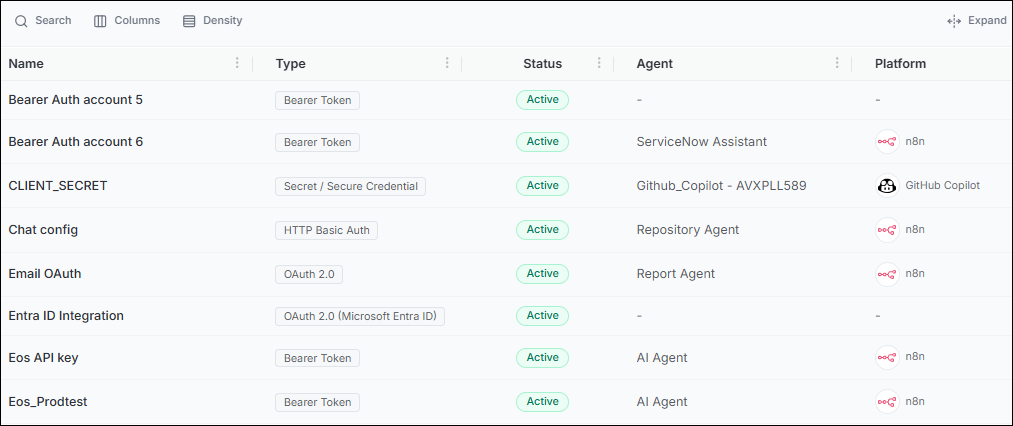
| Column | What it shows |
|---|---|
| Name | A descriptive label for the credential, usually reflecting the service it authenticates for example, API Key – Competitive Intelligence Agent. |
| Type | The credential format: API Key, OAuth, or a platform-specific authentication method. |
| Status | Active means the credential is valid and ready to use. Inactive means it has expired or been disabled. |
| Agent | The agent associated with this credential. A dash means no agent is currently linked this credential is orphaned. |
| MCP Server | The MCP server that uses this credential for authentication. |
| Platform | The AI platform through which the credential was provisioned. |
Note:
- Credentials showing dashes (-) in the Agent, MCP Server, and Platform columns are orphaned. Regularly audit unassociated credentials and link or revoke them to maintain least-privilege access for AI agents.
- Export the credentials list periodically and cross-reference it with your organization's official secret management system such as HashiCorp Vault or AWS Secrets Manager to find credentials that are not being tracked in your approved inventory.
What's Next?
- Managed Agents: View and manage the complete inventory of AI agents registered.
- Unmanaged Agents: View and unmanage the complete inventory of AI agents registered.
- Event Logs: Audit all credential access events.
