
Models
The Models page shows every AI model in use across your agent fleet so you can see which ones are approved, which ones are not, and take action before unapproved models create compliance risk.
What are models
Every AI agent is powered by an AI model the underlying language model that processes text, makes decisions, and generates responses. The Models page shows every AI model that Agent Identity Security has detected in use across your agent fleet.
Not all models are equal from a security and compliance perspective. Some may not have the certifications your organization requires. Others might be expensive, unfamiliar, or simply not vetted yet. This page lets you see exactly which models are in use and decide which ones your organization officially approves.
Model Summary

| Number | What it means |
|---|---|
| Models | The total number of distinct AI models detected across all your connected platforms. |
| Unsanctioned | Models that have not yet been approved by your organization. Using an unsanctioned Model raises a posture issue for the agent. Once the Model is sanctioned, the posture issue is automatically resolved. |
Models inventory
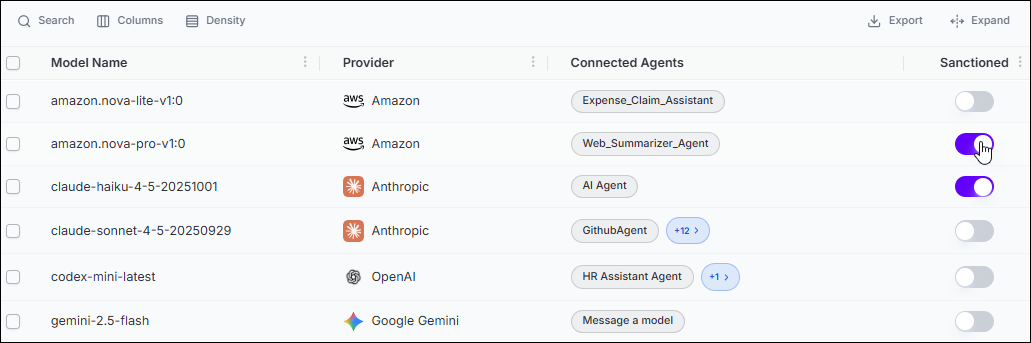
| Column | What it shows |
|---|---|
| Model Name | The technical identifier of the model for example, claude-sonnet-4-5-20250929 or gpt-4o. Hover long names to see the full value. |
| Provider | The company that created the model such as Anthropic, OpenAI, Amazon, Google, and others shown with the provider's logo. |
| Connected Agents | The agent or agents using this model. Select the +N badge to see the full list. |
| Sanctioned | A toggle switch. Turn it on to mark the model as organization-approved. Turn it off to mark it as unsanctioned. Using an unsanctioned Model raises a posture issue for the agent. Once the Model is sanctioned, the posture issue is automatically resolved. |
How to approve a model
- Find the model in the list.
- Review the model name and provider to confirm it is the model you want to approve.
- Select the Sanctioned toggle to turn it on.
- The change saves immediately. The Unsanctioned count in the header decreases by one.
- Agent Identity Security automatically resolves any posture issues raised against agents for using this model.
Why you should review this page regularly
New AI models are released constantly. Developers may configure agents to use a new model without going through a formal approval process. Check this page periodically especially after major AI provider releases to make sure no unapproved models have entered your environment.
