
Risk Scoring Configuration
Configure how Agent Identity Security evaluates and scores agent risk to reflect your organization's security priorities and risk tolerance.
Risk Configuration lets organizations tailor how Agent Identity Security evaluates agent risk. By adjusting the weight and participation of risk categories and signals, each enterprise can define what matters most in its environment instead of relying on a fixed, one-size-fits-all risk model.
This page controls how every agent is scored for risk. The same rules apply to all agents. Each agent's score still depends on that agent's credentials, posture, access, and owner.
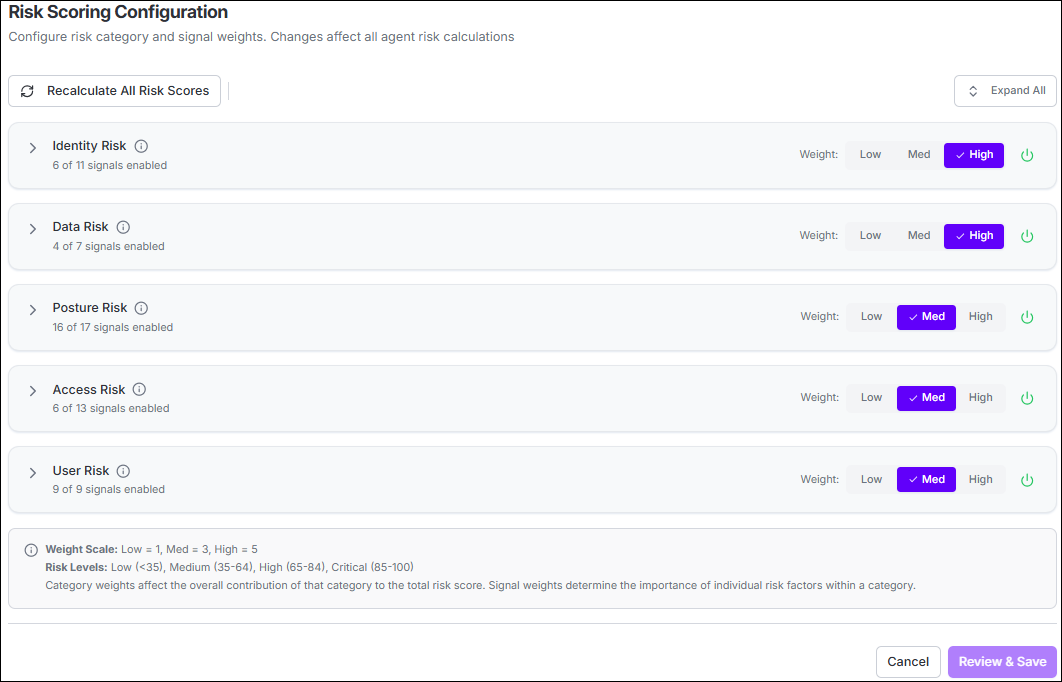
What You Can Do on This Page
| Control | What it does |
|---|---|
| Expand a category | Show the signals inside that category. |
| Weight: Low / Med / High | Control how strongly a category or signal counts toward the overall score. |
| On/off toggle | Include or exclude that category or signal from scoring. |
| Expand All | Open every category at once. |
| Recalculate All Risk Scores | Refresh scores for all agents using the current rules. |
| Review & Save | Apply your changes and trigger a recalculation for all agents. |
- Category weight: How much that type of risk can move the overall 0–100 score.
- Signal weight: How severe one finding is inside its category. A High signal can fill its category on its own.
- Weight scale: Low = 1, Med = 3, High = 5.
- Risk levels: Low (below 35), Medium (35–64), High (65–84), Critical (85–100).
How an agent’s score is calculated
- Every on signal in every on category is checked for that agent.
- Only findings that actually apply are kept.
- Those findings become a category score (0–5). Extra findings cannot push a category above 5.
- Category scores are combined using each category’s weight into one 0–100 score.
Default Categories and Signals
All five categories are enabled by default. The tables below list only the signals that are on by default. Other signals may appear on the page in an off state and do not affect scores until you turn them on.
Identity Risk Default weight: High
Risk from how the agent authenticates and how far its credentials reach.
| Signal | Default weight | When it applies |
|---|---|---|
| API Key Credentials | Med | The agent authenticates with API keys or similar long-lived tokens. |
| Long-Lived Tokens | Med | A credential does not expire, or lasts longer than 365 days. |
| Multi-Platform Credentials | Med | The agent has credentials on three or more different platform types, which increases blast radius. |
| Weak Credential Type | Med | An MCP connection uses a weak method such as API key, basic auth, a personal access token, or a password. |
Data Risk Default weight: High
Risk from access to sensitive data (for example PII, health data, or secrets). No data signals are on by default. Turn a signal on when you want that check to count toward agent scores.
Posture Risk Default weight: Med
Risk from unresolved posture issues and from the models or MCP servers the agent uses.
| Signal | Default weight | When it applies |
|---|---|---|
| Critical Postures | High | The agent has unresolved critical posture issues. |
| High Severity Postures | High | The agent has unresolved high-severity posture issues. |
| Medium Severity Postures | Med | The agent has two or more unresolved medium-severity posture issues. |
| Low Severity Postures | Low | The agent has five or more unresolved low-severity posture issues. |
| Unsanctioned LLM | High | The agent uses a model that is not approved for your organization. |
| Model Risk | Med | The agent uses a model with known risk, vulnerability, or compliance concerns. |
| MCP Server Risk | Med | The agent connects to MCP servers with excessive tools, excessive permissions, or known issues. |
Access Risk Default weight: Med
Risk from what the agent can reach and how much it runs.
| Signal | Default weight | When it applies |
|---|---|---|
| Tool Sprawl | Med | The agent has access to more than 20 tools across MCP servers. |
| High Volume Executions | Med | The agent has more than 500 access events in the last 7 days. |
User Risk Default weight: Med
Risk from who owns or operates the agent.
| Signal | Default weight | When it applies |
|---|---|---|
| Named High-Risk Individual | High | The owner is on your high-risk individuals list. |
| High-Risk Group Membership | Med | The owner is in a privileged or high-risk group (for example domain admins). |
| High-Risk Department | Med | The owner is in a high-risk department such as engineering, finance, HR, or executive. |
| Guest/External User | Med | The owner is a guest, contractor, or other external user. |
| Privileged Role | Med | The owner has an elevated role such as admin or security admin. |
| High-Risk Location | Med | The owner is in a location you have marked as high risk. |
| No Owner Assigned | Med | The agent has no owner, which is a governance gap. |
After You Save
Review & Save updates the scoring rules for the whole environment. Scores are then recalculated for all agents.
- Use Recalculate All Risk Scores if scores still look out of date after saving.
- Until recalculation finishes, some agents may show the previous score.
