
AI Assistant
The AI Assistant settings configure Infinity AI, the in-product AI assistant for Agent Identity Security. Use these settings to control whether Infinity AI is available to users, configure the AI models it can use, and determine which Agent Identity Security capabilities it can access.
Enable or Disable Infinity AI
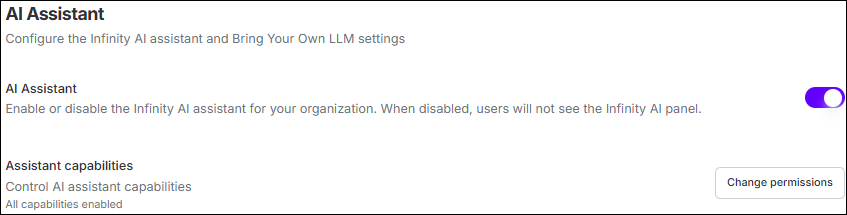
Use the AI Assistant setting to enable or disable Infinity AI for the organization.
| Setting | Description |
|---|---|
| On | Makes Infinity AI available to users, subject to their assigned roles and permissions. |
| Off | Hides Infinity AI for all users. Existing model and provider configurations are retained and restored when Infinity AI is enabled again. |
Configure the AI Model
Infinity AI can use organization-provided LLM credentials through Bring Your Own LLM (BYOLLM) when this option is available.
When BYOLLM is enabled, configure a supported model provider and select the models that Infinity AI can use.
Model Provider Settings
| Setting | Description |
|---|---|
| API Key | API key used to authenticate with the selected model provider. The configured key is stored securely and displayed as a masked value after it is saved. |
| Models | Select the models that can be used by Infinity AI. At least one model must be enabled for the configured provider. |
| Default Model | Defines the model used by default. Other enabled models can be selected where model selection is available. |
| Remove | Removes the configured provider, including its API key and model configuration. |
| Save Settings | Saves the API key, enabled models, and default model configuration. |
Configure Assistant Capabilities
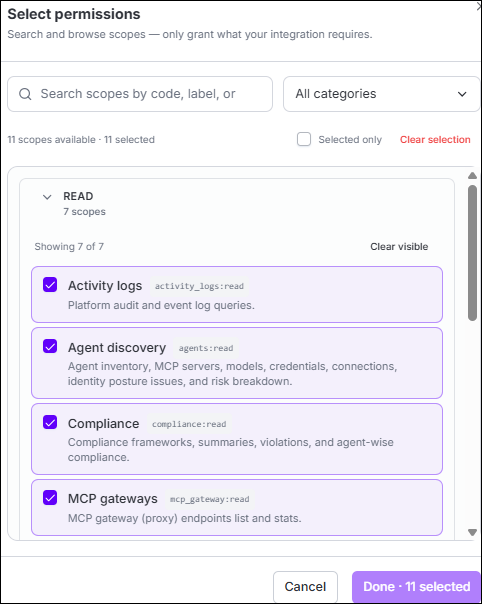
Assistant capabilities controls which Agent Identity Security capabilities Infinity AI can use across the organization.
| Capability | Description |
|---|---|
| Read | Allows Infinity AI to retrieve and work with supported information such as agents, activity, policies, workflows, and other product data. |
| Action | Allows Infinity AI to perform supported actions, such as activating or deactivating an agent, sanctioning a resource, or triggering a job. |
How Permissions Are Applied
Infinity AI respects both the organization-level Assistant capabilities configuration and the permissions assigned to the signed-in user.
A capability is available through Infinity AI only when it is enabled for Infinity AI and permitted by the user's assigned role.
For example, enabling an action capability for Infinity AI does not allow a user to perform that action if their assigned role does not provide the required permission.
Product navigation, product help, and the user's own connected tools are not controlled through the Assistant capabilities configuration.
