
Job System
The Job System manages background tasks in Agent Identity Security, including integration synchronization and agent risk calculation. It provides centralized controls for scheduling these tasks and visibility into their execution through Job History.
Job System Settings
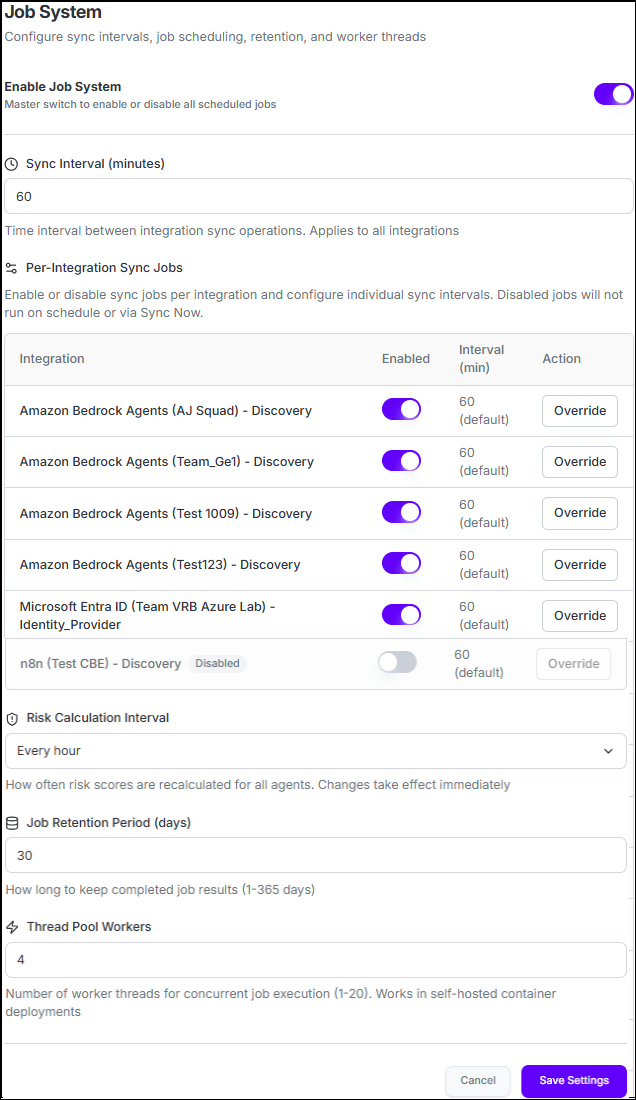
| Setting | Description |
|---|---|
| Enable Job System | Enables or disables scheduled background jobs. When disabled, scheduled jobs do not run. Existing execution records remain available in Job History. |
| Sync Interval | Defines the default interval, in minutes, for integration synchronization. The interval applies to integrations that do not have an individual sync interval configured. |
| Per-Integration Sync Jobs | Controls synchronization independently for each integration. You can enable or disable synchronization, use the default interval, or configure an integration-specific interval using Override. Select Reset to Default to return to the global sync interval. |
| Risk Calculation Interval | Defines how frequently Agent Identity Security recalculates risk scores for agents. Available intervals are every hour, every 2, 6, or 12 hours, or daily at 2 AM. |
| Job Retention Period | Defines how long completed job execution records remain available in Job History. The retention period can be configured from 1 to 365 days. |
| Thread Pool Workers | Defines the number of jobs that can execute concurrently. This setting applies to supported self-hosted container deployments and can be configured from 1 to 20 workers. |
The global sync interval provides a common synchronization schedule while allowing individual integrations to use their own intervals when required.
Select Save Settings to save the Job System configuration. Risk calculation intervals and per-integration overrides are applied through their respective controls.
Job History
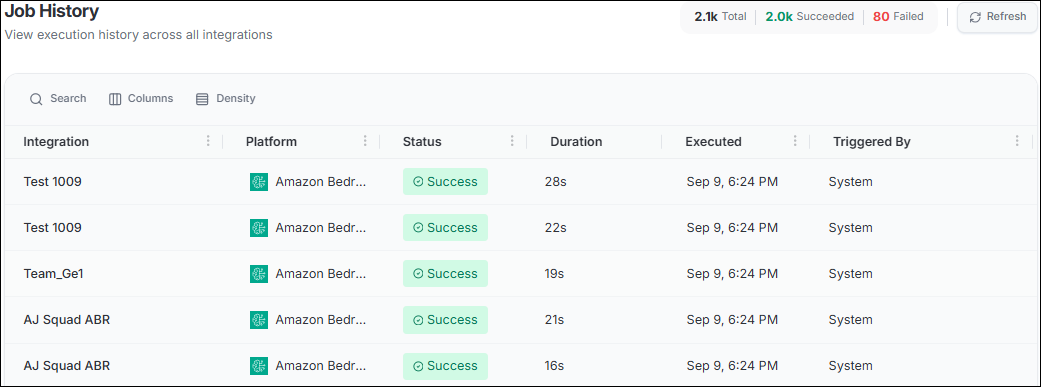
The Total, Succeeded, and Failed counts provide a quick view of execution status and can be used to filter the job list.
| Information | Description |
|---|---|
| Integration | Integration for which the job was executed. |
| Platform | Platform associated with the integration. |
| Status | Execution status, such as Success, Failed, Running, Pending, or Cancelled. |
| Duration | Time taken to execute the job. |
| Executed | When the job was executed. |
| Triggered By | User who initiated the job, or System when the job was triggered automatically. |
View Job Details
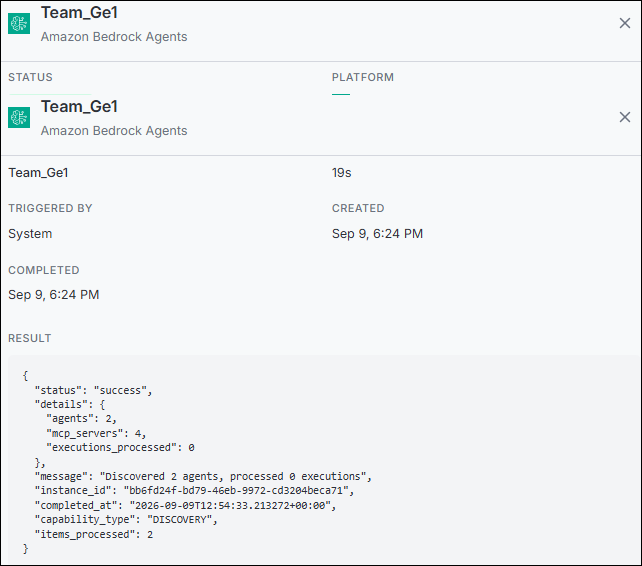
| Detail | Description |
|---|---|
| Status | Current or final status of the job execution. |
| Platform | Platform on which the job was executed. |
| Integration | Integration associated with the job. |
| Duration | Total execution time. |
| Triggered By | User who initiated the job, or System for an automatically triggered job. |
| Created | When the job execution started. |
| Completed | When the job execution completed. |
| Result | Execution result information for a successfully completed job. |
| Error Traceback | Error information for a failed job to help identify the cause of the failure. |
For a failed job, the details provide error information and a Retry Task action. This allows administrators to investigate the failure, address the underlying issue, and retry the job without waiting for the next scheduled execution. Successful jobs display the execution result instead of an error traceback.
How Jobs Are Triggered
Jobs can run automatically according to their configured schedule or be initiated manually. For example, an integration synchronization can be started from the integration using Sync. The resulting execution is recorded in Job History.
Scheduled jobs are identified as triggered by System, while manually initiated jobs identify the user who started the execution.
