
Troubleshooting for GoDaddy CA Issues
Supported Web Browsers
| Browser | Version | Notes |
|---|---|---|
| Firefox | Till latest (Version 84.0.4147.135) | NA |
| Chrome | Till latest (Version 80.0) | NA |
| IE | Limited support in 9, Full support from 10+ | No support for IE9 post-AppViewX Version 11.0 |
| Safari |
Till latest (Windows - Version 5.1.7, macOS - Version 13.1.2) |
From AppViewX Version 11.1 |
| Opera | Till latest (Version 70) | From AppViewX Version 11.1 |
Supported Devices
| Device | OS | Resolution |
|---|---|---|
| Desktop | Windows | 1024 X 768 onwards, 1366x768, 1920x1080, Higher |
| Desktop | Linux | 1024 X 768 onwards, 1366x768, 1920x1080, Higher |
| Desktop | Mac | 1024 X 768 onwards, 1366x768, 1920x1080, Higher |
| iPad | iOS | 1024 X 768 |
Issues in Configuring GoDaddy CA
| Error Message | Possible Cause | Possible Solution |
|---|---|---|
| Unable to save CA settings CA Settings name already exists. | A CA setting with the same name for GoDaddy already exists in inventory. | Check the CA Setting name, it should be unique. |
|
Some of the mandatory fields might be missing or might be invalid. | Add all the valid information in the mandatory section. |
| Please enter valid credentials – URL | URL entered might be wrong and not in proper URL format | Please check the URL entered |
| Unable to establish connection with CA | The configured CA details may be incorrect. | Check the CA details configured on the CA settings page. |
| Proxy details may not be configured. | heck whether proxy details are configured in proxy settings. | |
| AppViewX may not be able to reach CA. | Check whether network access is available. | |
| Unable to establish connection, Please ensure Proxy/Internet connectivity. | Invalid proxy details. | Please check the proxy details provided. |
| Internet connectivity may not be available. | Please check Internet connectivity to reach CA. | |
| Invalid URL provided in CA Settings. | Please check whether a valid CA URL is provided in CA Settings or contact AppViewX Support. |
Issues in Enrolling a GoDaddy CA Certificate
| Error Message | Possible Cause | Possible Solution |
|---|---|---|
| Unable to submit the CSR request to certificate authority - No available units for the selected product type | Units may not be available for the product type selected in the GoDaddy account. | Purchase a valid unit for the product type in the GoDaddy account. |
| Unable to submit the CSR request to certificate authority - No available units for the selected product type | Units may be available for the product type selected in the GoDaddy account but the selected certificate validity may be incorrect for the product purchased. | Edit the CA connector and change the Validity in CSR parameters as purchased in the product. |
| Unable to establish connection with CA | The configured CA details may be incorrect. | Check the CA details configured on the CA settings page. |
| Proxy details may not be configured. | heck whether proxy details are configured in proxy settings. | |
| AppViewX may not be able to reach CA. | Check whether network access is available. | |
| Unable to establish connection, Please ensure Proxy/Internet connectivity. | Invalid proxy details. | Please check the proxy details provided. |
| Internet connectivity may not be available. | Please check Internet connectivity to reach CA. | |
| Invalid URL provided in CA Settings. | Please check whether a valid CA URL is provided in CA Settings or contact AppViewX Support. | |
| Insufficient privilege for the user to create a certificate. | Request accepted but operation is refused due to insufficient privileges, disabled features, etc. | Please refer to the user privileges in GoDaddy server for creating certificates or Contact AppViewX Support. |
| Invalid Create Certificate Payload | Most likely missing or invalid input parameters / JSON body in the request. | Please validate the input parameters/payload provided or contact AppViewX Support. |
| Too many create certificate requests | Too many create certificate requests for GoDaddy. | Please try to create a certificate request after some time or contact AppViewX Support. |
Issues in Renewing a GoDaddy CA Certificate
| Error Message | Possible Cause | Possible Solution |
|---|---|---|
| Unable to submit the CSR request to certificate authority - No available units for the selected product type | Units may not be available for the product type selected in the GoDaddy account. | Purchase a valid unit for the product type in the GoDaddy account. |
| Unable to submit the CSR request to certificate authority - No available units for the selected product type | Units may be available for the product type selected in the GoDaddy account but the selected certificate validity may be incorrect for the product purchased. | Edit the CA connector and change the Validity in CSR parameters as purchased in the product. |
| Unable to submit the CSR request to certificate authority - No orderId available | There might not be any order id i.e certificate id available for the certificate in ca connector information. |
|
| Unable to renew the certificate | Renewal of GoDaddy certificates via AppViewX is not supported. GoDaddy handles the auto-renewal of its issued certificates. |
While enrollment, reissue, regeneration, and revocation of GoDaddy certificates is supported via AppViewX (through the purchase of SSL credits), GoDaddy automatically handles the renewal process. The scheduled discovery instance is to ensure that the renewed certificates are automatically updated in your AppViewX certificate inventory regularly. |
| Unable to establish connection with CA | The configured CA details may be incorrect. | Check the CA details configured on the CA settings page. |
| Proxy details may not be configured. | heck whether proxy details are configured in proxy settings. | |
| AppViewX may not be able to reach CA. | Check whether network access is available. | |
| Unable to establish connection, Please ensure Proxy/Internet connectivity/GoDaddy Server. | Invalid proxy details. | Please check the proxy details provided. |
| Internet connectivity may not be available. | Please check Internet connectivity to reach CA. | |
| Invalid URL provided in CA Settings. | Please check whether a valid CA URL is provided in CA Settings or contact AppViewX Support. | |
| Insufficient privilege for the user to create a certificate. | Request accepted but operation is refused due to insufficient privileges, disabled features, etc. | Please refer to the user privileges in GoDaddy server for creating certificates or Contact Support Team. |
| Invalid Create Certificate Payload | Most likely missing or invalid input parameters / JSON body in the request. | Please validate the input parameters/payload provided or contact AppViewX Support. |
| Too many create certificate requests | Too many create certificate requests for GoDaddy | Please try to create a certificate request after some time or contact AppViewX Support. |
Retrieving the certificate ID (order ID) from the Go Daddy Portal
- Login to your GoDaddy account.
-
Navigate to My Account > SSL
Certificates.
Here you can see the list of certificates created via this GoDaddy account.
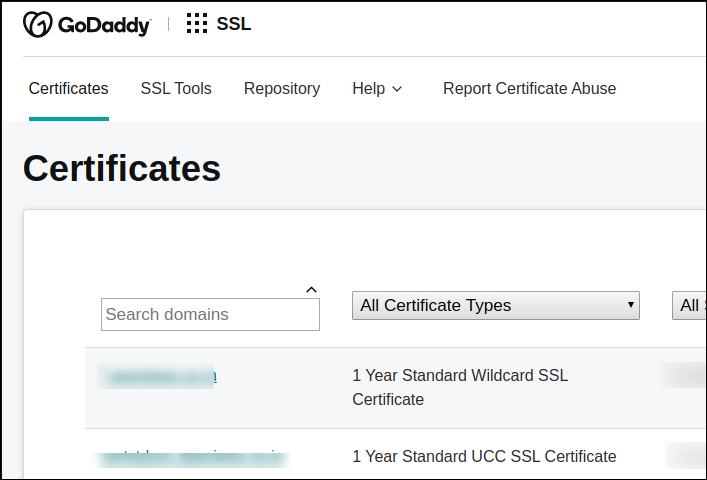
-
Click on the certificate for which you require the order ID.
In the URL framed you can see the order ID.

-
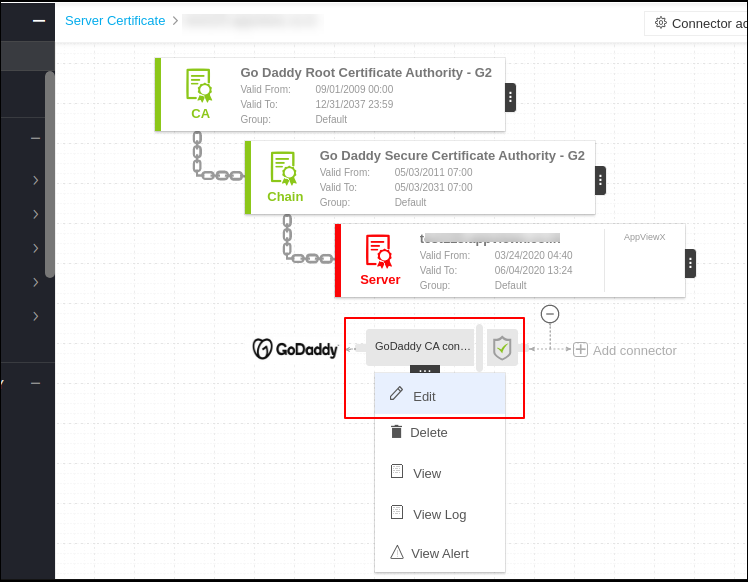
Use this order ID in our AppViewX CA connector as shown below:
- Click on edit in CA connector options.
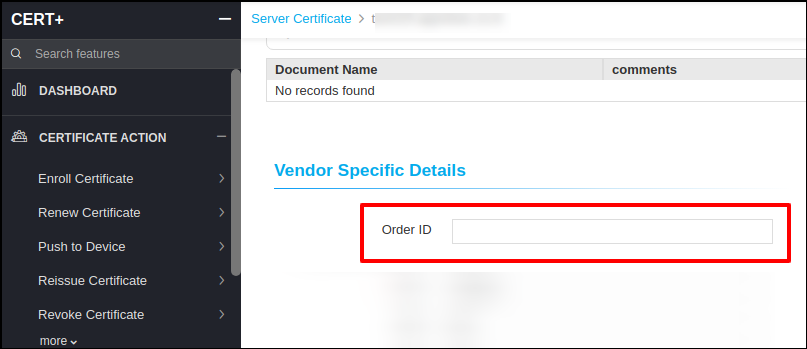
- Find for Order Id in vendor specific fields.
- Input the order id obtained from CA portal and update the connector.
-
Resubmit the failed request.
Issues in Regenerating a GoDaddy CA Certificate
| Error Message | Possible Cause | Possible Solution |
|---|---|---|
| Unable to submit the CSR request to certificate authority - No available units for the selected product type | There might not be available units for the product type selected in the GoDaddy account. | Purchase a valid unit for the product type in the GoDaddy account. |
| Unable to establish connection with CA | The configured CA details may be incorrect. | Check the CA details configured on the CA settings page. |
| Proxy details may not be configured. | heck whether proxy details are configured in proxy settings. | |
| AppViewX may not be able to reach CA. | Check whether network access is available. | |
| Insufficient privilege for the user to create a certificate. | Request accepted but operation is refused due to insufficient privileges, disabled features, etc. | Please refer to the user privileges, disabled features in GoDaddy server for creating certificates or contact AppViewX Support. |
| Invalid Create Certificate Payload | Missing or invalid input parameters / JSON body in the request. | Please validate the input parameters/payload provided or contact AppViewX Support. |
| Too many create certificate requests | Too many create certificate requests for GoDaddy | Please try to create a certificate request after some time or contact AppViewX Support. |
Issues in Revoking a GoDaddy CA Certificate
| Error Message | Possible Cause | Possible Solution |
|---|---|---|
| Unable to submit the CSR request to certificate authority - No orderId available | There might not be an order id i.e certificate id available for the certificate in ca connector information. |
|
| Unable to establish connection with CA | The configured CA details may be incorrect. | Check the CA details configured on the CA settings page. |
| Proxy details may not be configured. | heck whether proxy details are configured in proxy settings. | |
| AppViewX may not be able to reach CA. | Check whether network access is available. |
Issues in Discovering GoDaddy Certificates
| Error Message | Possible Cause | Possible Solution |
|---|---|---|
| Unable to establish connection with CA | The configured CA details may be incorrect. | Check the CA details configured on the CA settings page. |
| Proxy details may not be configured. | heck whether proxy details are configured in proxy settings. | |
| AppViewX may not be able to reach CA. | Check whether network access is available. | |
| Unable to establish connection, Please ensure Proxy/Internet connectivity/GoDaddy Server. | Invalid proxy details. | Please check the proxy details provided. |
| Internet connectivity may not be available. | Please check Internet connectivity to reach CA. | |
| Invalid URL provided in CA Settings. | Please check whether a valid CA URL is provided in CA Settings or contact AppViewX Support. | |
| Insufficient privilege for the user to create a certificate. | Request accepted but operation is refused due to insufficient privileges, disabled features, etc. | Please refer to the user privileges, disabled features in GoDaddy server for creating certificates, or contact AppViewX Support. |
