Prerequisites 
 (AppViewX_Jenkins_Plugin.zip):
Note: Files present within the downloaded zip file are:
- AppViewX.hpi (the plugin to be installed in the Jenkins)
- Jenkins and AppViewX Integration Guide <.html>
- Jenkins and AppViewX Integration Guide <.pdf>.
To install the AppViewX plugin in Jenkins:
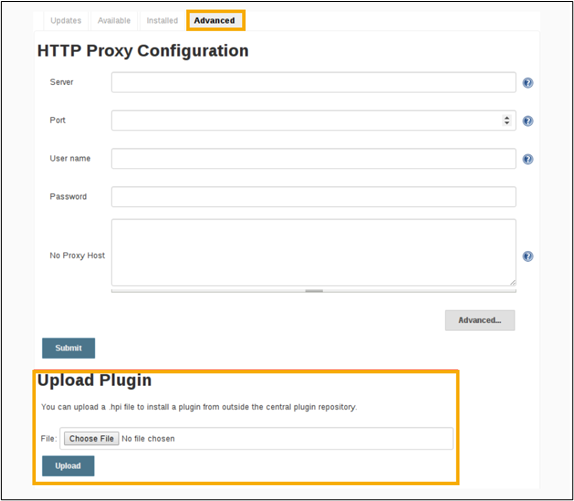
- Go to the Manage Jenkins > Manage Plugins page in the web UI (available to administrators of a Jenkins environment).
- Click on the Advanced tab.
- Under the Upload Plugin section, click the <.hpi> file.
-
Upload the plugin file.