Prerequisites
Before beginning the installation, ensure that the following are prepared:
-
If any operation is being carried out using the interactive tool, these steps
should be followed.
- If a script patch is released for the version, make sure to download the patch.
- Move the patch to the <installer_path>/patch directory.(e.g.: /home/appviewx/appviewx_kubernetes/patch)
- Trigger the
install.shscript and respond with 'yes' to any prompts that appear, as shown in the image below.
These steps are essential to ensure that the tool operates with the latest fixes.
- Sudo access to the configured for the appviewx installation user
- If the user opts for a key-based installation, passwordless sudo must be configured.
As the root user, add the following lines to the /etc/sudoers
file:
appviewx ALL=(ALL) NOPASSWD:ALL - Load balancer (LB) for the AppViewX GUI (optional - refer note below)
- Kubernetes master L4 load balancer (optional - refer note below)
- A .p12 certificate for the AppViewX Web GUI - An external signed certificate is typically issued by a trusted Certificate Authority (CA) and is used to authenticate and encrypt communication between the web server and clients, ensuring data integrity and security. (optional - refer note below).
- NTP server details
- Nameserver details
- Proxy or internet access is required on all the nodes if any of the following OS
prerequisite packages mentioned below are to be installed during the prerequisite
check. Ignore, if the packages are already installed on the nodes.
- Ubuntu - curl, net-tools, nmap, zip, unzip, sysstat, rsync, tcpdump, chrony, bind9-utils, dnsutils, ebtables, netcat, netcat-openbsd
- RHEL - curl, net-tools, nmap, zip, unzip, sysstat, rsync, tcpdump, chrony, bind-utils, nmap-ncat, (ebtables, iptables-ebtables, iptables-nft) any one based on OS version
- If you wish to enable Mongo/Vault backups to the SFTP server, you must specify the server where the Database and Vault backups will be securely stored. Ensure that the IP address or hostname is accurate, accessible from your network, and has enough storage space to avoid any connectivity or capacity issues during the backup process.
- The HSM client must be configured on the HSM node. For a single node, the configuration is done on the node itself. For a multi-node setup, the HSM nodes are selected and configured accordingly.
- The Load Balancers and the .p12 certificate prerequisites are optional during the installation process but are recommended to be enabled for High Availability (HA). This will help complete the installation or upgrade smoothly in one attempt.
- If a custom workflow is being used, please contact AppViewX technical support before proceeding with the upgrade.
Updating the Kernel version
kubeadm
                        init
setup is no longer compatible with older Linux kernel
versions. This is primarily due to enhanced reliance on cgroups
(control groups), a Linux kernel feature that manages resource isolation and
allocation. This incompatibility typically affects nodes running older operating
system versions, particularly those in the RHEL 8 series (e.g., 8.5, 8.6,
or even 8.10), depending on the specific kernel version present on the node.

Cgroups Overview:
Control Groups (cgroups) are a kernel-level feature that enables the limitation, prioritization, and isolation of resource usage (CPU, memory, I/O, etc.) among process groups. Kubernetes leverages cgroups extensively for container orchestration.
Determining the Cgroups Version in Use:
stat -fc %T /sys/fs/cgroup- If the output is
tmpfs, the system is using cgroups v1.
- If the output is
cgroup2fs, the system is using cgroups v2.
| Cgroups Version | Minimum Kernel Version | Recommended Kernel Version |
|---|---|---|
| v1 | 4.19+ | 5.x or 6.x series |
| v2 | 4.15+ | 5.8 or later |
To ensure compatibility with Kubernetes 1.32.2, it is recommended to validate and, if necessary, upgrade the Linux kernel version in accordance with the cgroups configuration of the host system.
uname -r
Solution provided:
- If the system does not meet the minimum required kernel version, the installation will be blocked from proceeding.
- Additionally, if the system is using cgroups v1, a warning message will be displayed recommending an upgrade to cgroups v2 for improved compatibility and performance.
Keyboard Shortcuts for Install and Upgrade Operations
- Ctrl + Z: Go to the previous question
- Ctrl + L: Collect the logs
- Ctrl + W: Scroll up
- Ctrl + S: Scroll down
- Ctrl + U: Unpause scrolling
- Ctrl + C: Cancel the installation or upgrade
- Ctrl + T: Show or hide the password
- Ctrl + E: Show the error message
- Ctrl + P: To rollback during apply patch failures
- Ctrl + R: To resume
- Ctrl+W: To scroll up
- Ctrl+S: To scroll down
- Ctrl+A: To scroll left
- Ctrl+D: To scroll right
- V : View verbose logs
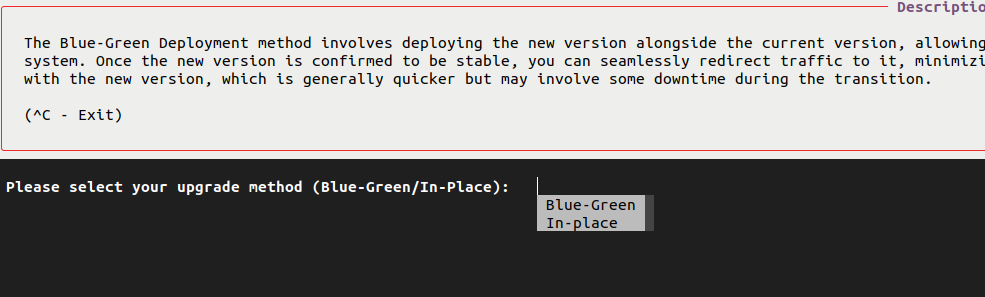
- Tab: Press the tab key for suggestions to questionsExample below shows options for upgrade when the Tab key is pressed.