
Syslog Reception Settings 
Accessing Syslog Reception Settings
| New Menu | Old Menu |
|---|---|
| In the Platform module, from the navigation pane on
the left, under OBSERVE & EXPLORE, select Syslog
Reception. The Settings :: Syslog Reception page is displayed by default. |
|
| For more information on how to switch between menus, click here. | |
Syslog Reception
Note: Please ensure the Syslog listener is setup in your
environment to receive Syslogs and enable Syslog subscription for the required
device(s) from the inventory.
-
On the Settings :: Syslog Reception page, enter the following
details:
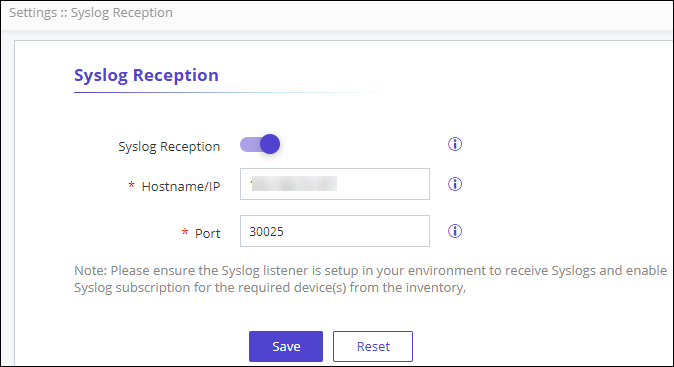
Table 1. Field descriptions for Syslog Reception Field Description Syslog Reception Enable the toggle to enable Syslog reception for real time configuration updates from the subscribed devices. *Hostname/IP Enter the Hostname or IP address of the Syslog listner. In case of a multi node or multi cloud connector setup, provide virtual IP(VIP). This field is displayed when the Syslog Reception toggle is enabled.
*Port The default port value is set to 30025. However, if a virtual IP or host is used, the port can be customized. This field is displayed when the Syslog Reception toggle is enabled.
* : Mandatory fields -
Click Save.
If the Syslog reception is enabled, the following header notification is displayed on the top of your screen in green.

-
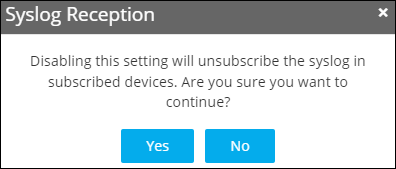
To disable Syslog reception, disable the toggle and click
Save.
The Syslog Reception pop-up is displayed.
-
Click Yes to continue.
If the Syslog reception is disabled, the following header notification is displayed on the top of your screen in green.
