
Configuration Updates through Syslog
AppViewX functions as a Syslog listener, subscribing to device-level logs. It establishes Syslog notifications with the devices managed within its system, allowing it to detect any changes occurring on these devices. These notifications trigger automatic configuration updates in AppViewX at specified intervals, ensuring that device changes are promptly reflected.
The received Syslog from the devices and the subsequent changes processed by AppViewX in response to these Syslog are meticulously recorded within the logging module.
Syslog Configuration in AppViewX
-
Enable the Syslog receiver flag during the cloud connector installation. For instructions on how to set the flag, see AppViewX Cloud Connector guide.
-
Enable avx_platform_syslog plugins.
-
Set up the IP address or port for Syslog reception within the Platform. For instructions on how to configure the Syslog reception, see Platform User Guide.
-
In case you have an older version of AppViewX and want to make use of Syslog capabilities for ADC SaaS, you must manually activate the Syslog flag by setting SYSLOG_ENABLED=
truein the path ccpath/deps/properties.
Device Syslog Subscription Example (F5 Sample)
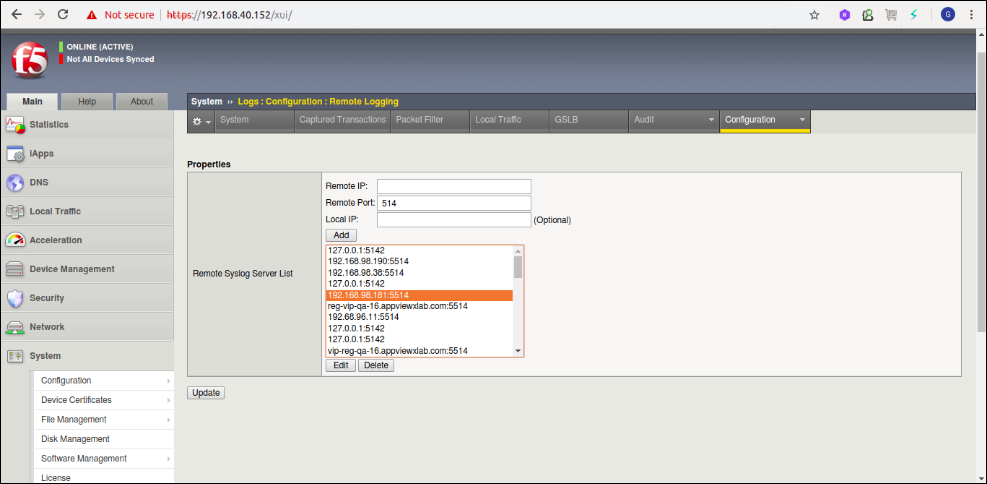
tmsh modify sys syslog include "options {use_fqdn(yes); keep_hostname(no); };"
  tmsh save sys config
  tmsh restart sys service syslog-ng
Vendors Supported
| Device Version/Vendor | Object Types |
|---|---|
| F5 v12 - 17 |
LTM objects: LTM VirtualServer,LTM Pool,LTM PoolMember,Virtual Address,LTM Node and secondary objects. GTM objects: GTM WideIP,GTM Pool,GTM Server,GTM Datacenter,GTM Virtual Server and secondary objects. State and Status |
Syslog Processing
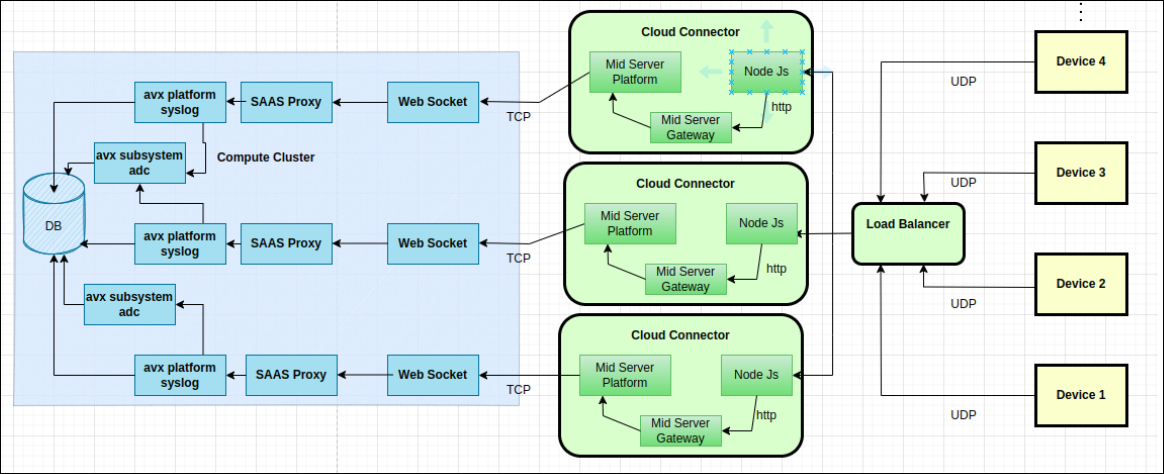
A new Node.js component has been introduced within the cloud connector to handle Syslog processing. This component initiates its processing by loading predefined information from a configmap.
The preset information is composed of two key components:
-
mid-server-syslog-grok-patterns-config: This segment comprises the grok patterns that correspond to the log messages sent from the device to the Syslog component.
-
mid-server-syslog-grok-filter-config: The second part contains metadata information. This information outlines the grok patterns that will be applied to the received log messages, specifying the details that should be extracted from these messages. Furthermore, it defines the content that should be forwarded to the subsystem responsible for parsing the message.
Once the preset information has been integrated into the Syslog component, the component will initiate the receiver function within the Kubernetes pod, operating on port 5514. Externally, incoming Syslog messages will be directed to the designated host on port 30025. Following receipt on port 30025, the message will then be forwarded to port 5514 for further processing.
Logs originating from the device will undergo filtration according to the grok filters established within the "mid-server-syslog-grok-filter-config" configmap in the Kubernetes environment. Grok serves as a method to compare a line with a regular expression, map specific parts of the line into metadata fields, and push the matched Syslog message along with metadata field information to avx-platform Syslog pod in Compute cluster for subsystem based parsing.
Based on the filters applied, messages or events are directed to the avx-platform-syslog component. In response to this, log messages are stored within the logging collection. Concurrently, event details are sent to the avx-subsystem-adc. This enables the parsing of real-time updates pertaining to the state and status of an object.
Syslogs can be retained for up to 5000 entries per device. When this limit is exceeded, the logs will be automatically cleared. You can adjust this configuration within the settings.
Scenarios
The following scenarios have been taken into consideration:
-
Syslog based updates for Object state change For example: Enabled, Disabled etc.,
-
Real time updates are supported only for F5.
-
-
Syslog based updates for Object status change For example: Available, Offline etc.,
-
Real time updates are supported only for F5.
-
Real-time State/Status Processing for F5
The node-js syslog component filters the state/status Syslog of F5 and forwards the message to the Syslog_Receiver which subsequently transmits them to subsystem adc plugin along with the Syslog details. Within the subsystem_adc plugin, the message undergoes parsing, leading to updates in the state/status of the respective object within the 'me_adc' and 'ro' collections. After the update, Syslog_Receiver adds the Syslog message with a ‘Picked’ status in logging collection. Grok filters are restricted to only the managed object types in AppViewX, which is configurable. The changes will be reflected in the control center/dashboard or other modules wherever the objects are configured which will enable near real time monitoring.
Database Operations for Processing a Syslog Message
-
Retrieve device information using the FQDN.
-
Update the state of the object in the 'me_adc' collection.
-
Update the state of the object in the 'ro' collection.
-
Include the Syslog message with a selected status in the Logging collection.
Technical Flow Diagram
Syslog Based Alerting
As devices often produce substantial data volumes, employing a Syslog alert offers a user-friendly approach to receive notifications regarding critical Syslog information. Users can set up Syslog alerts for specific events or Syslog patterns that hold significance. In the event of a triggered Syslog alert, actions such as sending an email or initiating a workflow can be activated for prompt response.
For Configuring Syslog Alert notification, see Configuring Syslog Alert Notification.
Performance Metrics
Vendors Tested: F5
-
300 device and 33lk objects in RO collection
-
2700 valid Syslog message in 10 seconds send from cc to compute cluster
-
No Pod restart observed cloud connecter and Compute cluster
-
Observed CPU utilization 60 to 65% in Database
-
1.5 GB of memory is required for Syslogs pod in cloud connector.
-
One Syslog pod in cc, able to process approximately 270 logs per second.
Limitations
-
The state status drift functionality will be non-functional as the session ID is not being provided by the node-js component.
- On the Syslog alert configuration, users can only select a maximum of 10 devices or objects from the list of available devices or objects.
Sample Logs
<133>Sep 19 04:29:30 bigip-40-152 notice mcpd[6046]: 01070417:5: AUDIT - user admin - transaction #84197177-2 - object 0 - modify { virtual_server { virtual_server_name \"/Common/testVs\" virtual_server_enabled 0 virtual_server_update_status 1 } } [Status=Command OK]\n<133>Sep 19 04:30:59 bigip-40-152 notice mcpd[6046]: 01071682:5: SNMP_TRAP: Virtual /Common/testVs has become unavailable\n
<133>Sep 19 04:30:41 bigip-40-152 notice mcpd[6046]: 0107183a:5: Virtual Address /Common/1.2.3.16 general status changed from RED to YELLOW.\n
Troubleshooting Steps
-
To verify the reception of UDP packets, run the command
tcpdump
                                -ni any port 30025
within the cloud connector. -
To ensure that the Device VIP is receiving packets, run the command
tcpdump -ni any host VIP_IP_address port 5514on the F5 device. -
For confirming if logs are passing through the filters, check the logs within the Syslog pod in the cloud connector environment.
Frequently Asked Questions (FAQ)
-
How many Syslogs are being received & processed per second in AppViewX?
The performance testing of the Syslog components in our local testing environment has confirmed their capability to handle 300 logs per second.
-
How the processing of Syslog and TRAP events in AppViewX is implemented for actions such as enabling, disabling, and performing forcedowns in F5 devices?
Traps are not supported in AppViewX. However, the mentioned actions triggers modifications within the device, subsequently triggering a Syslog event. The processing procedures remain consistent with those outlined in #3.
-
How AppViewX manages the processing of Syslog and TRAP events for state and status changes in F5 objects?
Syslog messages received from the device are grouped into batches and subsequently relayed to the subsystem plugins. Within these Syslog messages, we extract key information including the hostname, object details, and its state and status information. Utilizing the object information obtained, we locate the corresponding entry in our database where a change in state or status occurred. This information is then updated in the database accordingly.
-
Under what circumstances does the state and status of an object not get updated, even after the Syslog message has been parsed?
If the hostname is not configured for a device, even when logs are received, it becomes impossible to identify the device where these changes are occurring. Consequently, the state and status of the object won't be updated within AppViewX.
