Security Posture Determination and Interpretation

Application security score reports, TLS, and Cipher suite reports allow you to identify the security level of service. To reduce security risks, change the application configuration to restrict the cipher suites and the TLS versions that are marked as LOW. Also for certain applications, OS upgrades will be applied to align with the security standard.

You can generate security reports through,

TLS Report

TLS report fetches data from SSL sessions and generates the report. It makes it easy for customers to check the protocol version of their servers based on this data. This report will generate data to identify vulnerable protocol versions. For example, in your infrastructure, there may be endpoints that still support TLSv1.0 and TLSv1.1 versions.

The TLS version - Server report is available on the Server Endpoint Security dashboard.

Cipher Suites Reports

Some ciphers use SHA1 that is still supported by servers. Cipher Report will discover servers that support these ciphers and provide data as per security standards. This report will generate data to identify vulnerable ciphers.

The Cipher Suites - Server report is available on the Server Endpoint Security dashboard.

Generating Application Score Reports

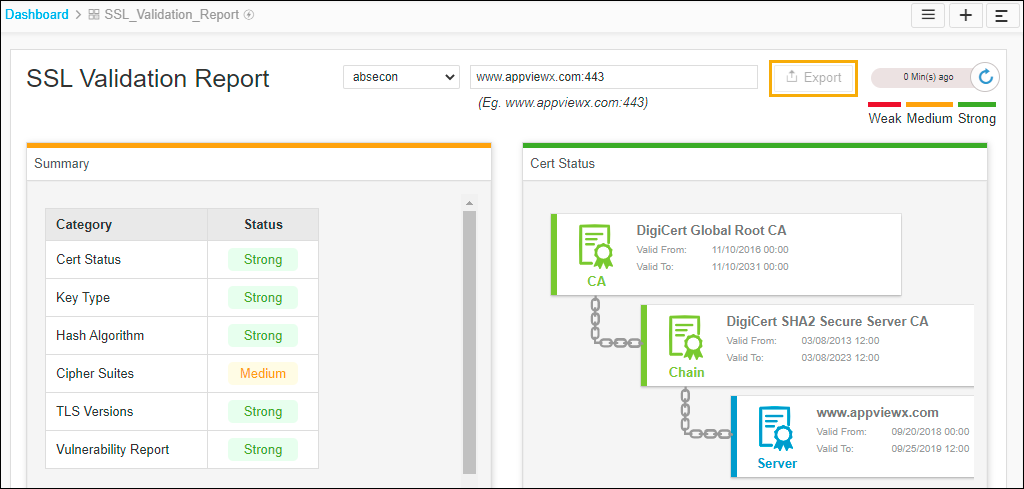
The application score report provides security scores of certificate parameters based on industry standards. You can get the score based on parameters such as Cert Status, Key Type, Hash Algorithm, CAA Record, TLS Version, and Vulnerability. Also, you can search for domains and check the security score. For example, you can check if the certificate name is valid through this report.

To generate application score reports:

  1. Go to (Menu) > CERT+ > Dashboard.
    The list of dashboards is displayed.
  2. On the dashboard page, click SSL Validation Report.
  3. Select a data center from the first dropdown.
  4. In the search bar, enter a domain name (www.appviewx.com:443) and press Enter.
    The report is generated with the summary and all required parameters.
  5. To export this report as a PDF, click Export.