
Troubleshooting for Upgrade Errors
UPGRADE FAILED: another operation (install/upgrade/rollback) is in progress
While performing the upgrade (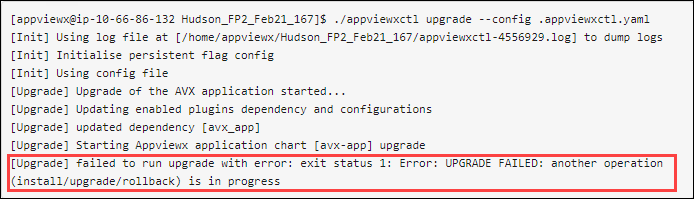 Perform the following steps:
./appviewxctl upgrade --config
                        .appviewxctl.yaml
), if the system encounters the error of
UPGRADE FAILED: another operation (install/upgrade/rollback) is in
progress as shown below. Perform the following steps: -
Fetch the deployment history of avx-app helm deployment using
command mentioned below.
helm history avx-app -n avx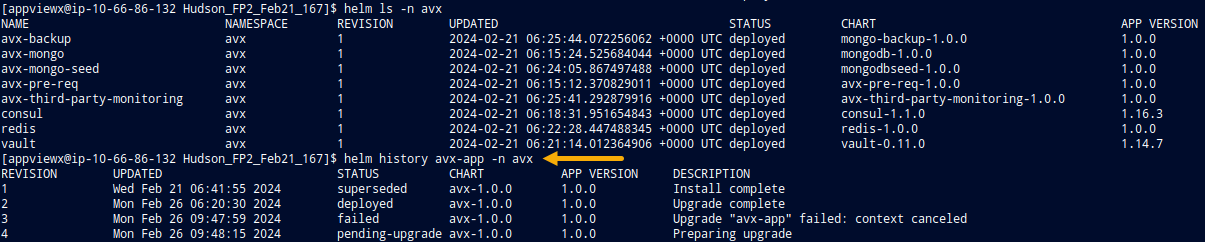
-
Find the most recent revision of avx-app which is in deployed state.
In this case Revision 2 is the most recent upgrade.
-
Run the rollback command to retrieve the deployment from failed
state.
Example:helm rollback avx-app <REVISION NUMBER> -n avxhelm rollback avx-app 2 -n avx
-
Re-run the
helm history avx-app -n avxcommand to verify the rollback is complete.
Failure Issue during Upgrade
- Go to the section Cleanup of OpenBao and follow the steps provided.
-
When the cleanup is complete, install in the following order:
#Install OpenBao
./appviewxctl --config .appviewxctl.yaml installOpenbao

# Restore Vault
./vault_restore_openbao_migration.sh -p <vault backup file full path>

# Restore Mongo
./mongo_restore.sh <mongo backup file full path>

# Upgrade Plugins
./appviewxctl upgrade --config .appviewxctl.yaml
Login Issue after Upgrade
- Perform he vault cleanup, refer the section Vault/Consul Cleanup.
- Reinstall OpenBao.
- Restore the Vault data.
- Now, repeat the application upgrade process.
