
Log Collection
The log collection script is designed to collect logs in a managed kubernetes setup. It is compatible with all mk8s environments, regardless of the cloud provider, and also retrieves logs from the backup folder.
Prerequisites: The bastion host should have kubectl and have access to the compute cluster to collect the logs.
- Login to bastion host.
- Download the helper tarball from the release portal.
-
Execute the following command:
./mk8s_collect_logs.sh
Note: The script can be run anywhere in the bastion host. -
Fill the interactive questions as follows:
-
Enter the end date to fetch logs:
- Enter the date until which you want to collect logs.
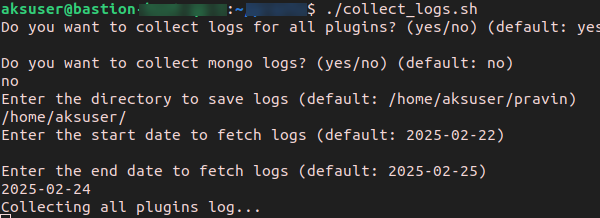
-
Enter the end date to fetch logs:
Alternative options: Passing Parameters via Command Line
Alternatively, you can provide the inputs as parameters instead of entering them
interactively. To view the available parameters, run the command
below.
./mk8s_collect_logs.sh --help