
Reinstating Client Certificate
-
Go to
 (Menu) > CERT+ > CERTIFICATE
INVENTORY > Client.
The Client Certificate page is displayed.
(Menu) > CERT+ > CERTIFICATE
INVENTORY > Client.
The Client Certificate page is displayed. -
To reinstate a certificate,under Common Name, select the required
certificate name.
The certificate topology view for the selected certificate is displayed.
-
From the
 (More) menu for the
certificate, click Reinstate.
(More) menu for the
certificate, click Reinstate.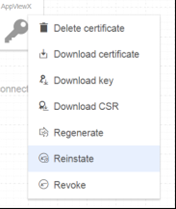 The Certificate Reinstate dialog box is displayed.
 - In the Certificate Reinstate dialog box, from the dropdown list, select a reason for reinstating the certificate.
- Enter you Comments in the text field and click Yes.
