
Duplicating Certificates
Certificate duplication refers to the process of creating a copy of an existing certificate while maintaining its original attributes and key usage information. This action is typically used when a new certificate with similar properties is required for a different application or system without altering or renewing the original certificate.
Important: Currently,
this feature is supported for only DigiCert certificates. For the full list of
DigiCert certificate types that can be duplicated, click here.
To duplicate a
certificate:-
Go to
 (Menu) > CERT+ > CERTIFICATE
INVENTORY > Server.
The Server Certificate page is displayed.
(Menu) > CERT+ > CERTIFICATE
INVENTORY > Server.
The Server Certificate page is displayed. - To open the holistic view of a certificate, under Common Name, select the required certificate name.
-
From the
 (More) menu for the
certificate, click Duplicate.
(More) menu for the
certificate, click Duplicate. 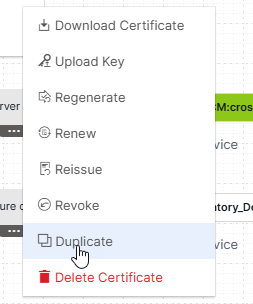 The Server Certificate > Duplicate page is displayed for the selected certificate.For duplicating a certificate:
- The uneditable fields are displayed, which means these are
attributes you cannot change for a duplicate certificate.
For field descriptions of the editable fields, click here.
- While the common name for the duplicate certificate can be updated, it is valid only if it conforms with the SAN/DNS selected for the parent certificate.
- A duplicate certificate can only be:
- Downloaded
- Duplicated
- Revoked (at the certificate level as well as at the order level)
- The uneditable fields are displayed, which means these are
attributes you cannot change for a duplicate certificate.
-
Click Duplicate.
The message Cert duplicate triggered successfully is displayed.
You will be redirected to the holistic view of the certificate.
- Refresh to view the certificate in the holistic view and the certificate inventory.
DigiCert CA Certificate Types Supported for Duplication
- Secure Site OV
- Secure Site EV
- Secure Site EV SSL
- Secure Site EV Multi-Domain SSL
- Basic OV
- Basic EV
- Multi-Domain SSL
- Wildcard
- EV SSL
- EV Multi-Domain
- GeoTrust TrueBusiness ID EV
- GeoTrust TrueBusiness ID OV
- Thawte SSL Webserver EV
- Thawte SSL Webserver OV
- Private Multi-Domain SSL
- Private SSL Wildcard
- Private SSL OV
