
Managing the Device Certificate Inventory
Device certificate inventory displays all the management interface certificates. Currently, in this inventory, only F5 vendor certificates are shown.
On the Certificate Inventory > Device page, all the device certificates are listed. You can perform the following actions:
| Options | Description |
|---|---|
| Groups | Expanding this dropdown displays the certificate groups and the
number of certificates in each group. Selecting a group will display the
filtered list of certificates.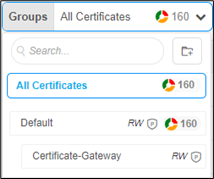 |
| Filter Summary | Displays the status of certificates according to expiry, compliance,
validity, and so on. |
| Advanced Search | Allows you to perform a quick search for specific data. Clicking on the search bar dropdown opens the Advanced Search window. |
| Actions | Displays the list of actions you can perform on the certificates. |
| Columns | Allows you to select the columns to be displayed on the Device Certificate inventory page. |
| Toggle | Allows you to toggle between the following display options for the
Server Certificate inventory:
|
The list of actions you can perform on the certificates are:
- Export Certificates - To export the server certificate.
- Delete - To delete the server certificate.
- Assign Group - To assign a group to the certificate.
- Unassign Group - To unassign a group from the certificate.
- Add/Modify Comments - To add/modify comments to the certificate.
- Certificate Attributes - To update the certificate attributes.
- Bulk Update Attributes Value - To update the certificate attributes for certificates.
- Renew Certificates - To renew certificates before expiry.
- Revocation Check - To check the revocation status of the certificate.
