
Quantum Trust Hub: Configuration Scan
A Configuration Scan is the process of analyzing the cryptographic settings and parameters configured across systems, applications, and network infrastructure within an organization. In the context of post-quantum cryptography (PQC) implementation, a configuration scan helps build a comprehensive view of cryptographic configurations that may be vulnerable to quantum-based attacks.
The goal of a PQC configuration scan is to identify and assess systems that are using classical algorithms (such as RSA or ECC), outdated protocol versions, or insecure cipher suites, which may not provide adequate protection in a post-quantum world.
The results of the scan support identifying, classifying, and scoring systems based on their cryptographic posture and PQ-readiness. This enables informed planning and prioritization of remediation activities, such as protocol upgrades, algorithm replacements, or configuration hardening.
- Enabled cryptographic algorithms and protocols (for example, RSA, ECC, TLS 1.2, TLS 1.3, IPsec, SSH)
- Cipher suites (e.g., inclusion of PQC-safe or hybrid suites, use of deprecated ciphers like RC4 or 3DES)
- Key sizes and cryptographic parameters (e.g., RSA-2048, ECDSA P-256)
- Protocol versions and fallback behavior (e.g., support for only secure versions like TLS 1.3)
- Support for PQC or hybrid cryptography mechanisms, where available.
- Helps identify cryptographic configurations that rely on quantum vulnerable algorithms and protocols.
- Reveals misconfigurations or weak parameter settings that may increase security risks.
- Assists in prioritizing updates to cryptographic settings in alignment with NIST guidelines (e.g., NIST SP 800-131A, SP 800-52r2).
- Supports cryptographic agility and prepares systems for a seamless transition to PQC-safe algorithms.
The Configuration Scan dashboard is a collection of widgets that display a multi-faceted view of the PQC risk and quantum readiness data for the results of a PQC-focused configuration scan. The data displayed on the dashboard is a quantifiable measure of your organization’s risk and readiness for the PQC adoption.
Prerequisite: Verify that your user role has the required ACF permission to view configuration scan reports. To enable ACF permission, click here.
- Go to .
The Quantum Trust Hub : Organization View page is displayed.
- From the menu bar, select Configuration.
The Quantum Trust Hub : Configuration Scan page is displayed.
The dashboard widgets are explained in the subsequent sections.
Quantum Readiness Score
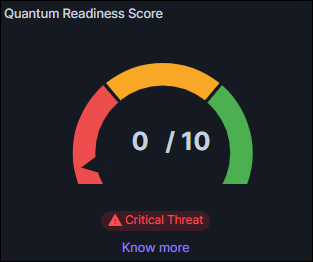
- Each Configuration Scan is assigned a PQC score based on its quantum resistance.
- Quantum Resistant Categories (1 point each) = 5
- Total Categories Assessed: 10
- Quantum Vulnerable = 0 Point
The Configuration Scan Quantum Readiness score, displayed using this widget, is then calculated as:
Your Total PQC Score = (Number of Quantum Resistant Crypto Categories Identified) /
(Total Number of Crypto Categories Identified)
 The
threat level is displayed on the widget below the Gauge chart.
The
threat level is displayed on the widget below the Gauge chart.Configuration Count
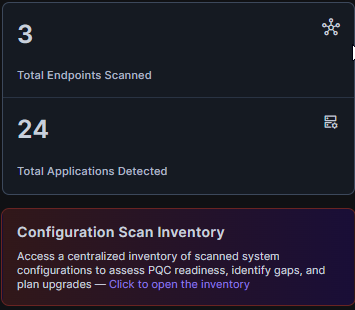
| Metric | Description |
|---|---|
| Total Endpoints Scanned | Displays the total number of individual endpoints (e.g., servers, devices, network assets) that were scanned during the configuration assessment. This reflects the breadth of your cryptographic visibility across the infrastructure. |
| Total Applications Detected | Indicates the number of distinct applications discovered and analyzed across the scanned endpoints. These applications are using cryptographic configurations that were evaluated for vulnerabilities and quantum readiness. |
A Configuration Inventory pop-up, filtered for the selected configuration type block, is displayed, with the complete details of each configuration type.
For example, to view the Total Endpoints Scanned, click the Total Endpoints Scanned block from the metric card. The corresponding Configuration Inventory is displayed.
- View a detailed list of individual endpoints that were scanned during the configuration scan.
- Navigate to the main Configuration Inventory by clicking Configuration Scan Inventory.
- Export the Configuration Scan
Inventory from the Quantum Trust Hub.To do this:
- Select the checkboxes corresponding to the records you want to export.
- From the toolbar, by clicking Export.
- From the How would you like to download the data? dialog box, select the file format for the exported configuration data.
- Click Submit.
Quantum Readiness by Crypto Library
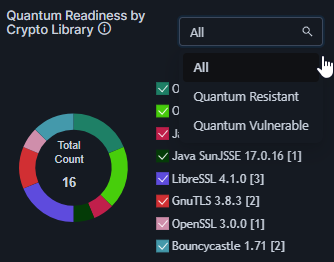
The Quantum Readiness by Crypto Library widget provides insight into the quantum security posture of the cryptographic libraries used across your environment. Cryptographic libraries implement the algorithms that protect your data and communications, so understanding their quantum readiness is essential for safeguarding against future quantum attacks.
The donut chart in this widget shows all the crypto libraries discovered in the scan and interactive legend lists the number of instances of usage of each library.
Use the interactive legends to update the visualization to see the usage distribution for only specific libraries.
| Option | Description |
|---|---|
| All | Displays all cryptographic libraries detected, regardless of their quantum readiness status, giving a complete overview of your cryptographic landscape. |
| Quantum Resistant | Shows only cryptographic libraries that implement post-quantum cryptographic algorithms, ensuring strong resistance against quantum computing threats. |
| Quantum Vulnerable | Lists cryptographic libraries that rely on classical cryptographic algorithms vulnerable to quantum attacks, highlighting areas requiring immediate attention. |
- Select a filter from the dropdown menu to view cryptographic libraries by their quantum readiness status.
- Identify vulnerable libraries and prioritize updates or replacements with quantum resistant versions.
Quantum Readiness by Protocols
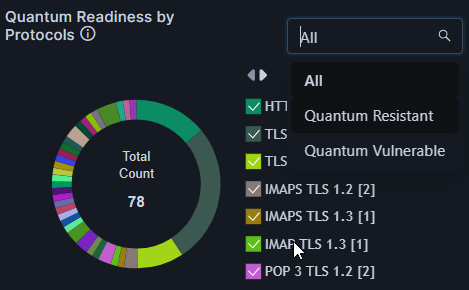
The Quantum Readiness by Protocols widget gives you an overview of the quantum security status of cryptographic protocols in use within your environment. Protocols such as TLS, SSH, and others play a key role in securing communications, so assessing their readiness against quantum threats is crucial.
The donut shows the total number of protocols discovered by the scan and the usage distribution for the protocols. The interactive legend lists the protocols discovered along with the number of usage instances for each protocol.
Use the interactive legends to update the visualization to see the usage distribution for only specific protocols.
| Option | Description |
|---|---|
| All | Displays all cryptographic protocols detected, regardless of their quantum readiness status, for a complete picture of your security posture. |
| Quantum Resistant | Shows only protocols that use quantum-safe algorithms or configurations designed to resist attacks from quantum computers. |
| Quantum Vulnerable | Lists protocols that rely on classical cryptographic methods vulnerable to quantum attacks and should be prioritized for upgrade or replacement. |
- Select the required filter from the dropdown to focus on all protocols, only quantum resistant ones, or those that are quantum vulnerable.
- Identify vulnerable protocols and understand which protocols in your environment are at risk from quantum attacks.
Risk Levels
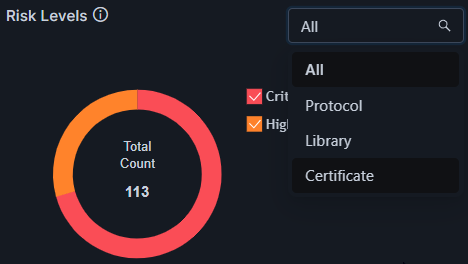
The Risk Levels widget provides an at-a-glance summary of the quantum risk associated with different cryptographic components in your environment. It helps you understand where vulnerabilities exist and prioritize your remediation efforts.
The donut chart in this widget shows the total number of cryptographic components (protocols, libraries, and certificates) detected. It also shows the risk level distribution across these components. The chart legend lists the risk level of the detected components and also indicates the number of components mapping to each risk level.
Use the interactive legends to filter the risk data for a specific risk level(s).
| Option | Description |
|---|---|
| All | Displays risk levels for all cryptographic components combined, including protocols, libraries, and certificates. Use this for a holistic view of your quantum risk exposure. |
| Protocol | Shows risk levels specifically related to cryptographic protocols (e.g., TLS versions, SSH), highlighting protocols that may be vulnerable to quantum attacks. |
| Library | Filters the view to show risk levels in cryptographic libraries or algorithms implemented within your systems, helping identify weak or deprecated crypto code. |
| Certificate | Focuses on the quantum risk posed by digital certificates, based on their encryption algorithms and PQC readiness. This helps spot certificates needing urgent replacement or upgrade. |
- Use the dropdown to select a category based on your focus area: protocols, libraries, certificates, or all combined.
- Review the distribution of risk levels (e.g., Critical, High, Medium, Low, Unknown) displayed in the widget.
Quantum Readiness by Key Exchange Usage in Cipher Suites
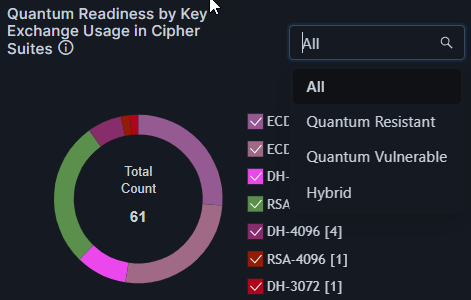
The Quantum Readiness by Key Exchange Usage in Cipher Suites widget displays an analysis of the key exchange algorithms used within your cipher suites, focusing on their resilience against quantum computing threats.
Key exchange is a critical part of establishing secure communications, and this widget helps you understand how prepared your cryptographic configurations are for post-quantum security.
The donut chart on the widget shows the total number of key exchanges observed across all cipher suites. The legend lists all key exchange instances along with the individual count of occurrence.
Use the interactive legend to filter the visualization for specific key exchange instances.
| Option | Description |
|---|---|
| All | Shows all key exchange algorithms detected in your cipher suites, regardless of their quantum readiness. Use this view to get a complete picture of your cryptographic posture. |
| Quantum Resistant | Displays only key exchange algorithms that are considered secure against quantum attacks, such as lattice-based or other post-quantum algorithms. |
| Quantum Vulnerable | Lists key exchange algorithms that rely on classical cryptography (e.g., Diffie-Hellman, ECDH) which can be broken by quantum computers and therefore require urgent upgrade. |
| Hybrid | Shows key exchange methods that combine classical and post-quantum algorithms, providing enhanced security during the transition to quantum-safe cryptography. |
- Select a filter from the dropdown menu to focus on specific key exchange algorithm types.
- Identify vulnerable key exchange algorithms that should be prioritized for upgrade or replacement.
Quantum Readiness by Authentication in Cipher Suites
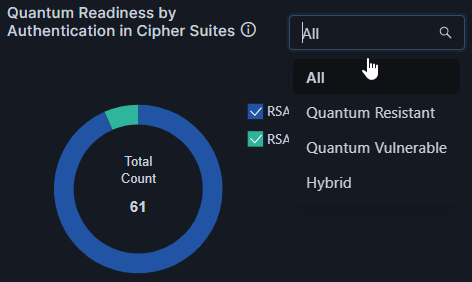
The widget shows the cryptographic algorithms/cipher suites used for authentication across your environment, as well as the total and individual count of usage. Use the interactive legend to filter the visualization for a specific cryptographic algorithm/cipher suite.
| Option | Description |
|---|---|
| All | Displays all cipher suites detected across your environment, regardless of their quantum resistance status. Use this for a comprehensive view. |
| Quantum Resistant | Shows only cipher suites that use quantum-safe authentication algorithms, offering strong protection against both classical and quantum attacks. |
| Quantum Vulnerable | Lists cipher suites that rely on classical authentication methods vulnerable to quantum attacks (e.g., RSA, ECDSA). These require prompt remediation. |
| Hybrid | Displays cipher suites that implement a combination of classical and post-quantum algorithms to enhance security during the transition to quantum-safe cryptography. |
- Use the dropdown to filter cipher suites by quantum readiness status.
- Identify vulnerable cipher suites that require upgrading to post-quantum or hybrid authentication methods.
Applications Usage Summary
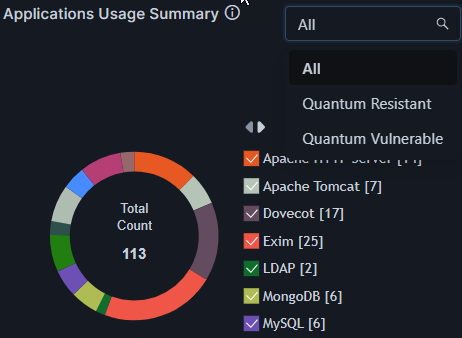
The widget shows the total number of applications detected in your environment. The legend lists these applications and also includes a count which indicates the number of cryptographic usages detected for that application. Use the interactive legend to filter the chart visualization for specific applications.
| Option | Description |
|---|---|
| All | Displays all applications in your environment, regardless of their cryptographic posture. Use this view to get a full inventory snapshot and identify areas for improvement. |
| Quantum Resistant | Shows only applications that are currently using quantum-safe cryptographic configurations and/or certificates. These applications are considered prepared to withstand future quantum attacks. |
| Quantum Vulnerable | Displays applications using legacy or quantum vulnerable encryption (e.g., RSA, ECC, SHA-1, TLS 1.0/1.1). These applications require remediation to avoid exposure to potential quantum threats. |
- Use the dropdown filter to switch between views (All, Quantum Resistant, Quantum Vulnerable) based on your focus area.
- Identify and prioritize vulnerable applications for cryptographic upgrades.
Quantum-Readiness Posture
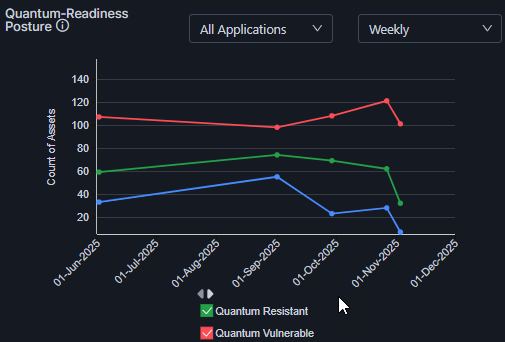
The Quantum-Readiness Posture chart displays a holistic view of your organization’s readiness for a PQC transition for a selected period of duration.
It is essentially the configuration count data represented graphically. The widget offers the additional ability to view trends for specific applications over a specific duration by selecting the required values from the dropdown lists in the top-right corner of the widget.
The chart legends are interactive. Select/clear the checkbox for a risk severity level to show/hide, respectively, the corresponding data on the chart.
Configuration Scan Inventory
To access the configuration scan inventory:
Prerequisite: Verify that your user role has the required ACF permission to view configuration scan inventory. To enable ACF permission, click here.
- To view the Configuration Scan inventory, go to .
You will be redirected to the Configuration Scan Inventory.
The Configuration Scan Inventory provides a comprehensive, category-wise view of all cryptographic configurations across your organization’s IT infrastructure - including protocols, cipher suites, encryption algorithms, and security settings used across applications, servers, and network devices.
This inventory is critical for evaluating your system’s quantum readiness from a configuration perspective, ensuring that all components adhere to evolving post-quantum cryptographic standards.
