
Quantum Trust Hub: Certificate Scan
Certificate Scan: Overview
A certificate scan is the process of assessing an organization’s cryptographic environment to find all digital certificates currently in use. In the context of a post-quantum cryptography (PQC) implementation, a certificate scan helps to build a baseline inventory that can be used to evaluate an PQC-readiness of an organization’s certificates.
Results of the PQC certificate scan can be used for identifying, classifying, and scoring certificates based on their quantum resistance, enabling informed decision-making and prioritization of remediation efforts.
- Public key algorithm used for encryption, digital signatures, or key exchange (for example, RSA, ECC, PQC)
- Cryptographic key size (for example, RSA-1024, RSA-2048, RSA-4096, etc.)
- Hash function (for example, MD5, SHA-1, SHA-2, SHA-3)
- A PQC-focused certificate scan helps to identify weak algorithms, smaller key sizes, and insecure hashes that can be exploited by hackers.
- Based on the above classification, your organization can identify and prioritize high-risk certificates for immediate action.
Certificate Classification and PQC Risk Severity Assignment
- Classical (certificates using only the traditional public-key algorithms like RSA/ECC)
- Hybrid (certificates that use classical algorithms along with the PQC algorithms)
- PQC-only (certificates that use only PQC algorithms)
| PQC Risk Severity | Criteria |
|---|---|
| Critical |
|
| High |
|
| Medium |
|
| Low (Quantum Safe) |
|
- A dashboard that uses multiple widgets to present the data across different dimensions.
- A certificate scan inventory that lists all the certificates discovered in a scan along with their PQC risk severity and quantum readiness.
Certificate Scan Dashboard
The Certificate Scan dashboard is a collection of widgets that display a multi-faceted view of the PQC risk and quantum readiness data for the results of a PQC-focused certificate scan. The data displayed on the dashboard is a quantifiable measure of your organization’s risk and readiness of the PQC adoption.
Prerequisite: Verify that your user role has the required ACF permission to view certificate scan reports. To enable ACF permission, click here.
To view the Certificate Scan dashboard, go to .
The dashboard widgets are explained in the subsequent sections.
Quantum Readiness Score
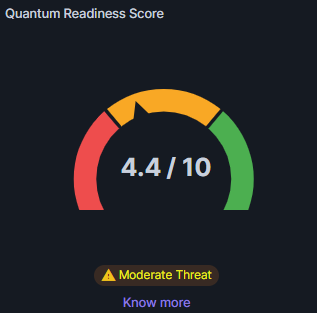 The Quantum Readiness Score
widget displays the cumulative PQC score for a scan, aggregated from the PQC scores
of all discovered certificates.
The Quantum Readiness Score
widget displays the cumulative PQC score for a scan, aggregated from the PQC scores
of all discovered certificates.- Each discovered certificate is assigned a PQC score based on its quantum resistance.
- Quantum resistant certificate = 1 point
- Hybrid certificate = 0.6 points
- Quantum vulnerable certificate = 0 points
The Certificate PQC score, displayed using this widget, is then calculated as:
(Sum of all certificate points/Total number of certificates discovered in the scan) * 10 The
threat level is displayed below the Gauge chart.
The
threat level is displayed below the Gauge chart.Certificate Count
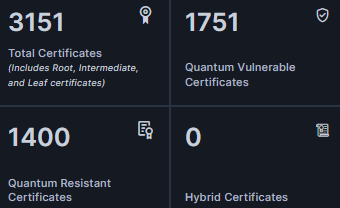
- Quantum vulnerable (certificates that rely purely on classical algorithms like RSA and ECC)
- Quantum resistant (certificates use Post-Quantum Cryptographic (PQC) algorithms)
- Hybrid (certificates that combine a classical algorithm with a PQC algorithm)
To view the details of the certificates under each of these categories, click the corresponding block on the metric card.
A Certificate Inventory pop-up, filtered for the selected certificate type block, is displayed, with the complete details of each certificate of that type.
For example, to view all quantum vulnerable certificates, click the Quantum Vulnerable Certificates block from the metric card. The corresponding Certificate Inventory is displayed.
In this certificate inventory, you can:
- View detailed certificate data, for the selected certificate type, organized by certificate category (server, client, code signing, root, intermediate, and device).
- Switch between certificate categories by clicking the corresponding tab from the menu bar.
- Export the certificate inventory from the Quantum Trust Hub by selecting the records you want to export, clicking Export and finally, selecting the column display and format of the exported certificate data.
Quantum-Readiness Posture
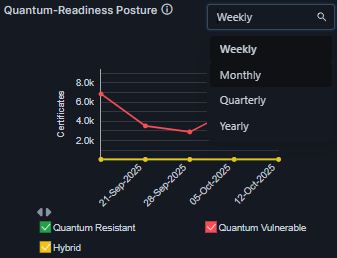 The Quantum-Readiness Posture
chart displays a overview of your organization’s readiness for a PQC transition for
a selected period of duration. Select the duration from a dropdown list in the
top-right corner of the widget.
The Quantum-Readiness Posture
chart displays a overview of your organization’s readiness for a PQC transition for
a selected period of duration. Select the duration from a dropdown list in the
top-right corner of the widget. The chart legends are interactive. Select/clear the checkbox for a risk severity level to show/hide, respectively, the corresponding data on the chart.
High Risk Certificate Usage Report
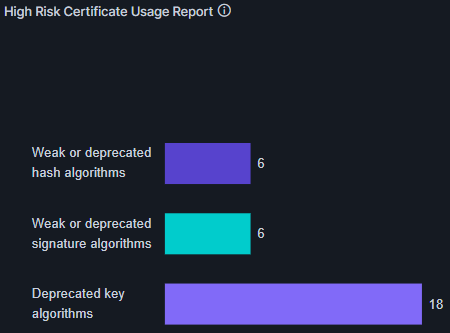 This chart highlights cryptography
algorithm weakness/deprecations across the quantum vulnerable certificates in your
system. This helps to identify areas of security risk associated with weak,
deprecated, or outdated algorithms.
This chart highlights cryptography
algorithm weakness/deprecations across the quantum vulnerable certificates in your
system. This helps to identify areas of security risk associated with weak,
deprecated, or outdated algorithms. The info icon displayed next to the widget title gives a breakdown of the hashes, signatures, and key exchange details for the algorithms detected by the scan.
- detailed certificate data, for the selected certificate type, organized by certificate category (server, client, code signing, root, intermediate, and device).
- switch between certificate categories by clicking the corresponding tab from the menu bar.
A Certificate Inventory pop-up, filtered for your selection, is displayed.
- View detailed certificate data, for the selected certificate type, organized by certificate category (server, client, code signing, root, intermediate, and device).
- Switch between certificate categories by clicking the corresponding tab from the menu bar.
- Export the certificate inventory from the Quantum Trust Hub. To do this:
- Select the checkboxes corresponding to the records you want to export.
- From the toolbar, click Export.
- From the How would you like to download the data? dialog box, select the column display and the file format for the exported configuration data.
- Click Submit.
PQC Risk Severity by Trust Hierarchy
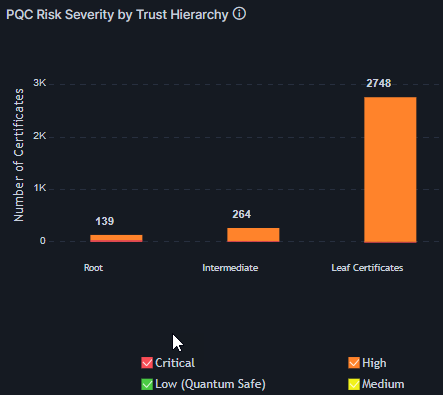 This chart displays the distribution
of the PQC risk severity across the certificate hierarchy (root, intermediate, and
leaf certificates), for the quantum vulnerable certificates. The X- axis indicates
risk severity and Y axis indicates the number of certificates.You can filter the
data in the chart by risk severity level.
This chart displays the distribution
of the PQC risk severity across the certificate hierarchy (root, intermediate, and
leaf certificates), for the quantum vulnerable certificates. The X- axis indicates
risk severity and Y axis indicates the number of certificates.You can filter the
data in the chart by risk severity level.Public Cert PQC Risk Severity
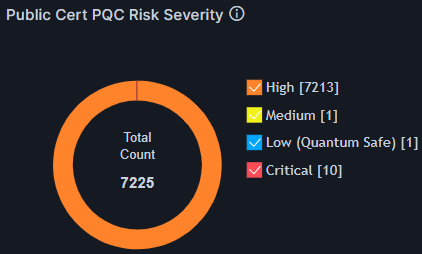 This is a distinct visualization of
the risk readiness of public certificates. This widget displays the risk severity
breakdown for the total number of public certificates scanned. The chart legends are
interactive. Select/clear the checkbox for a risk severity level to show/hide,
respectively, the corresponding data on the chart.
This is a distinct visualization of
the risk readiness of public certificates. This widget displays the risk severity
breakdown for the total number of public certificates scanned. The chart legends are
interactive. Select/clear the checkbox for a risk severity level to show/hide,
respectively, the corresponding data on the chart.Internal Cert PQC Risk Severity
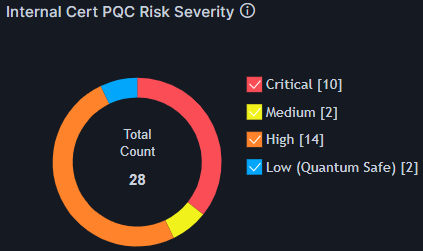 This widget displays the risk severity breakdown for the
total number of private certificates scanned. You can filter the data in the chart
by risk severity level.
This widget displays the risk severity breakdown for the
total number of private certificates scanned. You can filter the data in the chart
by risk severity level.Algorithm Usage Summary
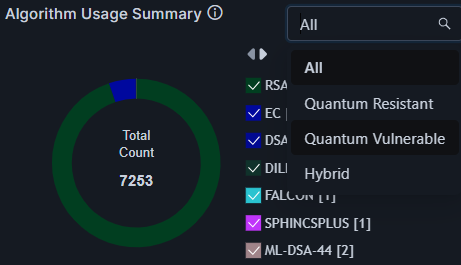 This widget displays a breakdown of the cryptographic
algorithms used across the certificates scanned.
This widget displays a breakdown of the cryptographic
algorithms used across the certificates scanned.The interactive chart legend displays the full list of algorithms used along with the count of instances. Use the legend interactivity to filter the visualization for specific algorithms.
Use the dropdown list from the top-right corner of the widget to filter the chart visualization for a quantum safety status value (All, Quantum Resistant, Quantum Vulnerable, Hybrid).
Key Usage Summary
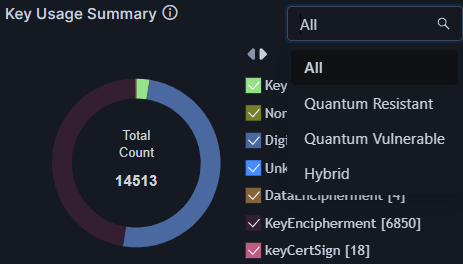 This widget displays the distribution of how cryptographic keys are used across the
certificates scanned.
This widget displays the distribution of how cryptographic keys are used across the
certificates scanned. The interactive chart legend displays the full list of the keys used along with the count of instances. Use the legend interactivity to filter the visualization for specific key types.
Use the dropdown list from the top-right corner of the widget to filter the key exchange visualization according to the quantum-safety status (All, Quantum Resistant, Quantum Vulnerable, Hybrid).
EKU Usage Summary
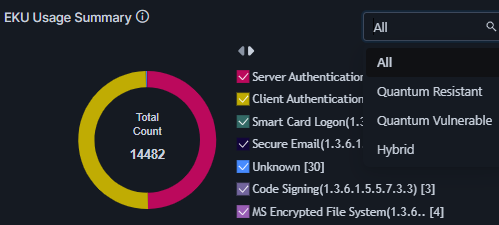 This widget shows a breakdown of the specific application purposes for which the
scanned certificates are valid. This is an important insight that indicates risk
severity with respect to business functions.
This widget shows a breakdown of the specific application purposes for which the
scanned certificates are valid. This is an important insight that indicates risk
severity with respect to business functions. The interactive chart legend displays the full list of certificate EKU usages, used along with the count of instances. Use the legend interactivity to filter the visualization for specific certificate usages.
For a filtered view, use the dropdown list from the top-right corner of the widget to select a PQC-certificate category (All, Quantum Resistant, Quantum Vulnerable, Hybrid).
