
Orphan Objects
Objects without parents will be considered as orphan objects. For example, an F5 pool that is not associated with wide ip will be considered an orphan pool.
There are two ways to view the orphan objects in the Control Center.
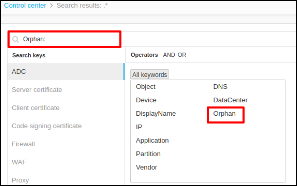
Using Orphan Keyword
- Log in to the AppViewX application with valid credentials.
- Select Menu > ADC+ > TRAFFIC MANAGEMENT > App Search.
- Expand the keywords tab.
- Click on Orphan keyword from the all keywords section and click
enter.
Using Orphan Objects Button
- Log in to the AppViewX application with valid credentials.
- Select Menu > ADC+ > TRAFFIC MANAGEMENT > App Search.
- Run a search.
- From the grid / infrastructure view click the Orphan Objects
icon.

- In the grid view, the parent column will always be empty for the orphan object.
